Users with a Cyclos account can perform a operation by a phone call (either land-line or mobile). The IVR module, which is a IP based phone central will handle the operations and communicate with Cyclos. The IVR module can be behind an analogical phone line or a trunk of digital lines. The currently IVR - Cyclos prototype allows making payments and retrieving account information.
Generic operation flow
When Asterisk responds to a call it will communicate with the IVR module via the Fast AGI which will take over the control of the call. AGI will perform the following actions:
- Capture phone number of caller.
- Check if the phone number is real, and not for example a skype generated nr.
- Verify in Cyclos if the phone number belongs to a user that has permissions to operate with the IVR channel.
- Generate welcome message (audio)
- Generate menu (audio)
- Capture the selected menu option entered by the caller
- Request operation input
- If input of any other data is required generate message to request input data
- Capture input data
- If the operation requires authentication (PIN), generate a message that PIN is required.
- Capture PIN typed by the caller
- Try to execute the operation in Cyclos
- Generate audio message with the confirmation of the operation and possible return values
- Generate message to perform other operation or exit
- When user selects the ‘exit’ option -> goodbye message - > close session
- When user selections other operation go to first menu
Payment operation flow
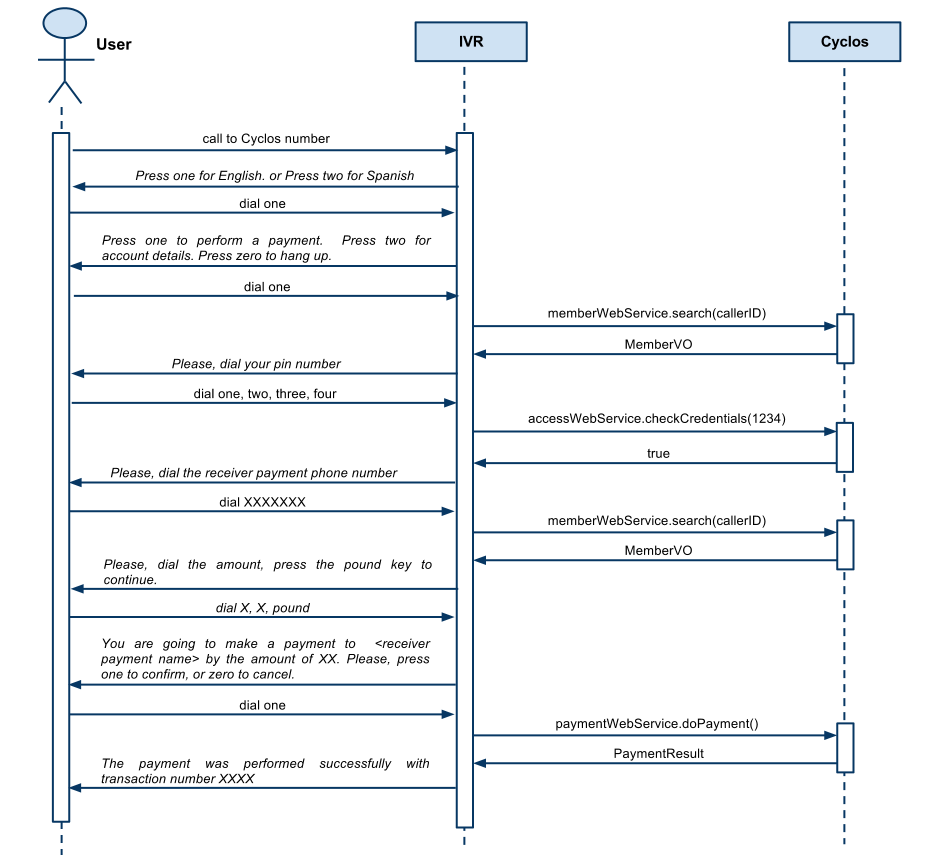
- The user (with a Cyclos account) will call the organization phone number or short code
- The call is answered by the PBX (IVR)
- Audio: Press one for English. Press two for Spanish (this step is optional and would only be necessary for systems with more than one language)
- User presses the number 1 on the phone keypad
- Audio: Press one to perform a payment. Press two for account details. Press zero to hang up.
- User presses the number 1 on the phone keypad
- Audio: Please dial your PIN number and finish with the pound key (this is an optional step, authentication can be handled by phone number detection)
- User dials his personal PIN number at the keypad and selects the pound key (#)
- Audio: Please dial the phone number of the receiver finish with the pound key
- User dials the destination phone number and selects the pound key (#)
- Audio: Please dial the amount you want to pay finish with the pound key
- User dials the amount and selects the pound key (#)
- Audio: You are going to make a payment to <receiver payment name> by the amount of xyz. Please, press one to confirm, or zero to cancel.
- User dials 1
- Audio: The payment was performed successfully with transaction number XYZ - Press one to perform a payment. Press two for account details. Press zero to hang up.
Account information
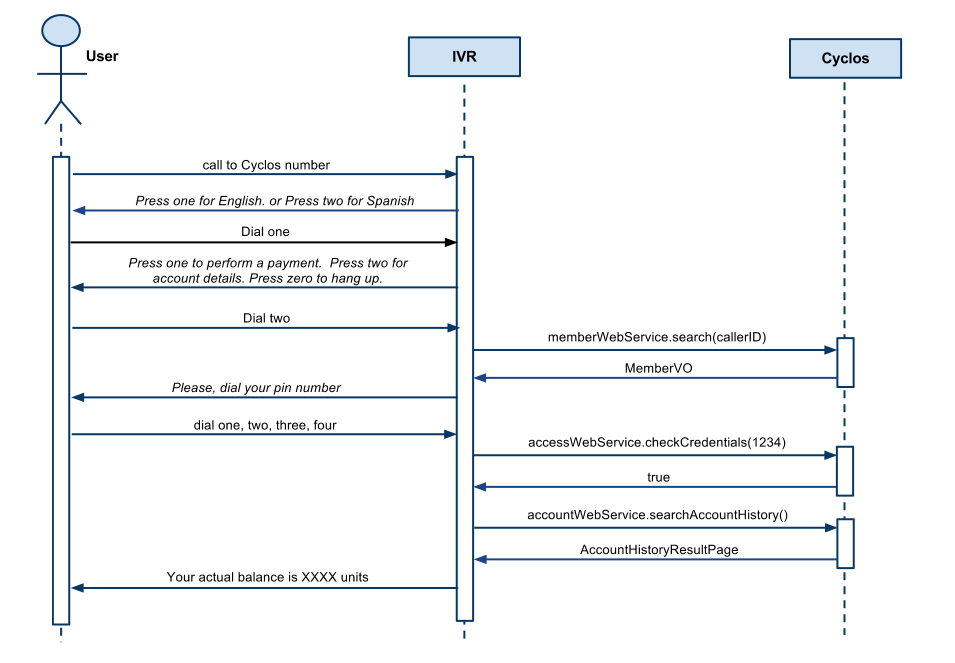
- The user (with a Cyclos account) will call the organization phone number or short code
- The call is answered by the PBX (IVR)
- Audio: Press one for English. Press two for Spanish (this step is optional and would only be necessary for systems with more than one language)
- User presses the number 1 on the phone keypad
- Audio: Press one to perform a payment. Press two for account details. Press zero to hang up.
- User presses the number 2 on the phone keypad
- Audio: Please dial your PIN number and finish with the pound key (this is an optional step, authentication can be handled by phone number detection)
- User dials his personal PIN number at the keypad and selects the pound key (#)
- Audio: Your current balance number is 'XYZ - Currrency' - Press one to perform a payment. Press two for account details. Press zero to hang up.