User interface
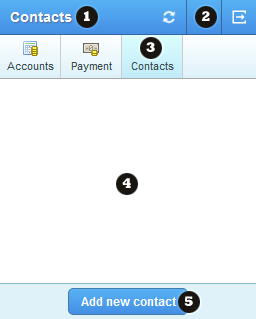
The mobile App consists of three menu bars. First the topMenuBar (used for the help, logout and reload functionalities), the topMenuBar consist merely of icons. Second the tabsMenu is displayed right under the topMenuBar, this tabsMenu is for all the main functionalities and consists of an icon and a label. Under the tabsMenu the mainContent is displayed and finally completely on the bottom of the App the footer is displayed, in this footer there is space for buttons. These buttons in the footer are specific for the page open in the main Content. These buttons only consists of a text and no icon.
|
|
Field types:
- Heading
- TopPanel / ToolbarButton
- MenuPanel / MenuButton
- MainPanel (Pages)
- BottomPanel / ActionButton
The TopPanel has the following ToolbarButtons:
- Reload - this icon will spin when the page is loading, when the icon is clicked the page will reload.
- Help - clicking on this icon will open the help menu.
- Logout (only visible when logged in) - clicking on this icon will logout the user.
- Settings (only visible when logged out) - clicking on this icon will take the user to the settings page.
The MenuPanel has the following MenuButtons
- Accounts - here the user can find his balance and transactions overview for his accounts.
- Payment - here the user can pay other users.
- Contacts - here the user can view his contacts and add new contacts.
|
Page and field types
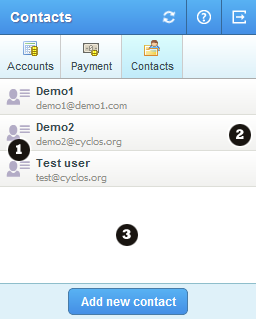
1. List page
|
|
Field types:
- UserRow - RowImage
- UserRow
- DataList
Other list page field types:
- AccountRow (occurs in the account details page).
- AccountRow - Heading
- AccountRow - SubHeading
- AccountRow - Value
- UserRow - Heading
- UserRow - SubHeading
|
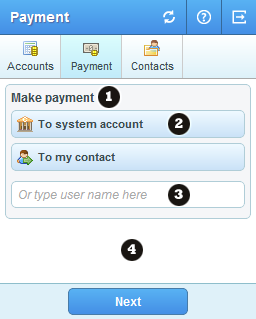
2. Form page
|
|
Field types:
- LabelField
- IconButton
- TextField
- SquarePanel
Other form page field types:
- PasswordField (password input)
- NumberField (number input)
- SelectionField
- AmountField
- TextAreaField
CustomValueField (custom fields):
- DateField (date)
- Numberfield (number)
- BooleanField (checkbox)
- RadioButtonGroupField (radio buttons)
- SelectionField (drop down menu)
- TextAreaField (large texts)
- TextField (texts and urls)
|
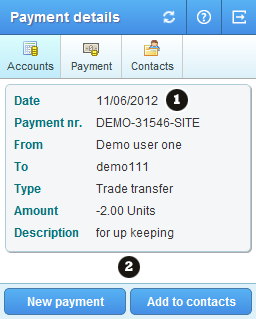
3. Details page
|
|
Field types:
- LabelField
- FormField
Other details page field types:
- HTMLField (almost the same as a LabelField, but with some more extra html markup)
Other fields types that may appear:
- LoadingPopup
- PromptDialog (logout dialog and popups)
- NotificationDisplay (notification messages)
|