Contents
- 1 Accounting structure
- 1.1 Currencies
- 1.2 Account types and Accounts
- 1.3 Payment types
- 1.4 Scheduled payments
- 1.5 Authorized payments
- 1.6 Account fees
- 1.7 Transaction fees
- 1.8 Payment filters
- 1.9 Payments
- 1.10 Loans
- 1.11 Invoices
- 2 Users & Groups
- 3 Member related elements
- 4 System configuration
- 5 Alerts & Errors
- 6 Scheduled tasks
- 7 File logging
- 8 Reports & Statistics
Accounting structure
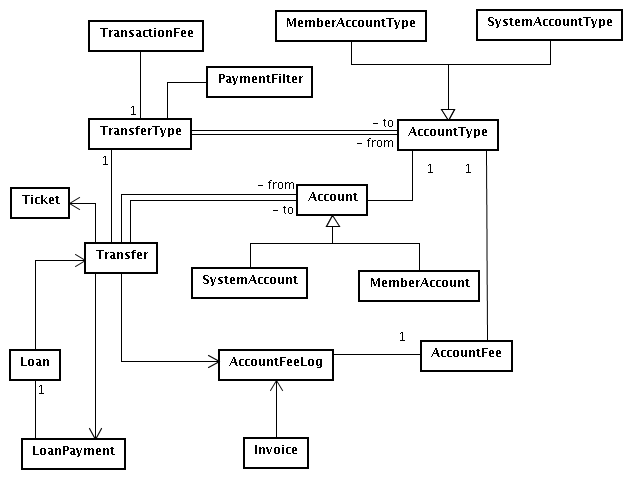
There are several entities related to accounts on Cyclos. They form the core system functionality.
Currencies
Though most organisations that use Cyclos work with a single currency, some of them operate with multiple currencies. Each currency will have its own system and member accounts types accounts. The currency also contains a pattern that is used to format monetary values. For more details, refer to the help page.
Account types and Accounts
Account types
Account types are 'higher level' definitions regarding accounts. They define, for example, what are the possible payment types, which fees will be applied, and so on. An account type also define if an account will belong to the system or to members. A 'system' account has no directly relation to a user. Administrators can be given permissions to perform payment from the system account. Member accounts do have a direct relation to member (groups). When a member account is related to a member group every of the group will own such an account. For more details, refer to the help pages for member account types and for system account types.
The account type define the following configurations:
- Currency: Every account type use a single currency. Some systems use more than one, making it necessary to create different account types for each currency.
- Credit limit: Defines how negative the balance of an account can go.
- Unlimited accounts: A system account type may be defined as unlimited, which means that it's balance can go indefinitely negative. Many times such account types are used to create the internal units and therefore provide the control the emission of units. Often they are called 'Debit' or 'Float' account. They will mirror the balance of all positive accounts. Most systems will have a single unlimited account per currency (most systems use a single currency), but more complex systems may have multiple unlimited accounts.
- Limited accounts: Normally all member account types and additional system account types will be limited, which means that they will can have a limit of zero or below zero. Member account types define a default credit limit. Each individual member account may have a different credit limit. Upper credit limits can be used as well, controlling the maximum balance an account will have. This is less common.
- Payment types: The payment types define the origine and destination account and owner. It is possible set additional configuration and define behavior of the payment type
- Account fees: For member accounts, it is possible to define account fees, which are fees that will be charge all members related to an specific account type through it's group.
- Payment filters: Payment types may be grouped in order to give a better semantic to payments when an user is seing his account history. These groupings are called payment filters. They can also be used to retreive statistics on a group of transactions.
Accounts
An account is the holder for transactions: every transaction is done from and to an account. On a Cyclos instance, each system account type will have an account, and each member account type will have an account per member (an account type may be configured to specific member groups, so, member accounts may exist depending on the member group).
An important thing to note is that the balance for a given account is not stored - it's calculated suming the amounts of the transfer destination minus the sum for transfers where the account is the source. Several questions arrose from this approach, specially performance. It is important to say that even on systems with millions of transactions, calculating the balance does not impact in a sensible way on performance. This may, however change in the future, where caching or storing mechanisms will have to be developed.
Payment types
In order to make payments between accounts there must exist a payment type between the account types. A payment type have various properties as the type of allowed payment media (e.g. mobile, web) and maximum amount per day. Payment types are listed per type in the permission section. This way an admistrator can allow or restricting user groups to perform specific payments.
The help pages for transfer types from system account types and from member account types have information about each payment type property.
Because of the internal naming convention of Cyclos the entity for payment types is called TransferType.
Contexts (properties) for payment types
There are several contexts where and with what media a payment type may be used. They are:
- Direct payment: A member or administrator may use this payment type to make a direct payment to another member or to the system within the Cyclos webinterface.
- Self payment: This context is used when an account owner (be it the system or a member) will an internal payment from one account to another. It's a transfer of units between different accounts of the same member. In case of system accounts, a payment between different system accounts.
- Mobile payment: Only available for member to member payments. Either wap1 or wap2.
- External payment: This context is consisted of payments done outside the main Cyclos system - Via the external payment page, external operators / paydesk or web services. TODO link the external payment and external operators page
Conditions for a payment type to be used
In order to a payment type to appear in a payment, several conditions must be fulfilled.
Payments from system to member
- The payment type must be enabled;
- The logged administrator's group must have manage permissions set to the member group;
- The payment type's destination account account type must be related to the destination member's group;
- The logged administrator's group must have permission for that payment type.
Payments from member to system
- The payment type must be enabled for direct payment;
- The payment type's source acount account type must be related to the logged member's group;
- The logged member's group must have permission for that payment type.
Payments from member to member
- The payment type must be enabled for direct payment;
- The payment type's source account type must be related to the logged member's group;
- The payment type's destination account account type must be related to the destination member's group;
- The logged member's group must have permission for that payment type.
Payments as administrator or broker from member to system
- The payment type must be enabled for direct payment;
- When logged as administrator, the administrator group must have manage rights of the member group;
- When logged as broker, the source member must be on the broker's member list
- The payment type's source account account type must be related to the source member's group;
- The logged user must have the explicit permission to use that payment type pay as member to system
Payments as administrator or broker from member to member
- The payment type must be enabled for direct payment;
- When logged as administrator, the administrator group group must have manage permissions to both the source and destination member's groups;
- When logged as broker, the source member (payer) must be on the broker's member list
- The payment type's source account account type must be related to the source member's group;
- The payment type's destination account account type must be related to the destination member's group;
- The logged user must have the explicit permission to use that payment type pay as member to member
Loan parameters
When a transfer type is set as loan, there are several parameters that can be defined. The first one is the loan type, which may be:
- Single payment: This type of loan has single repayment date, with a default time period for repayment date.
- Multiple payments: Loans with an arbitrary number of repayments, but no additional fees are applied.
- With fees: Traditional loans, with several configurable fees. Refer to the help page for more details
When when a payment type is a loan there will always be a relation to another payment type as being the type that repayments will have. In case of loans with fees, those payment types may be configured per component fee. As before, please, refer to the help page for more details.
Scheduled payments
With this function a member can add scheduled payments to members or system accounts. It can be a single scheduled payment, multiple payments or recurrent payments. The payments will be done automatically at the specified dates. A member that sends an invoice to another member will be able (when he has the permissions) to specify if the payment can be done at a scheduled (future) date or multiple payment dates. Once the recieving member accepts the invoice the scheduled payments will appear in his scheduled payment list (and charged at the dates specified by the memmber that has send the invoice)
Authorized payments
This is a much requested function and common with barter networks. The function will allow to define specific transactions types as ‘authorized’ what means that when the transaction is done by a member the member will be informed that the transaction will need to be authorized first by his broker or by an administrator (according to the configuration). The payment will stay in the 'waiting for authorization' status. The authorizer (broker or admin) will be notificated and can authorize (activate) the payment. The member will receive a notification when the payment is done.
The authorized payment funcion has various settings (per payment type). The amount of the transaction can be blocked until the authorizer approves or disapproves the payment. The payer and payee will be informed with an alert when the payment is authorized (or not). Both member and authorizer (broker or admin) will have access to a list with pending payments that need authorization. The authorize payment is set per transaction type. It is also possible to define if an payment always need authorization or only if a max amount per period (day, week, month) is surpassed.
Account fees
Account fees are run on accounts of given account types, charging each member of the member group(s) that has been selected in the account fee. Ofcourse the member group must be related to that account.
Basically, there are 5 different charging modes:
- Fixed amount: The same fixed amount is charged for each member. A common example of this charging mode is an annual for membership costs. The charging can also be system-to-member in which case it would be a bonus or donation.
- Positive balance percentage: A percentage of the account balance is charged, but only when it's positive.
- Negative balance percentage: Same as above, but only charges negative balances.
- Positive volume percentage: The average transactioned volume is calculated for a given charge period. Of that volume, a percentage is charged. This can be system-to-member what would be earning interest and member-to-system (demurrage)
- Negative volume percentage: This option would be used mostly for interest charges on debits. The transaction type in that case will be member-to-system.
There are several other configurations for an account fee, like run mode (manual or scheduled), invoice mode (send invoice instaed of charging) and others. For more details, refer to the help page.
Transactioned volume calculation
The transactioned volume is basically the average value of the each balance multiplied by the number of seconds that balance remained and divided by the number of seconds on a given period. For example if a member has 100 units during one month and the positive volume percentage is set as 1% per month the member will pay 1 unit when the demurrage is charged. A parameter for the calculation is the free base, which means a threshold where balances after that value are charged. When free base is 0 values above zero are counted. So it would not have any effect in the above example When greater than zero, values above the free base are counted, but subtracting it. For example: when free base is 50.00, a balance of 50.00 or lower is considered zero, where 60.00 is considered 10.00. In the above example with a free base of 50 the member would be charged 0,5 units demurrage (instead of one).
Here are some more examples, assuming, for sake of simplicity, that the period has 100 seconds and we are calculating the positive volume with free base = 0.00:
- Initial balance=10.00, no more payments on period: (10.00 * 100) / 100 = 10.00 (TODO explain a bit more)
- Initial balance=10.00, one payment of 10.00 after 50 seconds: ((10.00 * 50) + (0.00 * 50)) / 100 = 5.00
- Initial balance=0.00, one payment of 10.00 on 10 seconds, other of 20.00 on 45 seconds and another of -25.00 on 60 seconds: ((0.00 * 9) + (10.00 * 34) + (30.00 * 24) + (5.00 * 40)) / 100 = 12.60
There is another parameter for the calculation: the tolerance period. When a tolerance period is used, credits followed by debits within that period are ignored. For example: when the tolerance period is 16 hours and there was a credit of 100.00 and, 10 hours later a debit of 100.00, that amout is ignored on the volume calculation. However, when the debit is greater than the credit, only the credit amount is used. Example: The balance was 100.00. There was a credit of 50.00 and within the tolerance period, a debit of 75.00. In that case, the credit is ignored and the debit is considered as 25.00.
Transaction fees
Contrary to account fees that are scheduled or can be run manually on accounts (charging or crediting selected member groups) transaction fees only run when another specific payment types is made. Because of this a transaction fee is binding two transaction types. The original transaction and the generated transaction. A transaction fee in it self is no payment type. It is directly related to the original payment type and defines the generated payment type and addtional configurations. They are described at the help page. The account owner that will be charged can be set per fee:
- Source: The member that generates the transaction will pay the fee.
- Destination: The member that receives the transaction will pay the fee.
- Broker commission: A special type of fee where the broker of the member generating a transaction will receive a commission uppon that payment. The commission may be configured to last for a given time period, for a number of transactions or indefinitely.
Other configurations are:
- Set the tax te be either a percentage of the original transaction or a fixed amount
- Define one or more groups of members as source or destination, making it possible for systems to apply fees only between specific groups
- Choosing whether it will or not deduct the total amount, for example a fee of 3% over 100.00: When deducting, the payment value will become 97.00 and the fee 3.00. When not deducting, the payment will be of 100.00 and the fee of 3.00.
- Before creating the transaction tax a payment type that will be used for the tax needs to be created and selected tax configuration.
It is possible to set more than one transaction fee to be activated on a single transaction. For example a normal transaction defined as 'trade transfer' could have two transaction fees. One that charges the payer and one that charges the payee.
In some cases transaction fees can be used to 'forward' payments. Just one example: in a system whith consumer groups that receive loans directly as vouchers (scrip) a loan payment to such a consumer account can be redirected directly (tax of 100% on destination) to a specific system account with the transaction type "buy voucher".
Payment filters
When a member is looking at his account history, there will be several filters he can apply, like period, member and so on. But one of the most meaningful filter is the payment type. If many payment types exist for member accounts it can be very handy to 'group' several payment types in a single logical payment filter. This payment filter will show up in the account history search by members.
For example different types of fees and taxes can be grouped in a single payment type called 'taxes and fees'. A payment filter is always related to an account type, and may be availiable per group. Also, it is possible to determine if a payment filter is going to be used on the account history and/or administration reports. For a complete list of availiable properties, refer to the help page.
Payments
In Cyclos, a payment is a transfer between two accounts. One important thing to note is that there is a single record for each transfer. An account may "see" a transfer as being a credit or a debit, depending whether it's the source or destination of that transfer.
A transfer may relate to a "parent" transfer, for example, when a member paid 100.00 units, and this payment generated a fee of 1.00, the transfer for the fee payment will refer tho the other one as parent. So, a payments is different from a transfer because a single payment may be composed of several transfers: one for the main payment, plus other generated ones.
Transaction number
It is possible to enable the transaction number in the local settings page. Once the transaction number is enabled it will apply for all transacations in the syste. A transaction number is a unique identifier for each transaction. It is composed of a (configurable) prefix,number of digits and suffix. Both the prefix and suffix are strings that may include, between # a date format according to Java's SimpleDataFormat class. The digits are the database row identifier, padded with a given number of zeros. Once the maximum number in the digit range is reached it will grow dynamically. For example if the number ranges is 6 and the number 999999 is reached the next transaction will have 7 digits (1000000)
Here are some examples:
- prefix="CX-", suffix="-ZW", padLength=6: Would generate transaction numbers like "CX-000635-ZW";
- prefix="AB_", suffix="/#yyyyMM#", padLength=9: Would generate transaction numbers like "AB_000084512/200705" if the transaction were performed on may of 2007.
Tickets
Tickets provide a temporary permission mechanism for a web shop to receive a (secure) payment from a customer. For more details, refer to the web services section about tickets.
Loans
A loan is an extra option in a payment type that allow to administer the control the repaying of the loans and retreive reports. A loan is defined by a loan payment type. It's only possible to have loans from a system to a member account type (no loans between members). A loan is composed of one or more payments, each with an amount and expiration date.
When a loan is granted, a payment is created from a system account to a member account. The expiration date will be the the first open repayment's expiration date. A member can repay a loan internally in the Cyclos system with an arbitrary number of payments, until reaching the total payment amount. When a loan is repaid externally with other means than internal units (for example, with conventional money), the administrator can discard that loan payment. A discarded payment means that it was repaid elsewere and therefore Cyclos will mark that loan as paid.
More details on the grant loan form are availiable on the help page.
A loan may also contain custom fields, which allow customization of additional data needed for each loan.
Invoices
An invoice is a request for payment. The person that sends the request (invoice) will have to define the amount and the member that will recieve the invoice. An invoice can be from or to a member or system. The following operations may be applied to an invoice:
- Accept: The member (or system) that received the invoice accepts it what will generated the payment to the one that sent the invoice, with the amount specified by the sender.
- Deny: The member (or system/administrator) that received the invoice denies it. In that case, a payment for that invoice is never generated. A member cannot deny an invoice that comes from a system account.
- Cancel: The member (or system/administrator) that sent the invoice may cancel it.
When the invoice is sent, the member (receiver) will receive a notification with informing about the invoice. When the invoice status is changed (e.g. accepted, cancelled or denied), the other member will also be informed by message (for example, when an invoice is cancelled, the member that received the invoice is notified)
An administrator that sends an invoice to a member will have to select a payment type that will be generated when the member accepts the invoice (since payment types are from and to an account type, that will also select the source account for the payment). When a member or administrator sends an invoice and has more than one account he will have the option to specify the account that he wants to be credited. This also counts for accepting an invoice, the member (or administrator) will have choose a payment type when there is more than account that can be debited.
More options for the invoice may be seen on the help page.
Users & Groups
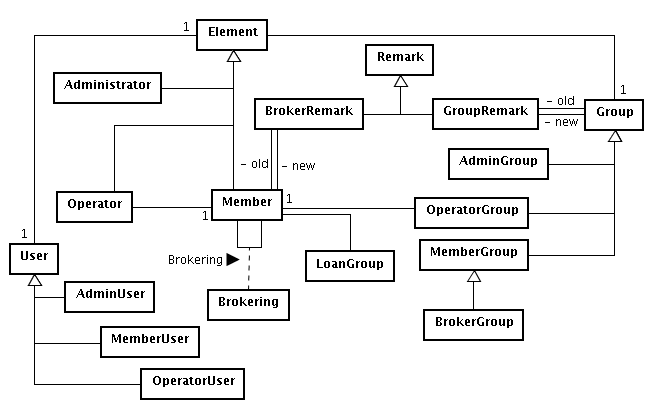
In Cyclos, an user may be one of 3 different types:
- Administrator: Performs system-wide tasks, has access to specified system accounts and can manage other users (members and administrators).
- Member: A regular member will have one or more member accounts and can make payments or interact in other ways with other members. Special types of members are brokers. A broker can register other members and have a certain level of control and access over his registered members. According to the system configuration a broker can receive commissions when his registered members trade with others. The brokering section has more details. Members and brokers may have one or more associated images.
- Operator: From Cyclos version 3.1, a member may be allowed to register operators. An operator is an user that manages the member's account(s), advertisements and other data. The operator functions are specially useful for larger members (companies) when several persons need access to the same account. The only data specific to the operator are the operator profile fields. All other data he manages (contacts, advertisements) belongs to the member. A member won't even "see" other member's operators. In his point of view, for example, when a "member A" operator performs a payment to "member B", "member B" will see that payment as if it were performed by "member A" himself. Even administrators don't have access to a member's operators. They will see all operations performed by operators as if they were performed by the members themselves. Only the member that registered the operators will know what specific operator did perform activities.
In terms of coding, the Element class is the superclass of Administrator, Member and Operator. For the sake of role separation, the Element class contains profile data and is related to other entities, but it does not contains access related information (like username and password). This kind of information is contained on the User class (and it's subclasses - AdminUser, MemberUser and OperatorUser). For more details on access related data, refer to the access section.
All elements (administrators, members and operator) have associated custom fields, which may be associated per group, allowing a fine-grained customization of which fields will be part of the profiles of member groups. Only the username, name and e-mail are fixed fields. Other fields (like gender, address, phone number, etc) are customizable.
Groups
Groups are a key concept in Cyclos. Most permissions and most configuratios like the account(s)the account and transaction fee(s) custom fields are related to groups.
There are several group settings that affects users on that group. Please, refer to the help page for administrator, member, broker or operator groups for more details.
A user can must belong to a one group. Whenever a user's group is changed the user will 'recieve' the new group configuration. Everytime a user is moved to another group the group history remark is generated, keeping track of the old and new group. When a member is in a non active group like 'pending activation' there is no relation yet to accounts. Only members of non active groups can be removed permanently from the system. Once the member is moved to an active group the member can not be removed anymore but can be moved to a group with type 'removed'. This way member and transaction data will still be availible for a history report.
Brokering
A broker is a member of a broker group. Depending on the system configuration, a broker may have several roles:
- On some systems, all members are brokers, and can register other members and receive commissions when they perform transactions.
- Other systems treat brokers as "key" members (brokers) that are working decicated finding new members. Most systems implementing the C3 methodology use this approach.
- Brokers may also be seen as local administrators that act in behalf of their registered members, controlling their loans and even making payments for them.
- In systems that have micro finance programs the broker fuction is often used as loan agent function.
It is possible to have different types of broker groups in the same system. The administration may change a member's broker anytime. Whenever it happens, a broker remark is created, storing the old and new brokers. Also, a setting (TODO: link) may define the expiration time for a brokering, for example, making a brokering relation to be removed after 1 year.
Group filters
Cyclos offers support for creating different communities or "subsystems" inside a single system. Each community may have different account types, administrators different configuractions, custom fields and even diferent layouts. It is possible to have the communities operating independently or to allow certain level of interaction between the communities. It will be sometime necesary to put various member group in a logical group like a community. The name group filter was a generic way to name community or subsystem.
A group filter may be configured to be shown or not when a member is looking at another member's profile. More details on the help page
Group permissions
Depending on the 'type' of group (admin, member, broker or operator), a user of the group will be able to perform different tasks:
- Administrator groups: Basic actions (login), System administration, administration of other administrators and member administration.
- Broker groups: Basic actions, (registered) member administration and member actions.
- Member groups: Basic actions and member actions.
- Operator groups: Basic actions and operator actions.
TODO: Will we list each module / operation?
Each action have associated permissions. In a general way, most CRUD operations will be composed of a view and manage permission. If an user cannot view, the menu item, button or associated page element won't be displayed. This way it is possible to enable/disable functions for specific member and admin groups. Manage permissions means that a user can create, modify and remove items.
Access
There are two password levels for users in Cyclos:
- Login password: The password an user must use in order to access Cyclos. Per group, it is possible to determine the period for a password to expire. After this period the member will be requested to chooce a new password. There are many other password settings like the password length constraint (min / max length), the maximum number of times a user may try to login with a wrong password before being blocked and the block time period.
There is also a system-wide setting determining the session timeout for administrators and members, which is the maximum time period an user may be inactive when logged in the system before he have to login again.
When a member is being created by an admnistrator or broker it is possible to set the password of in the member profile or use the automatic password mail function. If this function is enabled the member will receive a temporary password by mail. Once the member logs-in, he must change it. - Transaction password: The transaction password is an additional password that will be requested whenever a member or administrator wants to make a payment. The transaction password can be acativated per group. The password is always generated by the system and only the user can retreive it (only once after the reset). An administrator (or broker) with permissions may reset a member's transaction password or block it. When an user attempts to use a wrong password a few times (the number is a group setting) the password will be blocked automatically and an administrator (or broker) with permissions will have to reset his password again.
The transaction password can have various status. For example 'pending' when it was reset but the member did not retreive it yet. The status 'active' when a member did retreive the password and 'blocked' when the the password is blocked (automatically due to wrong login attempts or manually by the administrator.
Password security All passwords (both login and transaction) are stored on the database as an MD5 hash (SHA2 from version 3.1). The password is hashed even before the login or transaction pages are submitted to the server. For systems that don't use SSL, it is an additional security step to not send plain passwords over the net.
TODO: If we will implement the following reported bug about password hash algorithm, we should update this. If not, at least state that we plan to change this.
Another technique that is used in order to protect the member password is the virtual keyboard, where instead of typing the password directly, the user must click with a mouse some buttons in a virtual keyboard. This helps against keyloggers.
Loan groups
Loan groups are typically used by organizations with micro-credit programs. A loan group is a group of members that can that receive a loan together. A single member of the group will be the responsible person. This person must share the amount among all other members on the group. Once the loan is granted, any member in the group may repay it. It is possible to define per loan a different responsible person of the group. Members may be added and removed from a group, but the responsible and the members remain related to each loan, like a "snapshot" of the group at the moment the loan was granted.
Members can have several associated elements. This section will describe each one.
Advertisements
Commonly referred as ad, advertisements may be published by member to offer products and services or to search for them. An advertisement may contain one or more images.
There are some properties an ad may have, like:
- Permanent: "yellow page" like advertisements can be marked as permanent, making them available indefinitely.
- Publication period: the period in which it will be visible by other members.
- External publication: when web services are used, only those advertisements marked for external publication will be published externaly (e.g. organisation website).
There are various other properties. For more details, refer to the help page.
A member can define Ad interests with specific criteria (like categories, description, price range, etc). The member will be notified whenever an advertisement that matches his interests is published. This can be via e-mail or internal Cyclos message (depending on the member preferences)
Allthough the base funcionality of Cyclos is a transaction system Cyclos has various optional community and e-commerce functions like messages, references and advertisements. However, Cyclos is not a full featured e-commerce system with stock control. For example, a payment cannot be related to an advertisement and there is no "shopping cart" where a member may add products and pay the total amount.
References
It happens often in complementary currency networks that persons want to do trade with persons who they do not know (yet). Because of this 'anonymity' Cyclos has built-in functions like the reports & activities functions that help gather information about other members. References (expressions of content or discontent) can also be very helpful for this purpose. A member can give a reference to another member in the system. The reference consists of a valuation number and an (obligatory) description field. Every member can view all the references given to other members. To signal abuse of the reference system the administration can set alerts on giving extremely bad references to others”. The system can send administration alerts where a member exceeds a certain amount of negative received or given references”
Contacts
Contacts may be seen as a list of "favorite" members a specific member has, allowing a quick access to their profiles. It is also possible for the contact owner to write notes for each member on his contact list.
Messages
The messaging system of Cyclos can be used for direct communication between members, between the administration and members and to notify members about specific events (see notifications for more details).
Messages between members and the administration will always have an associated category. Categories can be assigned to member and administration groups [[Business rules#Groups|groups]. When an administrator will send a message to a member, both his group and the member group must have permission to a given category in order to it be shown as an option. This allows to define specific administrators to manage messages of specific member groups.
The messages functions are very much the same as a conventional e-mail client with an inbox, sent items or the trash bin. Once on the trash, messages can be removed permanently. A message also have a status, indicating whether it has been read, unread, deleted and/or forwarded.
According to specific settings (TODO: link), the message format may be defined as plain or rich text. In case of plain text, a normal textarea element should be used, otherwise, a rich editor (currently implemented using FCKEditor) will be displayed. The same setting allows any combination of the 2 formats, also specifying the default one.
Remarks
A remark is a general purpose comment that an administrator or broker (with permissions) can make about a specific member. Each remark has an associated date and writer (the admin or broker), allowing the administration to have an overview of all remarks written about a member.
Notifications
Several type of (member) events may generate notifications. For each type, the member decides how he will be notified: using an e-mail and/or an internal message. The following notification on events exists.
- Message from another member,
- Message from the administration to me,
- Message from the administration to my group,
- Access-related events (for example, login failures),
- Account-related events (for example, a notification of low units),
- Brokering-related events (like a message from broker or, in case of brokers, when a member is no longer on my brokering list),
- Recieved payments (message will include information about the payment
- Invoice-related events (for example, someone sent me an invoice),
- A loan has been granted,
- An advertisement I've published has expired,
- An advertisement I'm interested on has been published,
- A reference has been set to me.
It is possible to set per event the type of message you want to receive. This offers many possibilities. For example a member can define the e-mail field als 'hidden' and forward the internal messages to his e-mail address. This way it is not necessary to publish your e-mail address The messages will always include a direct link to the relevant item.
Note: In cyclos 3.1 notifications will also be available for administrators.
Ad interests
A member can register ‘Ad interests’. For example a member can register a new interest for ‘Offers’ in a specific category like ‘vehicles’, price range, keyword etc. When an Ad interest is matched a notification will be send automatically.
System configuration
There are several elements of configuration inside a Cyclos instance. They range from a variety of categories, as shown below.
Settings
Settings are system-wide configurations, divided in sub-categories:
Local settings
Contains global configurations, divided on the following categories:
- Cyclos instance identification: Friendly names to identify the Cyclos instance and the administration;
- Internationalization: Language, character encoding and number and date format settings;
- Limits: General limits, like page size, maximum upload size and so on;
- Data display: Misc settings defining how specific data will be show;
- CSV export: Configurations for various CSV options;
- External access: Configurations about the Web services and other external access options;
- Transaction number: Defines the use of the transaction number;
- Scheduled tasks: Configures the period where the scheduled tasks will run.
For more details, refer to the help page.
Alert Settings
Contains settings that define when or how alerts (specially member alerts) are generated. More details on the help page.
Access Settings
Several settings that control the level and configuration of the Cyclos access. More details on the help page.
Mail Settings
Configurations of the SMTP server. More details on the help page.
Log Settings
Controls the file logging of events on Cyclos. More details on the help page.
Custom fields
One of the major feature of Cyclos 3 over version 2 was the addiction of custom fields. They allow the administration to register fields for members and administrators, advertisements, loans and loan groups.
Depending on which of those elements a custom field is related, it will have additional configurations, but basically, all fields can have a data type (string, integer, decimal, boolean, date or enumerated), a control (text box, text area, radio button, select box and so on), a display name, an internal name (where it will be referenced by internal procedures) and validation constraints like 'obligatory' and 'unique'. It is possible to define the order the profile fields show up. All custom fields are stored in the database (and not defined in the code)
More information can be found at the help pages of each custom field type (member, administrator, advertisement, loan or loan group).
Customized files
In order to allow a better customization of Cyclos into an organization look and feel Cyclos allows the customizing of special files. There are distinct types of customized files:
- Static files: Misc files, like the top bar (the header after the member logs in), the admin and member manuals, login page, general news (appears on the member home page) and so on. The static files can be customized system wide or customized per group.
- Help windows: Allows the customization of any help page in cyclos;
- Stylesheet files: Allows customization of specific CSS file. Normally a theme is selected, customizing multiple style sheet files and style sheet images at once. Cyclos comes with various layout themes.
- Application pages: This is an advanced feature, allowing customize any jsp page. This allows to customize virtually any page in Cyclos but it has also a certain risk. The person that customizes the application page must take care not to break the existing functionality.
Except for style sheet ones, when a file is customized, the original version is stored. If an upgrade has a new version of that file, then the customized file is marked as conflicting. A system alert is generated and the administrator should carefully check the differences between the original contents and the new contents in order to incorporate those changes on the customized contents.
Customized images
All images in a Cyclos instance may be customized. The following types of images may be customized:
- System: The basic images, like the application logo and the edit and remove icons.
- Style: Images that are stored on the same directory as the style sheet files, allowing them to be referenced directly on the style sheet files by name. A theme can customize several images at a time.
- Custom: Arbitrary images that may be uploaded, in order to use on customized files.
Themes
A theme is a set of style sheet files and images in order to change the layout of a Cyclos instance.
It's actually a zip file with a theme.properties file, containing meta-data about the theme and a images and a styles subdirectories, containing both the style sheet files and style sheet images. Cyclos comes with various themes but it is possible to create and export a customized theme.
Care must be taken, because when applying a theme, all files will be customized. So, if, for example, someone applies a theme and customizes the login style, then apply a new theme, that customizations on the login style will be lost.
Documents
The administration can make documents that will show up in the Member section. The documents can retrieve fields from the profile of the Member that is viewing the document. It typical custom document would be a loan contract or any kind of request document. Documents can be assigned to member groups. It is possible to set the document only viewable by administrators. There are two types of custom documents. Simple documents in html format that just include member data (profile fields) and documents that present first an input form to the Member that needs to be filled in. When the Member submits the form a result page is generated which can included in the input data as well as the member profile fields.
A request context variable called member will contain the member data, and the following properties may be used in a JSP expression: ${member.name}, ${member.username}, ${member.email}, ${member.group.name} and ${member.FIELD} (being FIELD the internal name of a custom field. Also, to access form page parameters on the document page, use ${param.NAME}, being NAME the parameter name. It is important to not using a <form> tag on the form page - just declare the fields.
Translation
Cyclos provides standard translation for several languages. However, some translations are part of an specific dialect, for example, calling brokers as agents, and so on.
It is possible to customize translation keys and or to export / import all keys into property files. The import/export function comes with various options. Because Cyclos configures Struts the translation is loaded directly (no restart is needed).
Alerts & Errors
To help the administration to monitor what is happening on a Cyclos instance, alerts and error logs are generated. Alerts can be removed from the active list, but are never physically removed. They will always be available on the history search page so that they can used to look for patterns. The types of alerts are:
System alerts
Alerts for system events. Examples are: application shutdown, application startup, new version of customized file (probably making a conflict), a scheduled account fee is running and so on.
| Code constant | English application text | Description | Arguments |
|---|---|---|---|
| APPLICATION_RESTARTED | Application restarted | Alert when the application has been restarted, or started for the first time. |
|
| APPLICATION_SHUTDOWN | Application shutdown | Alert when the application has being shutdown. |
|
| ACCOUNT_FEE_RUNNING | Account fee running | Alert when an account fee has started running. |
|
| ACCOUNT_FEE_CANCELLED | Account fee cancelled | Alert when an account fee has been manually cancelled. |
|
| ACCOUNT_FEE_FAILED | Account fee failed | Alert when an account fee has failed. |
|
| ACCOUNT_FEE_RECOVERED | Account fee that didn't run was recovered | Alert when an account fee recovery log was created. |
|
| ACCOUNT_FEE_FINISHED | Account fee finished | Alert when an account fee has successfully finished. |
|
| MAX_INCORRECT_LOGIN_ATTEMPTS | Max incorrect login attempts for invalid user | Alert someone tries for a given number of tries (alertSettings.amountIncorrectLogin) to login with an invalid username |
|
| ADMIN_LOGIN_BLOCKED_BY_TRIES | Max incorrect login attempts for admin | Alert when an administrator login is temporarily blocked by reaching the maximum login attempts. |
|
| ADMIN_LOGIN_BLOCKED_BY_PERMISSION_DENIEDS | Admin login temporarily blocked by permission denied | Alert when an administrator had it's login temporarily blocked by too many permission denied exceptions. |
|
| ADMIN_TRANSACTION_PASSWORD_BLOCKED_BY_TRIES | Admin transaction password blocked by tries | Alert when an administrator transaction password is blocked by reaching the maximum attempts. |
|
| NEW_VERSION_OF_APPLICATION_PAGE | New version of application page | Alert when there is a new original version of an application page that was customized |
|
| NEW_VERSION_OF_STATIC_FILE | New version of static file | Alert when there is a new original version of a static file that was customized |
|
| NEW_VERSION_OF_HELP_FILE | New version of help file | Alert when there is a new original version of a help file that was customized |
|
| INDEX_REBUILD_START | Search index rebuilding start | Alert when an index rebuild has started. |
|
| INDEX_REBUILD_END | Search index rebuilding end | Alert when an index rebuild has ended. |
|
| INDEX_OPTIMIZED | Search index optimization | Alert when an index has been optimized |
|
| NULL_IRATE | Unexpected null I-rate encountered | Alert when a null i-rate on a system account was encountered. |
|
| RATE_INITIALIZATION_FINISHED | rate initialization job finished | When a rate initialization is finished, this alert is fired. It means the system can be put online again. | No arguments |
| RATE_INITIALIZATION_STARTED | rate initialization job started | A Rate initialization has started. The system has been set offline, and cannot be set online until it is finished. | No arguments |
Member alerts
Alerts for an specific member, like: new pending member, password blocked by trials, expired loan and so on.
| Code constant | English application text | Description | Arguments |
|---|---|---|---|
| LOGIN_BLOCKED_BY_TRIES | Member blocked by exceeding login attempts | Alert when a member exceeded the login attempts and had it's login temporarily blocked. |
|
| LOGIN_BLOCKED_BY_PERMISSION_DENIEDS | Member login temporarily blocked by permission denied | Alert when a member had it's login temporarily blocked by too many permission denied exceptions. |
|
| PIN_BLOCKED_BY_TRIES | Pin blocked by invalid tries | Alert when a member exceeded the pin attempts and had it's pin temporarily blocked. |
|
| TRANSACTION_PASSWORD_BLOCKED_BY_TRIES | Transaction blocked by exceeding attempts | Alert when a member exceeded the transaction password attempts and got his transaction password blocked. |
|
| INVOICE_IDLE_TIME_EXCEEDED | Expired system to member invoice | Alert when a member hasn't accepted an invoice and it has expired. |
|
| DENIED_INVOICES | Member denied too many invoices | Alert when a member has denied a number of invoices. |
|
| GIVEN_VERY_BAD_REFS | Member gave too many 'very bad' references | Alert when a member has exceeded the max. given very bad references. |
|
| RECEIVED_VERY_BAD_REFS | Member received too many 'very bad' references | Alert when a member has exceeded the max. received very bad references. |
|
| EXPIRED_LOAN | Expired loan | Alert when a loan is still open and has expired. | No arguments |
| SCHEDULED_PAYMENT_FAILED | Scheduled payment failed | Alert when an scheduled payment has failed. |
|
| BLOCKED_POS_USED | Attempt to use a POS device marked as blocked | Alert to indicate when a blocked POS has been used. |
|
| CARD_SECURITY_CODE_BLOCKED_BY_TRIES | Card security code blocked by invalid tries | Alert when a member exceeded the card security code attempts and it was blocked. |
|
| NULL_IRATE | Unexpected null I-rate encountered | Alert when a null rate on a member account was encountered. |
|
| INITIAL_CREDIT_FAILED | Initial credit transaction failed | Alert when the initial credit grant has failed. |
|
Error log
When an unexpected error (commonly named application error) occurs, a log is generated, in order to make it easier to reproduce and fix that error. The logged user, the request path and the request parameters are also stored.
Scheduled tasks
Many operations on Cyclos happens on background, as scheduled tasks. Operations are executed on daily or hourly base. The following operations exist:
- Account fee charging: Runs every hour, charging scheduled account fee that are configured to run on that day / hour;
- Ticket expiration: Runs every hour, expiring tickets that have not been completed within 1 hour;
- Invoice alert: Runs once a day, generating system alerts for invoices from system to members that have not been accepted within a time range configured on the alert settings page.
- Advertisement expiration notification: Runs once a day, notifying members about their advertisements that have expired.
- Loan expiration alert: Runs once a day, generating member alerts and member notifications about expired loans;
- Brokering expiration: Runs once a day, removing broker relations according to a local setting.
- Advertisement interests notification: Runs once a day, notifying members that advertisements advertisements that have become active matches their interests.
When a server hosts several Cyclos instances, the administrators should be aware set the scheduled tasks local settings for each instance to run on different hours, because some operations are heavy, and having several instances to perform heavy operations simultaneously may cause a heavy load on the server.
File logging
Several operations are logged into text files, in order to allow tracing of what's happening in a Cyclos instance.
The following logs are generated:
- Trace: Every action that modifies the database performed by any user is logged.
- Transactions: Any payment is logged.
- 'Account fee: For each account fee that being charged, each status change (started, finished, canceled and so on), as well as the amount for transactions (or invoices sent) for each member are stored.
- Scheduled tasks: Every scheduled task that runs logs the time it took. It may help administrators to balance the local settings for each instance.
The log settings controls the log level (from disabled to detailed) for each of the 4 logs, as well as the file locations.
Reports & Statistics
General setup and goals
The goal of the cyclos Statistics is to provide a sound and professional statistical overview of the state of the organization, to be usable in official reports.
NOTE: These pages consider the basic principles of statistics to be known. Please refer to the statistics manual for an explanation of these concepts and a glossary of terms.
Basic principles of the statistics are:
- Customizable
- Professional descriptive statistics according to the "arts of statistics"
- Provide graphs where ever possible
- Provide statistical analysis via tests where that is useful.
- a consistent setup throughout all of the statistics.
Presentation of Statistics
The statistics are always presented both as graphs and as tables. Only in some cases where it is obviously not useful, then only a graph or only a table may be presented, in stead of both.
Tables
Tables show all the datapoints which are shown inside the graph. Also, in an extra column, or in the column header, the n-values on which the results are based are always shown in the table. If applicable, the results of a statistical test are also given in the table, by means of the p-value.
Graphs
At the time of this writing, three types of graphs are shown in cyclos:
- Bar graphs: for any graph having distinct categories on the x-axis. This is usually done when comparing the results over two distinct categories (like "compare 2 periods").
- Line graphs: for any graph having a continuous x-axis, or an x-axis which has so many categories that it may be considered as continuous. A good example is the graphs which show results over a time range. As time is continuous, this is a good example of a continuous x-axis.
- Pie graphs: in case of showing subcategories inside a result.
By default, Graphs must have the following elements:
- a title
- an x-axis label stating what is depicted on the x-axis, including indication of the used units wherever applicable.
- an y-axis label stating what is depicted on the y-axis, including indication of the used units wherever applicable.
- x-axis category labels for each category on the x-axis
- y-axis category labels for each category on the y-axis
- if more than one series is shown: a legend with colors telling the meaning of each series.
When hoovering the mouse over a result in the table (a bar or a graph point), the browser shows a tooltip which renders the exact numerical value of that result.
Usually, the table and the corresponding graphs are in different window boxes. The help icon of the table provides the online help; the help icon of the graph only refers to the one of the table.
Categories
The following four basic categories of statistics are available:
- Single period Shows the statistics over one period. No statistical test is done, as there is nothing to test.
- Compare 2 periods Compares the results of two different periods. When possible, a statistical test is performed to test if the results of the two periods are really different.
- Through time Compares the results over a range of time. By default, the following three time ranges are available:
- Quarterly: shows the results per quarter over a time range.
- Monthly: shows the results per month over a time range.
- Yearly: shows the results per year over a time range.
- Distribution Shows the distribution of a certain statistical result. Often, histograms are shown here.
Not all of the four categories are always shown. Per subject, some of the categories may not be useful, so then they are not shown.
At the time of this writing, no statistical test is performed on the time ranges. This may change in future.
Precision and presentation of numbers
By default, results of statistics are presented as a StatisticalNumber. This is a special Cyclos subclass of the java Number class. The main extra feature of StatisticalNumber is that it can handle error ranges. In statistics, a result doesn't say much unless you provide the error range or precision of that number. In cyclos, statistic results are by default presented together with their 95% confidence interval (see the statistics manual for an explanation on this). In short: it means that there is 95% chance that the result lies inside this range.
In the tables, this is presented in the following form:
12.0 ± 4.3
. However, it may happen that distributions are skewed, in which case the range is asymmetrical. In such a case, it is represented as:
12.0 (3.4 - 13.9)
In graphs, this is presented as error bars around the point. These error bars may be asymmetrical.
Any result is to be presented in this form, if applicable (see below). The StatisticalNumber class provides functionality for this.
Of course, error ranges can only be presented when there is an underlying distribution of points behind it. For example: the total number of members is just one number, so it cannot have an error bar. On contrary, the average number of ads for each member does have an underlying distribution of points (namely: for each member there is a point representing the number of ads of this member), so this result can have an error range.
Median and Mean
The average or mean is not often used in cyclos. Using the mean is only reasonable if the underlying distributions are symmetrical without big chances on heavy outliers. This is often not the case in Cyclos: outliers as well as asymmetrical distributions are very frequent.
For this reason the Median is to be used by default; mean may only be used if there is an explicit reason to assume symmetrical or preferably normal distribution.
For further explanation and a glossary of terms see the statistics manual of cyclos.
Statistical Tests
Wherever this is reasonable, a statistical test will be provided to quantify the difference between results. This is of course only possible when two or more results are compared.
Without such a test, it would not be possible to know if two presented results are really different from each other.
By default, non-parametrical tests are used, as we may not assume that underlying distributions are normal. For comparing two medians this would be a Wilcoxon Rank sign test. For comparing more than two groups, Kruskal Wallis would be used.
Generally, the p-value is shown in the tables whereever applicable, and testing is generally done on a 5% level.
See the Statistics manual of cyclos for explanation of principles and terms.