Contents
- 1 SMS
- 1.1 Basic concepts
- 1.2 Web Services
- 1.3 Operations
- 1.4 Generated (outbound) messages
- 1.5 Connectivity
- 1.6 Setup
- 1.7 Consideraciones para WIKI de módulo SMS 3.0.114
SMS
Basic concepts
What does the system do?
The system adds another way for member to operate with Cyclos. The member's operations supported by the system at this time are the followings:
- Direct payment: allow a member to pay to another member.
- Request payment: allow a member (the receiver) to ask another member (the payer) to pay him.
- Account details: allow a member to query for a list of incoming and outgoing transactions.
Other functionality offered by the system is to deliver Cyclos generated notifications.
The objective of the system is to be able to send or receive asynchronous messages. The system has been developed to fullfill the need of Cyclos to work with SMS, although we wanted to isolate Cyclos from the complexities of the SMS world. The main idea was to work with SMS but we didn't want to restrict it only to the SMS world, so we build it to be able to handle any kind of asynchronous messages.
Brief review of the system
There are more than one responsability in the system. The main responsability is to connect one or several intances of Cyclos to the SMS world, this means the system should be able to decide which Cyclos is a message for or which number is a Cyclos message for (we named this routing). Once a message arrive to the system, it should be able to recognize the user request and extract the information needed to ask Cyclos to carry out the action.
There are several routing possibilities. In the most general scenario the system can be connected to several service providers and to several Cyclos instances. The other scenarios are simplifications of that one.
The system should be able to process a message. Once a message arrived, the system will try to identify what kind of message it was (payment, request, detail, etc). If the message isn't recognized, the system would answer with an error message. The system would make Cyclos process the message, if the message was recognized and the parameters were correct.
Architecture
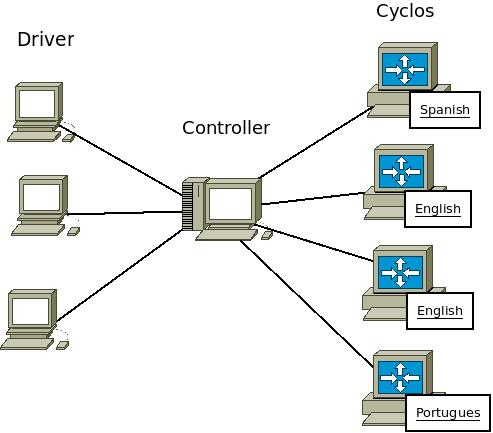
The system is composed by two modules: Driver and Controller. Each module offer a web service entry point and those entry points are guarded by address access control (ip) granting access only to authorized systems. The Controller can work with several Drivers and several Cyclos instances.
The driver support different communication channels. Every channel is considered to work with asynchronous messages. You can work with SMS by several means, GSM modem, a service provider or a direct connection with the TELCO talking SMPP. The actual version of driver support GSM modem through SMSLib and services providers through HTTP or HTTPS connection.
The controller take care of messages routing between Cyclos and Drivers, handling errors messages, sessions management and messages parsing.
You can be working with different service providers. They may be offering messaging service for different countries or different TELCOS. We can think of different Cyclos instances servicing different countries and working independently. In this scenario we should have one driver and Cyclos for each country and only one controller.
Conceptually we could think there is no controller and the driver is the channel. Here the channel (service provider, GSM modem, etc) is connected directly to the Cyclos instances and Cyclos knows exactly where to send messages. This conceptual view is carried out by the Controller module (see image below: Conceptual View).
Controller
Commands
The part of the system that carry out an action is based on the idea of commands. A command is an entity able to carry out some task at the time a message arrives. It can take an action against a Cyclos instance, although it can answer the message by itself. There are different types of commands you can setup for every Cyclos instance. Each command is developed for a specific use case.
Routing
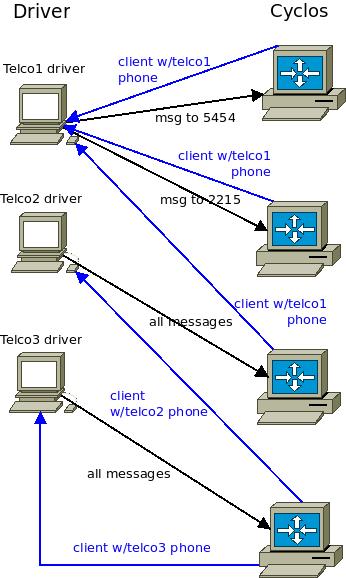
The routing is done in the Controller module. To be carried out there are two mappings, one from Cyclos to Driver and one from Driver to Cyclos. The Cyclos to Driver mapping is done based on two custom fields defined for every member. One of those custom fields defines what the TELCO is. The other custom field define the member's cellphone number. The mapping from Driver to Cyclos is easier, it is based only on the incoming number and driver id. You can forget about the Controller and think conceptually about the connections between Drivers and Cyclos just like shown in the image.
Driver
The main responsability for the Driver is to work as a proxy to isolate the Controller from the compexities of different communication channels. To acomplish this task the Driver is built with the idea of an Engine. The engine is responsible for the communication with the channel and there is one Engine for every supported channel.
There are several Engines. The SMSDriverEngine is responsible for communication using a GSM modem. The HttpGatewayEngine is responsible for communication through a Gateway. You can add more Engines as you need them.
Web Services
Controller web services used by Cyclos
Payment request
Cyclos will invoke this operation to ask the Controller to confirm a payment request.
Available operations:
requestPaymentConfirmation: Send the payment request message to the member. The Controller will generate a session in order to match the member confirmation response, otherwise the session will expire (there is a parameter to specify the expiration time).
- Input parameters:
- cyclosId (string): Cyclos instance identifier.
- ticket (PaymentRequestTicketVO): This ticket contains the payment information and the Controller will associate it to the generated session. For more details, refer to the model data details.
- Result:
- status (enumerated): The payment request status. May be one of:
- SUCCESS: The payment request was delivered to the member.
- INVALID_MEMBER: The member which should receive the request is invalid for the operation.
- SYSTEM_OFFLINE: The Controller couldn't conncet with the Driver or the Controller is offline.
- UNKNOWN_ERROR: There was an unknown error while sending the request.
- status (enumerated): The payment request status. May be one of:
Notifications
Allow Cyclos to deliver notification messages to members.
Available operations:
send: Used by Cyclos to send a notification to a member.
- Input parameters:
- cyclosId (string): The Cyclos instance identification (used by the Controller to route the message).
- memberVO (MemberVO): The target member that will be notified. For more details, refer to the model data details.
- text (string): The notification's text.
- Result:
- status (enumerated): The delivery state. Same as requestPayment result.
Controller web services used by Driver
Messaging
Allow the Driver to send a received message to the Controller.
Available operations:
send: Invoked by the Driver to send a message.
- Input parameters:
- driverId (string): The driver identification. This parameter is used together with the endPoint parameter.
- fromId (string): The source media identifier (cellphone number in case of SMS). This data is used by the controller to find the associated member.
- endPoint (string): The driver endpoint where messages arrive (the short number in case of SMS). This data plus the driverId are used by the Controller to find the Cyclos instance to work with.
- text (string): The message's text.
Driver web services used by Controller
Messaging
Allow the Controller to send a message to the Driver.
Available operations:
send: Invoked by the Controller to send a message.
- Input parameters:
- customParam (string): This parameter is specific to the SMS implementation. At this moment it is set by the Controller with the TELCO identifier.
- fromId (string): The source media identifier (the short number in case of SMS). See the endPoint parameter above.
- toId (string): The target media identifier (cellphone number in case of SMS).
- text (string): The message's text.
Model data details
Many of the web services operations works with model data. The following elements are available (with their properties):
PaymentRequestTicketVO
- fromChannel (string): ...
- toChannel (string): ...
- ticket (string): ...
- toMember (member): ...
- fromMember (member): ...
- amount (BigDecimal): ...
- formattedAmount (string): ...
- creationDate (Calendar): .....
- formattedCreationDate (string):...
- description (string):...
- isOk (boolean): ...;
- isCancelled (boolean): ...
- isPending (boolean): ...;
- isExpired (boolean): ...
- isAwaitingAuthorization (boolean): ...
TODO: complete
Operations
Direct payment
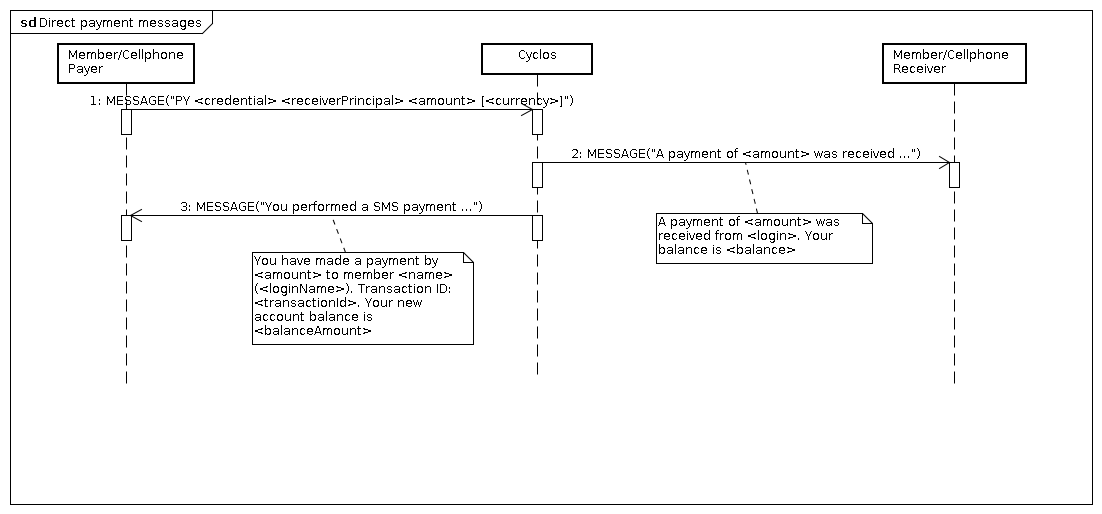
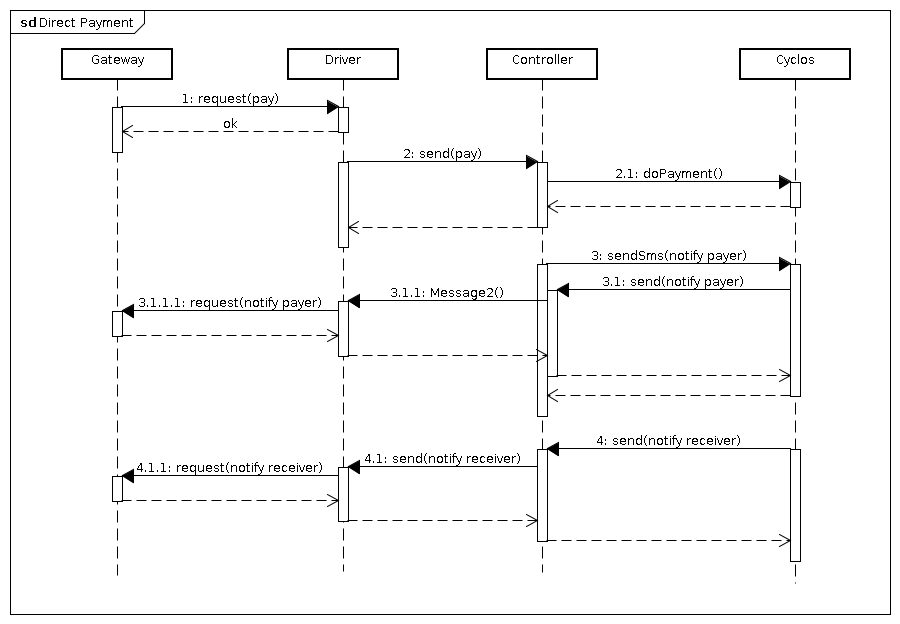
In this scenario one member decides to do a payment to another member. At that time, the payer send a text message indicating the amount, his credentials and the principal of the other member. If the payment was successful, the system would sends a message to the receiver member to notify that a payment has been received.
Message
- Payer Credentials: Depends on Cyclos configuration (could be the login password, transaction password, pin or card security code).
- Receiver principal: Depends on Cyclos configuration (could be the username or card number).
- Amount: The payment amount.
- Currency: (Optional) The payment currency (if not specified there is a default).
Flow
- The payer sends a payment message.
- The payer member is searched based on the cellphone number and his credentials are validated.
- The receiver member is searched based on his principal (specified in the message).
- The specified currency (if any) is validated or gets the default currency from the payer's default account (specified in Cyclos).
- Query for a transfer type according to the retrieved data and perform the payment.
- If the payment was successful, the receiver member would be notified and the payer is always notified about the payment result.
Messages samples
Message: PY 1234 748596 105 dolars
Description: The sender (which password is 1234) is paying 105 dolars to member 748596.
Payment request (two way payment)
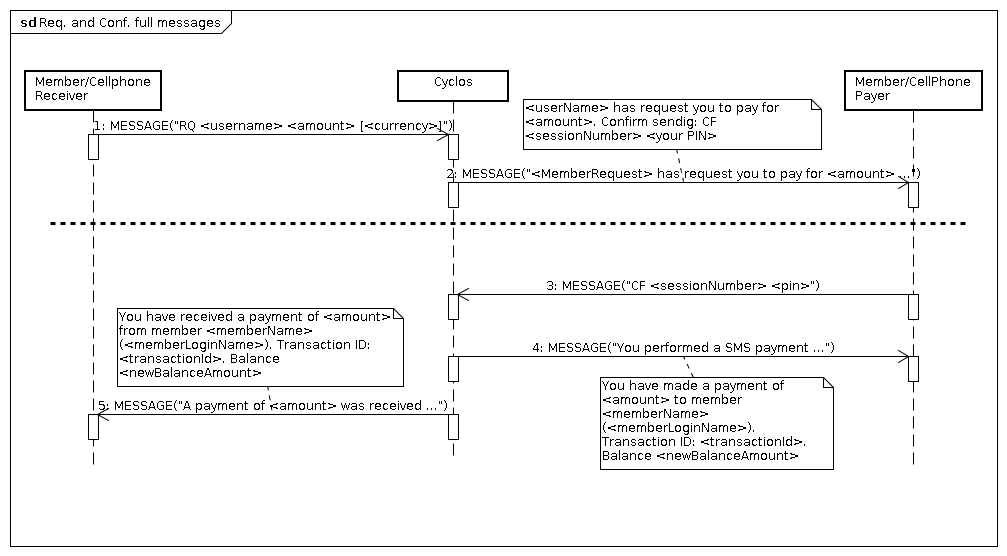
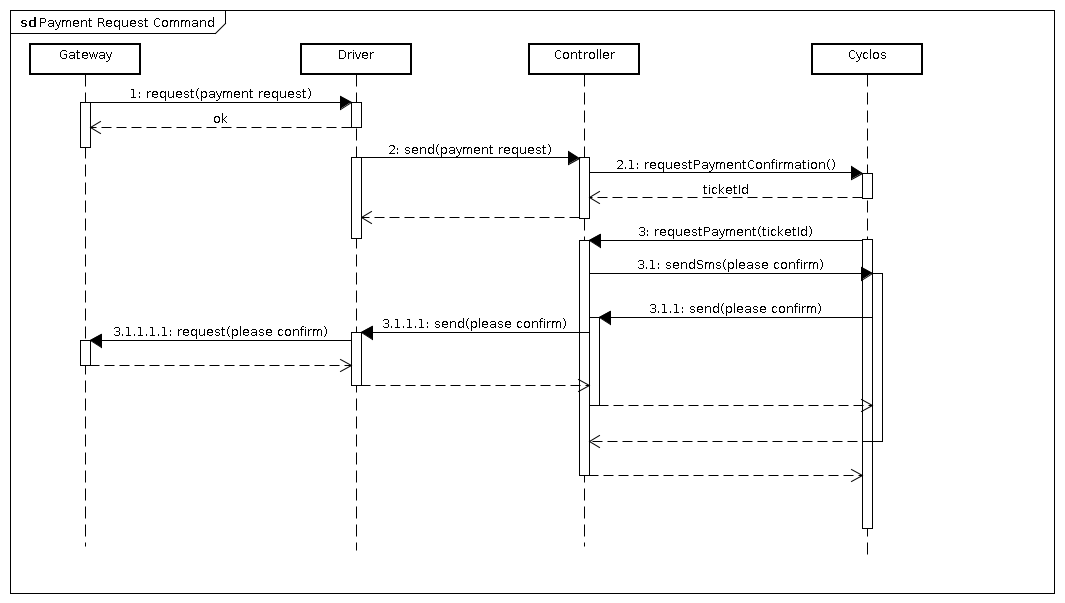
A member (the receiver) ask another member (the payer) to pay him an amount of money. The receiver sends a message indicating the amount, the payer member principal and (optionally) the currency. When the payer receives a message indicating the request he could answer with the code that was sent to him and his credentials to accept it. If he doesn't answer, the payment wouldn't be done.
Request message
- Payer principal: Depends on Cyclos configuration (could be the username or card number).
- Amount: This is how much do you want to pay.
- Currency: (Optional) The payment currency (if not specified there is a default).
Request flow
- The receiver sends a request message.
- The receiver member is searched based on the cellphone number.
- The payer member is searched based on his principal (specified in the message).
- The specified currency (if any) is validated or gets the default currency from the receiver's default account (specified in Cyclos).
- Query for a transfer type according to the retrieved data and check if the payment could be done.
- A session identifier (code) is generated to be send to the payer (as part of the confirmation request message).
- If the payment could be done, a confirmation request message would be send to the payer member otherwise an error message would be send to the receiver.
Confirmation message
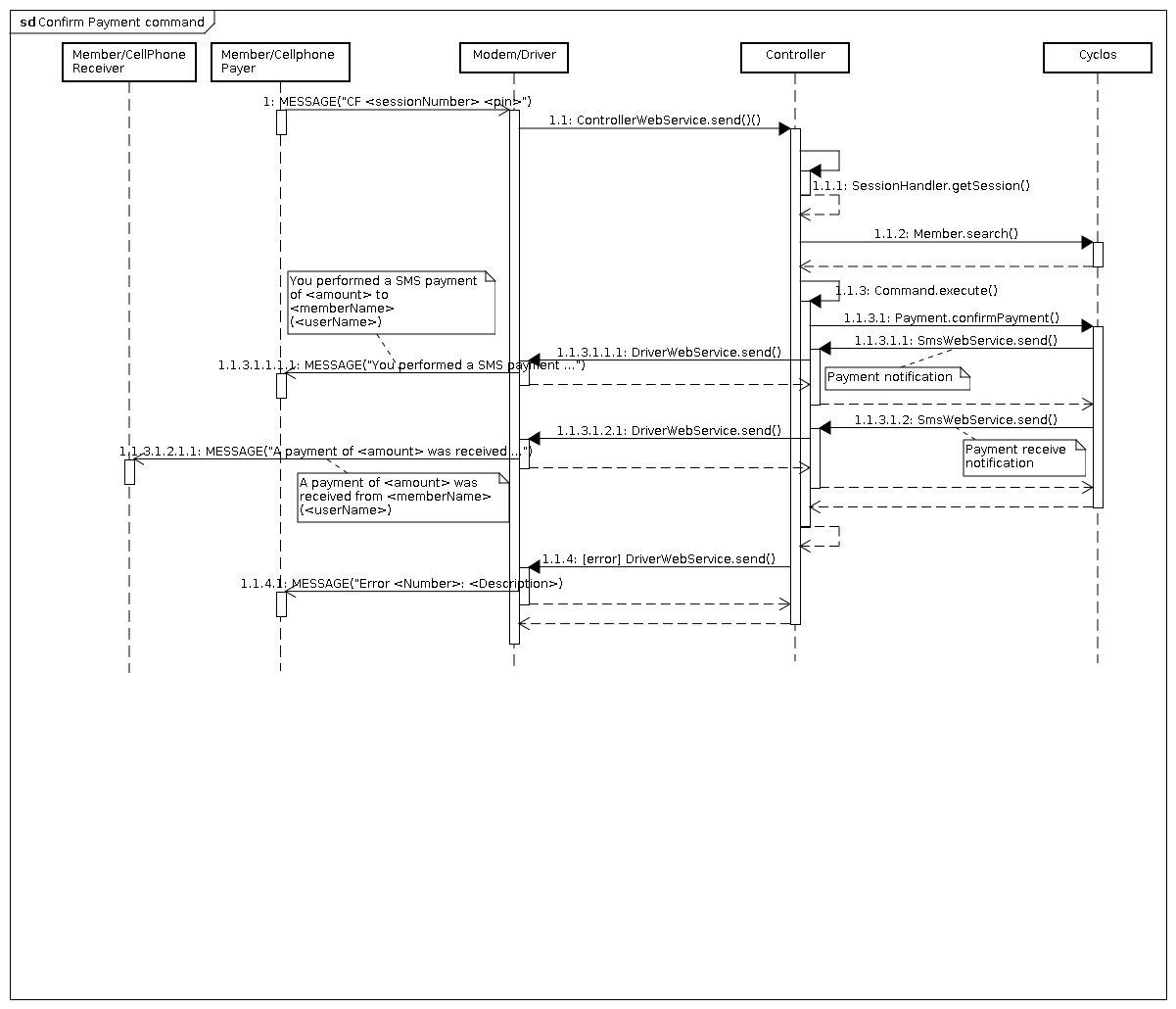
- Code (session id): A generated (numeric) code used to match the confirmation with the request.
- Payer Credentials: Depends on Cyclos configuration (could be the login password, transaction password, pin or card security code).
Confirmation flow
- The payer sends a confirmation message.
- A session is retrieved from the specified code (if it was not found and error message is send to the payer)
- The payer cellphone is validated with the session
- The payment is confirmed in Cyclos (the payment will be done only if all the information is right)
- If the payment was successful, the receiver member would be notified and the payer is always notified about the payment result.
Messages samples
Payment request message: RQ 748596 24 Dolars
Payment request message description: The receiver request the user 7485969 pay to him by 24 Dolars
Payment confirmation message: CF 1523 1234
Payment confirmation message description: The payer (which has 1234 pin number) confirm the pay for request 1523.
Account details
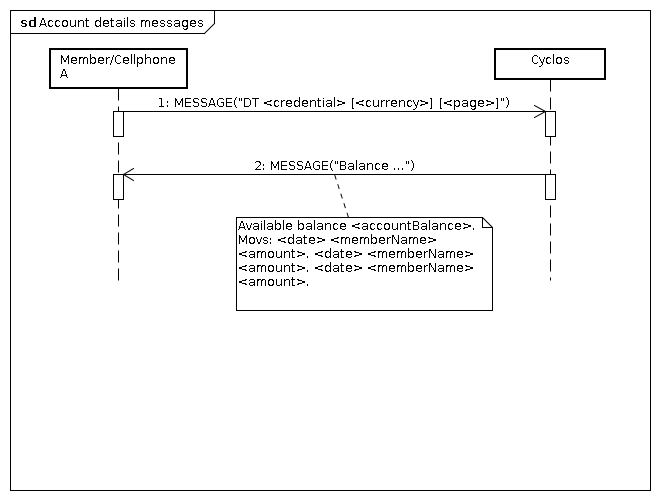
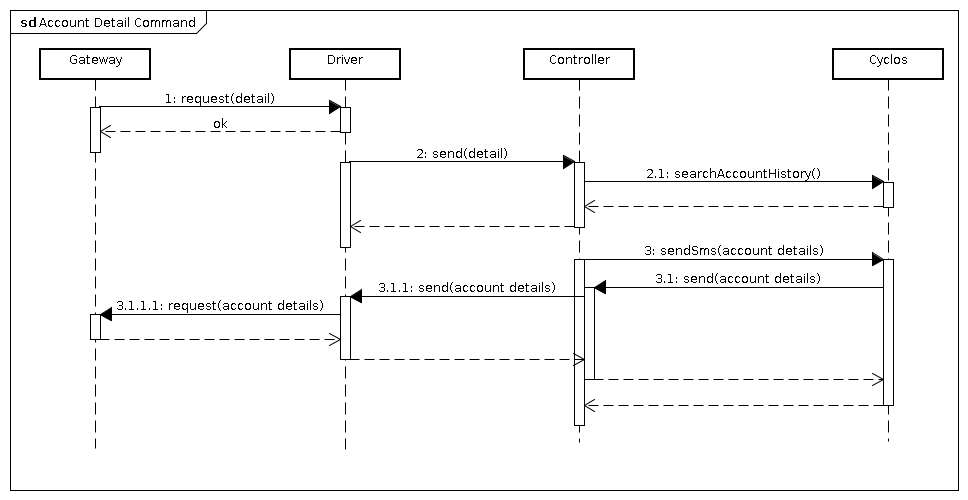
The member want to see his account history. The member send a message indicating his credentials and optionally the currency and page number.
Message
- Credentials: Depends on Cyclos configuration (could be the login password, transaction password, pin or card security code).
- Currency: (Optional) you can specify the currency you want to see the transactions for (there is a default currency).
- Page number: The results are paginated so you can specify the page number here (starting in one).
Flow
- The member sends a details account message.
- The member is searched based on the cellphone number and his credentials are validated.
- The specified currency (if any) is validated or gets the default currency from the member's default account (specified in Cyclos).
- The specified account history page (if any) is retrieved, if the page is not specified the first is retrieved.
Messages samples
Message: DT 1234 dolars
Description: The sender (which password is 1234) request his account history information for the dolars currency (the first page is returned)
Message: DT 1234 2
Description: The sender (which password is 1234) request his account history information for the default currency (the second page is returned)
Generated (outbound) messages
Notifications are generated in Cyclos, whereas error messages are handled directly by the Controller.
There are only two notifications messages that are generated by the Controller:
| Mensaje | Description |
| {0} ha solicitado su pago por {1}. Para confirmar, responda este mensaje con el texto\: CF {2} <un espacio y su PIN>. | Solicitud de confirmación de pago. Utilizado en el comando Requerimiento y confirmación de pago |
| Balance {0}. Movs: {1} {2} {3} | Mensaje de respuesta al comando Detalle de cuenta |
Error messages
The error messages send by the Controller can be defined in a properties (language) file in the Controller. As the Controller can handle more than one Cyclos instance there can be more properties files per controller (once per Cyclos instance). One properties file can be assigned to be the default file. The following is the list of error messages:
| Message | Description |
| El comando no fue reconocido. Los comandos válidos son rq, py, dt. | Este mensaje es devuelto por el controlador al origen de un mensaje recibido, en aquellos casos en que la estructura de texto del mensaje recibido no machea con el formato de ninguno de los comandos procesados. |
| Monto ({0}) invalido. Transacción Abortada | Generado por los comandos Requerimiento y confirmación de pago, y Pago directo cuando el valor del monto no puede ser convertido a un valor interpretado por Cyclos |
| Moneda {0} invalida. Transacción abortada | La interpretación de texto que representa a una moneda es mapeada en la configuración del controlador. Los comandos Requerimiento y confirmación de pago, y Pago directo pueden generar esta notificación si no logran encontrar mapeo correspondiente al parámetro de la moneda incluida en el mensaje |
| Es imposible utilizar la moneda solicitada ({0}) | Esta notificación es generada por el Controlador si este no puede encontrar en Cyclos la moneda mapeada en su configuración |
| Error desconocido al procesar el comando {0}. Transacción abortada | Es notificada al origen de un mensaje, cuando este último esta siendo procesado y se genera una excepción no manejada en el Controlador. |
| Error en campo personalizado de uno de los miembros. Transacción abortada | En general, cada vez que el controlador recibe un mensaje, su primer acción consiste en verificar que la dirección origen del mismo corresponda a un miembro habilitado de Cyclos. En el caso que el campo configurado en el controlador, que debe almacenar la dirección de los miembros, no sea encontrado en cyclos se generará esta notificación. |
| Acceso denegado, miembro inhabilitado o password incorrecto. Transacción abortada | Cada vez que la transacción correspondiente a la ejecución de un comando implique autenticar al miembro correspondiente a la dirección de origen, y este no sea encontrado o sus credenciales (PIN) no sean válidas, se generará esta notificación |
| Dispositivo {0} no encontrado. Transacción abortada | En general, cada vez que el controlador recibe un mensaje, su primer acción consiste en verificar que la dirección origen del mismo corresponda a un miembro habilitado de Cyclos. Si el miembro no es encontrado en Cyclos se generará esta notificación |
| El valor de la pagina no es valido. | En el comando Detalle de cuenta, opcionalmente se puede enviar la página del historial de transacciones a recibir (el historial se pagina cada tres transacciones, que corresponde al historial enviado en un mensaje). Si el valor del parámetro de página recibido en el mensaje esta fuera del rango del listado, se genera esta notificación. |
| El miembro pagador, {0}, es invalido. Transacción abortada | Se genera en el comando de Requerimiento y confirmación de pago, cuando la identificación del miembro pagador, recibido en el mensaje, no corresponde a un miembro de Cyclos. |
| Imposible confirmar el pago. Transacción abortada. | Este mensaje es notificado cuando la ejecución de un pago no es posible en Cyclos (las razones pueden ser varias, no existe saldo en la cuenta del pagador, el miembro destino no dispone del canal habilitado, etc) |
| El miembro receptor {0} es invalido. Transacción abortada | Se genera en el comando de Pago directo, cuando la identificación del miembro receptor, recibido en el mensaje, no corresponde a un miembro de Cyclos. |
| Error al crear la sesión para el pago. Transacción abortada | Al procesar un comando de Requerimiento y confirmación de pago, se genera una sesión en el Controlador a fin de esperar el mensaje de confirmación. Si la sesión no se ha podido crear se genera el presente mensaje (la causa mas probable es superar el tamaño máximo de sesiones configurado en el Controlador) |
| Sesión [{0}] invalida. Transacción abortada | Esta notificación se genera al recibir un mensaje correspondiente a una confirmación de pago cuya sesión no existe o ha expirado |
| El pago solicitado es imposible de realizar (error de simulación). Transacción Abortada | Esta notificación se genera en el caso de procesar un comando requerimiento y confirmación de pago (primer fase). |
| Imposible encontrar un tipo de transferencia entre los miembros. Transacción abortada | Cada vez que se genera un pago se debe encontrar un tipo de transferencia compatible con la moneda del pago entre los miembros involucrados. Esta notificación se genera si Cyclos no dispone de un tipo de transferencia válido para el pago. |
The member is allowed to setup what kinds of events he wants to be notified through SMS.
The most important notifications are the payments you have done and the payments you have received. Those notifications should be enabled to allow the system to work properly, if they are not enabled, the member won't know when a payment is done or received (Direct payment or Request payment).
Connectivity
Connectivity to gateway
Cyclos shuttle service for transactions via SMS can work through an SMS Gateway povider. Provider Gateway is designed to a more stable base and facilitate negotiations with each locale telcos
Abbreviations and Concepts
| TELCO | Company cellphone and SMS service. |
| MO | Mobile Originated: a message sent by a mobile phone. The message can be sent to a phone or to a software application. |
| MT | Message Terminated: a message to a mobile phone. The message can be sent by phone or by a software application. |
| GSM MODEM | An electronic device that allows the sending and receiving messages (and / or data) in a cellular network. In current cellular networks, this device requires an ID chip, known as SIMM to operate. |
| SMS GATEWAY | A provider which allow to send messages to TELCOS hidding the complexities of the TELCOS interfaces. |
Connection for sending and receiving SMSs
The Driver is the module that is connected to the Gateway to allow sending and receiving messages. Another option is connect the Driver to a GSM Modem, however working with a Gateway is probably the best option.
Network Protocols
The supported connection between the Driver and the service provider is HTTP or HTTPS. You can also negotiate a VPN. However connecting through a VPN or not, we always recommend to use the HTTPS connection to improve security.
Communication protocol
It is the way the Gateway and the Driver module will interact. It is accustom to use REST or SOAP as communication technologies, although we are not limited to those technologies. An agreement should be made between the Gateway and Driver technical staff about the communication protocol so one or both of them could start developing and testing the integration.
TELCO works with
It is important that the chosen provider operates with all the TELCOS you want integrate with. This is important for two reasons:
- The cost of messages between two TELCOS is usually more expensive than one message within the same TELCO
- We require a short number to be unique among all TELCOS to ensure that all cellphones (regardless of the TELCO to which they belong) send messages to the same number.
Short Number
There is typically only one short number to receive SMS messages. This short number must be requested in each TELCO you want to operate. It is usually easier for Gateways to negotiate short numbers among different TELCOS, in that case the only thing you need to do is give all information the Gateway ask for.
Cost of service
In general there are two types of contracts
- You pay a fixed monthly amount to the Gateway. In some cases this include a maximum number of SMS.
- You pay for SMS traffic.
Message Costs
Except the case of MT recovery message (see MT message recovery), all other messages sent by Cyclos would generate a cost to the organization that operates it. That cost is fixed by the TELCO through which the message is sent.
Telcos generally tend to work by selling packets of messages, which are valid at the time (similar to a prepaid card for sending SMS messages). For this reason, the cost of sending an SMS message can depend on TELCO whereby the trafficked.
In some cases gateway providers charge the organization with a cost per message traffic (received as sent, in whatever form). This cost is added to the monthly fixed cost for the service and will depend on the volume of message sent and / or received from each of the TELCO with which they work.
NOTE: when the personal interview with a Gateway provider, check what are the fixed costs for the service and whether there are variable costs depending on the traffic of messages (or otherwise).
MT message recovery
Often organizations want to avoid variable costs. For these cases you can use the MT message. This type of message is charged to the recipient thereof. Depending on the laws of each region (country), may require additional clauses in contracts with users who access this service or a kind of instantaneous activation and deactivation of the same (eg via SMS).
In general the cost charged for the message to the recipient exceeds the cost of a normal SMS and must be specified and informed service user. The price for the message must be negotiated with the TELCO when requesting the services of short number (for details, see the section on short number). In some cases the Gateway operator can add a fee to his favor at the cost of MT (payable by the recipient of the message).
NOTE: At the time of the interview with the gateway is important to record the plans that they suggest (and whether they can work on your order against the TELCO) service for the show, and make an outline of costs for each message.
Transfer service ID (Caller ID)
Every SMS you receive comes with the service ID of the sender (The caller ID is the cellphone number). This information is essential to identify what member sent the message and that way validate the transactions.
NOTE: Sometimes (especially when the message is transferred from a TELCO to another, or when the message travels across international borders), that information may not get properly. At the time of the interview with the Gateway's staff is important to note that ID is required for us to work properly.
Safety Requirements
As Cyclos operates on economic transactions special attention must be paid to data security. SMS messages should include personal data as transaction PIN, username, etc.
In many countries, personal data are regulated by law. You must take into account the legislation of the region to assess the requirements of confidentiality of the information contained in the messages.
For this reason the data and the means of transfer must be consistent in its protection. See also the connection point for sending and receiving data
TELCO connectivity
Gateway operator must connect each of the TELCO in which it does (to send and receive messages).
Special attention should be paid to the security of data transfer.
NOTE: at the time of the interview with the operator of Gateway is important to emphasize this fact and point out that security in data transfer becomes a key point. Try to get as much information as possible about the background of the Gateway operator in terms of security in their methods of operation.
Logs, and confidentiality clauses
It is important to include confidentiality clauses regarding the data that is included in messages that are trafficked, and the logs that are kept from them.
NOTE: To avoid surprises, at the time of the interview with the staff of Gateway providers do note that the request will include confidentiality clauses referring to the data traffic in the messages.
Setup
Driver setup
Working with MODEMS
Java comm configuration, by use with SMS modems
When you work with SMS modem, you need to download and install Java communication API extension (http://java.sun.com/products/javacomm/, anxious people can find basic files on resources/javacomm) . Some important tips:
- ../resources/javacomm/javax.comm.properties file should be placed in $JAVA_HOME/jre/lib.
- javax.comm.properties should contain the available ports to be used by the modem. I.E:
 -\# Paths to server-side serial port devices
 serpath0 = /dev/ttyS0
 serpath1 = /dev/ttyS1
 serpath2 = /dev/ttyACM0
 serpath3 = /dev/ttyACM1
 serpath4 = /dev/ttyUSB0
 serpath5 = /dev/ttyUSB1
- copy ../resources/javacomm/comm.jar file in $JAVA_HOME/jre/lib/ext
- To add the libLinuxSerialParallel.so to the runtime do ONE of the follow:
- Copy ../resources/javacomm/libLinuxSerialParallel.so to /usr/lib
- If you are using Eclipse, add the following to the Tomcat run configuration: -Djava.library.path=${project_loc:/cyclos3_sms_driver}/resources/javacomm
Please be warned that while working with Eclipse and Tomcat, the javax.comm.properties shouldn't be placed in your home directory.
Serial ports on Linux (udev command)
Some problems would arise, if you are use the GSM modem under linux. The main problem would be about the current user not having permissions on the device file. Another problem is that the device could appear connected in a different file under the /dev folder every time you plug the device. udev can help solve this by mapping the device to a unique file.
- - Connect the device to the computer.
- - udevadm info -q all -n {path to the device mounting point} -a
- - create a file name for the udev rules in /etc/udev/rules.d/ name it wathever you want ending with .rules
- - write down in a single line comma separated, ENV or ATTRS ({the subsystem you see in step 2}), with values that identify the device you want,
add SYMLINK+="newdevicename" were newdevicename is the name of the file you want the device to be pluged-in, MODE="0777" so you give permissions to everybody or wathever permission is right for your installation (the running user should have read and write permissions over the file)
- - unplug the device
- - sudo restart udev and wait a few seconds after it finishes
- - plug-in the device and wait a few seconds
- - udevadm info -q all -n /dev/{symlink name you added} (this should show you the device information)
- - setup your application configuration files to point to the symbolic link instead of the real device
Log 4J
Asynchronic message system use Log4J as logger function. If you prefer change the log4j characteristic you would need to change the log4j.xml or log4j.properties files (they are placed on root directory of sources for both applications, driver and controller). To know how to configure log4j by an XML file please refer to log4j web site.
Driver (properties) configuration file
The DriverConfig.properties file is placed on folder WEB-INF, this allow to configure some characteristic and behaviors. The items that allow to configure are:
- driverId - All driver applications need a label Id. This label Id will be used by controller to identify the driver instances and route the messages between it and Cyclos instances.
- wsClients - it's a while IP address list. Specify from which IP addresses allow to connect to served web service interfaces
- controllerUrl - specify the base url to contact the web services served by controller
- fromControllerQSize - Size for queue where to store message arrived from controller
- toControllerQSize - Size for queue where to store message arrived from external (going to go to Controller)
- engineClass - path and class name of engineClass, its an special implementation of driver (you have three implementation in Driver proyect:
- Http - nl.strohalm.cyclos.driver.sms.engine.HttpGatewayEngine - Allow send and receive messages using Http post (or get) from a Gateway provider
- Sms with Modem - nl.strohalm.cyclos.driver.sms.engine.SMSDriverEngine - Allow to send and receive SMS message through a GSM modem.
- Dummy - nl.strohalm.cyclos.driver.dummy.engine.DummyDriverEngine - Only log information, allow to test the asincrhonic message module
- disableCNCheck - Allow to connect with Controller WS by SSL, without check the server name
- trustAllCert - Allow to connect with Controller WS by a SSL, without check if the cert is endorsed by a trusted entity
- testServletAccess - it's a while IP address list. Specify from which IP addresses allow to operate the servlet test (see Testing the system bellow)
- message.maxLength - Maximum length allowed in a message from controller to modem, gateway or media (see Message filtering bellow)
- message.characterForbidden - list of character which will be forbiden in messages from controller to modem, gateway or media (see Message filtering bellow)
- message.characterAllowed - list of character allowed (in addition to letters and digits) in messages from controller to modem, gateway or media (see Message filtering bellow)
- message.characterToReplace - list of character which should be replaced in messages from controller to modem, gateway or media (see Message filtering bellow)
- message.characterReplacement - list of character used for replacement in messages from controller to modem, gateway or media (see Message filtering bellow)
- message.characterForbidenReplacement - a character to replace disallowed chars in messages from controller to modem, gateway or media (see Message filtering bellow)
Message filtering
When a message arrive to Driver from controller (the driver should to send the message to a modem, gateway or other media), the message text has to follow some rules and process:
- A) All letters (ascii ascii 65-90 or 97-122 ) or digits (ascii 48-57) are allowed on message text, except if character is specified on B point.
- B) All characters specified on message.characterForbidden property (Driverconfig.properties) will be replaced by the character specified in message.characterForbidenReplacement (it can be empty).
- C) All caharacter specified on message.characterToReplace property (Driverconfig.properties) will be replaced by the character in the same list position of message.characterReplacement
- D) all characters specified on message.characterAllowed are allowed on message text (same as point A).
- E) if a character is not specified on points A, C, or D will be replaced by the character in property message.characterForbidenReplacement
When a property specified a list of character it should be separated by a colon character (,). I/E: U, u, \u00ED,;
A character can't be duplicated on characters list of properties message.characterForbidenReplacement, message.characterToReplace, or message.characterAllowed.
All characters specified in properties can be wrote as Unicode ("$" is the same that "\u0024")
Driver configuration sample file
#the ID for this driver in controller
driverId=SmsDriver

#While list access for WS
wsClients=127.0.0.1 192.168.3.192

#URL for consume controller web service
controllerUrl=http://127.0.0.1:8080/cyclos3_sms_controller/services/controller
controllerDisableCNCheck=true
controllerTrustAllCert=true

# Incoming queue size for message (from controller)
fromControllerQSize=10

# Outgoing queue size for message (to controller)
toControllerQSize=10

# The class path and name for extended engine class
#engineClass=nl.strohalm.cyclos.driver.sms.engine.SMSDriverEngine
#engineClass=nl.strohalm.cyclos.driver.sms.engine.HttpGatewayEngine
engineClass=nl.strohalm.cyclos.driver.dummy.engine.DummyDriverEngine

#test servlet white list access
testServletAccess=192.168.0.192 127.0.0.1

# message from controller text filter
message.maxLength=240
message.characterForbidden=\u0025,#
message.characterAllowed=\u0024,-,:
#replace accented vowels (á,é,í,ó,ú)and special characters (ñ,Ñ) by standar characters
message.characterToReplace=\u00E1,\u00E9,\u00ED,\u00F3,\u00FA,\u00F1,\u00D1
message.characterReplacement=a,e,i,o,u,n,N
message.characterForbidenReplacement=_
Controller setup
The system will choose a command to be executed based on the message text. This text will be matched by means of a regular expression. The first command that matches the regular expression is the one that will be executed. Command's parameters are defined in terms of regular expression groups, the first parameter is asociated with the group 2 and so on.
The controller configuration is based in two files config.xml and cyclosInstance.properties.
The config.xml file (placed in the root folder of source) allow to set some aspects and behaviors. Here we will find the rules to route messages betwen cyclosInstances and driverInstances. Elements:
- cyclosInstances - A list of Cyclos which operate with this controller. Its include the rules to route message from the cyclosInstance to driverInstances.
- digitsSessionId - Specify the quantity of digits will be used to SessionId, for example if digitsSessionId=4, the SessionId number would reach the value 9999, after that, the next SessionId woulb have the value 1
- driverInstances - A list of driver which operate with this controller. Its include the rules to route message from the driverInstance and the cyclosInstances ( see Drivers instance bellow)
- ipWhiteList - an white ip address list. A list of Ip address separated by blank spaces from which the controller will accept coneccions from CyclosInstances or driverInstancess to the served web services interfaces.
- maxSessionHandler - the maximum quantities of session that will be drivered by controller at once.
- sessionTimeOut - specify how many seconds the controller will wait to get a confirm (for example in case of confirm payment transaction), after that time the controller will destroy the session and sen advise to related members
Cyclos instance
The Cyclos instance configuration has information about a cyclos which operate with this controller. Items:
- key - used to identify a cyclos instance, this item must have the same value that the field Identification for external channels located at adminMenu->Settings->LocalSettings (see Cyclos setup)
- value
- accountAliasess - an associated list of string and numbers, the string will be the name accepted in message to identify an account, and the number will be the cyclos intance account Id.
- commandActions - an associated list between two string, the first string identify a command (the commands are specified in nl.strohalm.cyclos.controller.config.CommandType), and the second string specify the class which process the message for this cyclos instance and command.
- disableCNCheck - Allow to connect with Cyclos WS by SSL, without check the server name
- driversChannels - an associated list between two string. The first string identify a driverId and the second identify the channel in the cyclos instances. When a message arrive from a Driver to the controller, the controller need to know with which channel Cyclos identify the transaction (this channel must exist in Cyclos->Settings->Channels ).
- driverDefault - when a message from cylos have to be routed to a driver and the controller can't find a driverMap which match the destination member's provider field, then it would use the driverDefault to dispatch the message (see driverMap entry, bellow).
- driverMap - a set of entry which allow to controller decide which driver use to deliver a message to a member from this Cyclos instance (see driverDefault entry above). When a message from this Cylos instance have to be routed to a driver, the controller try to find a driverMap entry to get a driverID and messageSource to deliver message. The driverMap entry selected by controller must match the entry key with destination member provider field (see provider entry below).
- languageProperties - this value identify a file in the same path as config.xml, the languageProperties file has the text of all messages generated by controller (tipically error messages, but there are messages generated by commands too, like Account Details response)
- memberDiscrimitaorField - this entry identify which member custom field has the address messaging (cellphone number by SMS) for a member
- provider - this entry identify the member custom field where to find a destination member provider name for a member (the member custom fiel must exist in menu->CustomField->Memberfield for Cyclos instance referenced)
- rootUrl - This entry contain the cyclos path for web services contact.
- trustAllCert - Allow to connect with Cyclos WS by a SSL, without check if the cert is endorsed by a trusted entity
Drivers instance
The Driver instance configuration has information for routing messages from the Driver to Cyclos. It is composed of a list of entry tags which contains the following tags:
- key Name of the driver Instance
- value contains the tags that come next.
- cyclosDefault Name of the default cyclos instance
- rootUrl URL for the Cyclos webservices
- disableCNCheck - Allow to connect with Cyclos WS by SSL, without check the server name
- trustAllCert - Allow to connect with Cyclos WS by a SSL, without check if the cert is endorsed by a trusted entity
- routeTyCyclos Mapping from short number to Cyclos instance
- key Short number
- value Cyclos instance name
Controller configuration sample file
<cycloscontroller  xmlns:xsi="http://www.w3.org/2001/XMLSchema-instance"
         xsi:noNamespaceSchemaLocation="/opt/develop/workspace.galileo.cyclos3_sms/cyclos3_sms_controller/src/config.xsd">

         <cyclosInstances>
         	<entry>
         		<key>compras</key>
         		<value>
	         		<accountsAliases>
	         			<entry><key>UN</key><value>1</value></entry>
	         			<entry><key>UNITS</key><value>1</value></entry>
	         			<entry><key>PE</key><value>2</value></entry>
	         			<entry><key>PESOS</key><value>2</value></entry>
	         		</accountsAliases>
	         		<driverChannels>
	         			<entry><key>TtyDriver</key><value>sms</value></entry>
					<entry><key>SmsDriver</key><value>sms</value></entry>
	         		</driverChannels>
	         		<commandActions>
	         			<entry>
	         				<key>BALANCE_REQUEST</key>
	         				<value>nl.strohalm.cyclos.controller.command.BalanceCommand</value>
	         			</entry>
	         			<entry>
	         				<key>BALANCE_RESPONSE</key>
	         				<value>nl.strohalm.cyclos.controller.command.BalanceResponseCommand</value>
	         			</entry>

	         			<entry>
	         				<key>CONFIRM_PAYMENT</key>
	         				<value>nl.strohalm.cyclos.controller.command.ConfirmCommand</value>
	         			</entry>
	         			<entry>
	         				<key>REQUEST_PAYMENT</key>
	         				<value>nl.strohalm.cyclos.controller.command.RequestPayCommand</value>
	         			</entry>
	         			<entry>
	         				<key>ACCOUNT_DETAILS</key>
	         				<value>nl.strohalm.cyclos.controller.command.DetailCommand</value>
	         			</entry>
	         			<entry>
	         				<key>PERFORM_PAYMENT</key>
	         				<value>nl.strohalm.cyclos.controller.command.PayCommand</value>
	         			</entry>
	         		</commandActions>
                               <disableCNCheck>true</disableCNCheck>
	         		<driverDefault>
	         			<driverId>TtyDriver</driverId>
	         			<messageSource>1234</messageSource>
	         		</driverDefault>
	         		<driverMap>
	         			<entry>
	         				<key>Ancel</key>
	         				<value>
	         					<driverId>TtyDriver</driverId>
	         					<messageSource>1234</messageSource>
	         				</value>
	         			</entry>
	         			<entry>
	         				<key>Movistar</key>
	         				<value>
	         					<driverId>SmsDriver</driverId>
	         					<messageSource>4321</messageSource>
	         				</value>
	         			</entry>
	         		</driverMap>
	         		<languageProperties>cyclosInstance.properties</languageProperties>
	         		<memberDiscriminatorField>phone</memberDiscriminatorField>
	         		<provider>cell_provider</provider>
	         		<rootUrl>http://127.0.0.1:8280/cyclos</rootUrl>
                               <trustAllCert>true</trustAllCert>
         		</value>
         	</entry>
         </cyclosInstances>
          <digitsSessionId>12</digitsSessionId>
          <driverInstances>
          	<entry>
          		<key>SmsDriver</key>
          		<value>
         			<cyclosDefault>compras</cyclosDefault>
                               <disableCNCheck>true</disableCNCheck>
          			<rootUrl>http://localhost:8080/cyclos3_sms_driver/services/driver</rootUrl>
         			<routeToCyclos>
         				<entry>
          					<key>1234</key>
         					<value>compras</value>
         				</entry>
        				<entry>
         					<key>4321</key>
         					<value>compras</value>
         				</entry>
         			</routeToCyclos>
                               <trustAllCert>true</trustAllCert>
         		</value>
        	</entry>
         	<entry>
         		<key>TtyDriver</key>
         		<value>
         			<cyclosDefault>compras</cyclosDefault>
                               <disableCNCheck>true</disableCNCheck>
         			<rootUrl>http://localhost:8080/cyclos3_sms_driver/services/driver</rootUrl>
         			<routeToCyclos>
         				<entry>
         					<key>1234</key>
         					<value>compras</value>
         				</entry>
         				<entry>
         					<key>4321</key>
         					<value>compras</value>
         				</entry>
         			</routeToCyclos>
                               <trustAllCert>true</trustAllCert>
         		</value>
         	</entry>
          </driverInstances>
	   <ipWhiteList>127.0.0.1</ipWhiteList>
          <maxSessionHandler>10</maxSessionHandler>
          <sessionTimeout>20</sessionTimeout>
</cycloscontroller>
Cyclos setup
Steps to integrate SMS service to Cyclos:
Usuario Administrador
- Campos personalizados – Campos de miembro. Crear dos campos: “Proveedor”, “Celular” y configurarlos en el controller. Marcar el campo “celular” como único ya que esto es lo que habilita a que se muestre para ser ingresado en el perfil del miembro.
- Configuración – Canales Seleccionar de la lista de Identificación de usuario: Código de usuario y SMS, también se debe seleccionar de la lista Credenciales: PIN y chequear Soporta solicitud de pago, todo esto es lo que habilita al miembro a realizar pagos, requerimientos de pagos utilizando su codigo de usuario y su pin, por ejemplo. La url del webservice es la utilizada por el controller para hacer los requerimientos de pago.
- Configuración – Configuración local En identificación de instancia de Cyclos, setear “Identificación para canales externos” con el mismo identificador que se detalla en el controller . En la sección SMS se debe tener chequeado Habilitado, se selecciona el canal y la url web: url para el envio de sms del controller a cyclos
- Cuentas – Administrar cuentas – Tipo de transacción Agregar un nuevo tipo de transacción configurada para la utilización de sms. Se debe Habilitar y seleccionar el canal correspondiente.
- Usuarios & Grupos – Administrar grupos – Configuración de notificaciones. Seleccionar de la lista Permitir mensajes SMS las notificaciones que se desean recibir por este canal.
- Cargo del tipo de transferencia por sms – transfer type creado anteriormente
- Cantidad de sms sin cargo: sms gratis que tendra habilitado cada usuario de este grupo para enviar sin cargo
- Tamaño del paquete de sms adicionales: sms formados en un paquete. Luego que se consuman los sms sin cargo, se continuará con este paquete.
- Período de validez del paquete adicional: [una vez definido que hay un paquete de sms adicionales y su monto, se definirá la validez del paquete no siendo acumulable para otros meses y renovandose su validez el primero de cada mes]
- Usuarios & Grupos – Administrar grupos – Configuración de acceso, se debe chequear en la lista de Acceso a los canales el que se haya definido para estas operaciones
- Configuración– Clientes de WebServices
- Elegir canal definido anteriormente
- Habilitar Credenciales requeridas
- Habilitar permisos correspondientes
- SMS Mailing – Mensajes – Mensajes de difusión
- Usuarios & Grupos – Administrar grupos – Permisos de Administrador
- se debe tener persmisos en el grupo para enviar sms sin cargo, en Mensajes SMS de difusión
- debe seleccionar Enviar mensajes sin cargos, Enviar Mensajes con cargos y Ver
- desde Mensajes – SMS de difusión
- Usuarios & Grupos – Administrar grupos – Permisos de Administrador
- crear un usuario para utilizar el servicio, que cuente con PIN para realizar las operaciones. (para obtenerlo debe contar con Contraseña de transacción)
- Desde perfil de Usuario
- Preferencias – Notificaciones Para que se reciban o envíen notificaciones sms se debe chequear “Habilitar operaciones por canal sms“
Manual de Usuario y Administrador
Manual de Usuario
Este manual podrá ser utilizado por el usuario final, en el que se le ayudará a entender que significan las funcionalidades que tiene disponibles, así como seleccionar o no aquellas que prefiera.
Deben de haberle dado permisos al usuario para poder visualizar y modificar sus notificaciones. Para saberlo debe estar logueado e ir a Preferencias - Notificaciones. Allí vera tres columnas "Email" - "Mensajes de Cyclos" - "SMS"
Detalle de las columnas
- Email: para cada una de las notificaciones que estén seleccionadas, el usuario recibirá en su casilla de correo, un email detallado. También se tienen las opciones de seleccionar Todo o Ninguno, siendo que si selecciona (Todo) se marcarán de una sola vez todas las notificaciones a las cuales se le dio permisos y si selecciona (Ninguno) se desmarcarán todas las notificaciones que tenga seleccionadas.
- Mensajes de Cyclos:
- SMS:
Common mistakes
Once you have setup the environment it is important to run some test to check the setup was successfull.
Regular expressions
- Take care of spaces at the begining and the end of the expression.
- Check you accept decimal values with the right separators.
Language setup
- Check you defined all the keys in the properties file.
- Check Cyclos and Controller language are the same.
Controller setup
- Check driver names you link to different URLs.
- Check Cyclos names you link to different URLs.
- Check session timeout and session digits values.
Testing the system
This sub module use the testServletAccess parameter on DriverConfig.properties to specify the allowed source IP.
To simulate sending or recieving an SMS to the driver at URL:
http://<TomcatIp>:<TomcatPort>/cyclos3_sms_driver/test
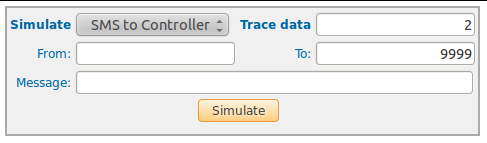
Parameters
- Simulate: allow to select a simulation action
- Tx: Simulate a received message from controller (the message will be send to cellular phone)
- Rx: Simulate a received message from a cellular phone (the message will be send to controller)
- ProcessFile: Process a file SimulationMessages.txt which content parameters separated by | (messages will be processed as Rx command)
- To cellular: target cel number used with Tx or Rx
- From cellular: origin cel number used with Rx
- Message: message text used with Tx or Rx
- Simulate: allow to select a simulation action
You can also use the Dummy driver (only create log, but don't take real action) by setting the parameter engineClass=nl.strohalm.cyclos.driver.dummy.engine.DummyDriverEngine into the properties file driver configuration.
Test sample
Simulate: Rx
From cellular: 59898399813
To cellular: 1234
Message: Py 5678 745812 110
The sample will simulate a received message (by driver) which would make a payment: from memeber with cellular 59898399813, to member with login name 745812, an by 110 unit in the default currency (1234 is the short number for Cyclos, and 5678 is the payer PIN).
Consideraciones para WIKI de módulo SMS 3.0.114
- Explicar claramente que en la respuesta del comando saldo el valor dado como disponible puede no ser 100% utilizable.
Considerar este caso, si se descuenta 1 peso a la cuenta por cada mensaje enviado, y se pide el saldo el valor de disponible sera el valor disponible real +1 (ya que luego de haber sacado el detalle y saldo disponible se envio el mensaje de respuesta que le resto 1 peso al valor). Para el caso que los SMs se carguen por paquete es incierto si el disponible mostrado por el comando sera el realmente disponible, o si el mensaje de respuesta genera cargo de costo de un nuevo paquete de sms (en cuyo caso el disponible sera el que mostro el mensaje menos el costo del paquete, pero esto solo sucede cuando se carga paquete porque se terminaron los sms disponibles).
- Crear una session de Seguridad en donde se explican todos los metodos de seguridad implementados
- confirmacion de comando
- registro de session de control (comandos invalidos, o validos con error en la ejecucion): se bloquea el celular origen
- registro sessiones de confirmacion de identidficador de session invalido: se incrementan los intentos de todas las sessiones abiertas ()
- registro de sessiones de confirmacion con pin invalido (independiente del bloqueo de pin de Cyclos)
- maxima cantidad de sessiones pendientes de confirmacion por celular origen (si se supera no se contesta a mensajes de ese celular)
- para futuras versiones de SMS
- El separador de transacciones en comando account details que sea "::" (conversado entre alejandro y Hugo el 19/01/11)