Contents
Driver setup
Working with MODEMS
Java comm configuration, by use with SMS modems
When you work with SMS modem, you need to download and install Java communication API extension (http://java.sun.com/products/javacomm/, anxious people can find basic files on resources/javacomm) . Some important tips:
- ../resources/javacomm/javax.comm.properties file should be placed in $JAVA_HOME/jre/lib.
- javax.comm.properties should contain the available ports to be used by the modem. I.E:
-\# Paths to server-side serial port devices
serpath0 = /dev/ttyS0
serpath1 = /dev/ttyS1
serpath2 = /dev/ttyACM0
serpath3 = /dev/ttyACM1
serpath4 = /dev/ttyUSB0
serpath5 = /dev/ttyUSB1
- copy ../resources/javacomm/comm.jar file in $JAVA_HOME/jre/lib/ext
- To add the libLinuxSerialParallel.so to the runtime do ONE of the follow:
- Copy ../resources/javacomm/libLinuxSerialParallel.so to /usr/lib
- If you are using Eclipse, add the following to the Tomcat run configuration: -Djava.library.path=${project_loc:/cyclos3_sms_driver}/resources/javacomm
Please be warned that while working with Eclipse and Tomcat, the javax.comm.properties shouldn't be placed in your home directory.
Serial ports on Linux (udev command)
Some problems would arise, if you are use the GSM modem under linux. The main problem would be about the current user not having permissions on the device file. Another problem is that the device could appear connected in a different file under the /dev folder every time you plug the device. udev can help solve this by mapping the device to a unique file.
- - Connect the device to the computer.
- - udevadm info -q all -n {path to the device mounting point} -a
- - create a file name for the udev rules in /etc/udev/rules.d/ name it wathever you want ending with .rules
- - write down in a single line comma separated, ENV or ATTRS ({the subsystem you see in step 2}), with values that identify the device you want,
add SYMLINK+="newdevicename" were newdevicename is the name of the file you want the device to be pluged-in, MODE="0777" so you give permissions to everybody or wathever permission is right for your installation (the running user should have read and write permissions over the file)
- - unplug the device
- - sudo restart udev and wait a few seconds after it finishes
- - plug-in the device and wait a few seconds
- - udevadm info -q all -n /dev/{symlink name you added} (this should show you the device information)
- - setup your application configuration files to point to the symbolic link instead of the real device
Log 4J
Asynchronic message system use Log4J as logger function. If you prefer change the log4j characteristic you would need to change the log4j.xml or log4j.properties files (they are placed on root directory of sources for both applications, driver and controller). To know how to configure log4j by an XML file please refer to log4j web site.
Driver (properties) configuration file
The DriverConfig.properties file is placed on folder WEB-INF, this allow to configure some characteristic and behaviors. The items that allow to configure are:
- driverId - All driver applications need a label Id. This label Id will be used by controller to identify the driver instantances and route the messages between it and Cyclos instances.
- wsClients - it's a while IP address list. Specify from which IP addresses allow to connect to served web service interfaces
- controllerUrl - specify the base url to contact the web services served by controller
- fromControllerQSize - Size for queue where to store message arrived from controller
- toControllerQSize - Size for queue where to store message arrived from external (going to go to Controller)
- engineClass - path and class name of engineClass, its an special implementation of driver (you have three implementation in Driver proyect:
- Http - nl.strohalm.cyclos.driver.sms.engine.HttpGatewayEngine - Allow send and receive messages using Http post (or get) from a Gateway provider
- Sms with Modem - nl.strohalm.cyclos.driver.sms.engine.SMSDriverEngine - Allow to send and receive SMS message through a GSM modem.
- Dummy - nl.strohalm.cyclos.driver.dummy.engine.DummyDriverEngine - Only log information, allow to test the asincrhonic message module
Driver configuration sample file
#the ID for this driver in controller
driverId=SmsDriver

#While list access for WS
wsClients=127.0.0.1 192.168.3.192

#URL for consume controller web service
controllerUrl=http://127.0.0.1:8080/cyclos3_sms_controller/services/controller

# Incoming queue size for message (from controller)
fromControllerQSize=10

# Outgoing queue size for message (to controller)
toControllerQSize=10

# The class path and name for extended engine class
#engineClass=nl.strohalm.cyclos.driver.sms.engine.SMSDriverEngine
#engineClass=nl.strohalm.cyclos.driver.sms.engine.HttpGatewayEngine
engineClass=nl.strohalm.cyclos.driver.dummy.engine.DummyDriverEngine
Controller setup
The controller configuration is based in two files config.xml and cyclosInstance.properties. The config.xml file (placed in the root folder of source) allow to set some aspects and behaviors. Here we will find the rules to route messages betwen cyclosInstances and driverInstances. Elements:
- cyclosInstances - A list of Cyclos which operate with this controller. Its include the rules to route message from the cyclosInstance to driverInstances.
- digitsSessionId - Specify the quantity of digits will be used to SessionId, for example if digitsSessionId=4, the SessionId number would reach the value 9999, after that, the next SessionId woulb have the value 1
- driverInstances - A list of driver which operate with this controller. Its include the rules to route message from the driverInstance and the cyclosInstances ( see Drivers instance bellow)
- ipWhiteList - an white ip address list. A list of Ip address separated by blank spaces from which the controller will accept coneccions from CyclosInstances or driverInstancess to the served web services interfaces.
- maxSessionHandler - the maximum quantities of session that will be drivered by controller at once.
- sessionTimeOut - specify how many seconds the controller will wait to get a confirm (for example in case of confirm payment transaction), after that time the controller will destroy the session and sen advise to related members
Cyclos instance
The Cyclos instance configuration has information about a cyclos which operate with this controller. Items:
- accountAliasess - an associated list of string and numbers, the string will be the name accepted in message to identify an account, and the number will be the cyclos intance account Id.
- driversChannels - an associated list between two string. The first string identify a driverId and the second identify the channel in the cyclos instances. When a message arrive to the controller from a Driver, the controller need to know with which channel of Cyclos identify the transaction, there this map help.
- commonsActions - an associated list between two string, the first string identify a command (the comands are especifyed in nl.strohalm.cyclos.controller.config.CommandType), and the second string specify the class which process the message for this cyclos instance and command.
- driverDefault - when a message from cylos have to be routed to a driver and the controller can't find a driverMap which match with the destination member provider field, then use the driverDefault to dispatch the message (see Driver map entry, bellow).
- driverMap - a set of rules which allow to controller descide which driver use to deliver a message to a member from a Cyclos
Drivers instance
The Driver instance configuration has information for routing messages from the Driver to Cyclos. It is composed of a list of entry tags which contains the following tags:
- key Name of the driver Instance
- value contains the tags that come next.
- cyclosDefault Name of the default cyclos instance
- rootUrl URL for the Cyclos webservices
- routeTyCyclos Mapping from short number to Cyclos instance
- key Short number
- value Cyclos instance name
Controller configuration sample file
<cycloscontroller  xmlns:xsi="http://www.w3.org/2001/XMLSchema-instance"
         xsi:noNamespaceSchemaLocation="/opt/develop/workspace.galileo.cyclos3_sms/cyclos3_sms_controller/src/config.xsd">

         <cyclosInstances>
         	<entry>
         		<key>compras</key>
         		<value>
	         		<accountsAliases>
	         			<entry><key>UN</key><value>1</value></entry>
	         			<entry><key>UNITS</key><value>1</value></entry>
	         			<entry><key>PE</key><value>2</value></entry>
	         			<entry><key>PESOS</key><value>2</value></entry>
	         		</accountsAliases>
	         		<driverChannels>
	         			<entry><key>TtyDriver</key><value>sms</value></entry>
					<entry><key>SmsDriver</key><value>sms</value></entry>
	         		</driverChannels>
	         		<commandActions>
	         			<entry>
	         				<key>BALANCE_REQUEST</key>
	         				<value>nl.strohalm.cyclos.controller.command.BalanceCommand</value>
	         			</entry>
	         			<entry>
	         				<key>BALANCE_RESPONSE</key>
	         				<value>nl.strohalm.cyclos.controller.command.BalanceResponseCommand</value>
	         			</entry>

	         			<entry>
	         				<key>CONFIRM_PAYMENT</key>
	         				<value>nl.strohalm.cyclos.controller.command.ConfirmCommand</value>
	         			</entry>
	         			<entry>
	         				<key>REQUEST_PAYMENT</key>
	         				<value>nl.strohalm.cyclos.controller.command.RequestPayCommand</value>
	         			</entry>
	         			<entry>
	         				<key>ACCOUNT_DETAILS</key>
	         				<value>nl.strohalm.cyclos.controller.command.DetailCommand</value>
	         			</entry>
	         			<entry>
	         				<key>PERFORM_PAYMENT</key>
	         				<value>nl.strohalm.cyclos.controller.command.PayCommand</value>
	         			</entry>
	         		</commandActions>
	         		<driverDefault>
	         			<driverId>TtyDriver</driverId>
	         			<messageSource>1234</messageSource>
	         		</driverDefault>
	         		<driverMap>
	         			<entry>
	         				<key>Ancel</key>
	         				<value>
	         					<driverId>TtyDriver</driverId>
	         					<messageSource>1234</messageSource>
	         				</value>
	         			</entry>
	         			<entry>
	         				<key>Movistar</key>
	         				<value>
	         					<driverId>SmsDriver</driverId>
	         					<messageSource>4321</messageSource>
	         				</value>
	         			</entry>
	         		</driverMap>
	         		<id></id>
	         		<languageProperties>cyclosInstance.properties</languageProperties>
	         		<memberDiscriminatorField>phone</memberDiscriminatorField>
	         		<provider>cell_provider</provider>
	         		<rootUrl>http://127.0.0.1:8280/cyclos</rootUrl>
         		</value>
         	</entry>
         </cyclosInstances>
          <digitsSessionId>12</digitsSessionId>
          <driverInstances>
          	<entry>
          		<key>SmsDriver</key>
          		<value>
         			<cyclosDefault>compras</cyclosDefault>
          			<rootUrl>http://localhost:8080/cyclos3_sms_driver/services/driver</rootUrl>
         			<routeToCyclos>
         				<entry>
          					<key>1234</key>
         					<value>compras</value>
         				</entry>
        				<entry>
         					<key>4321</key>
         					<value>compras</value>
         				</entry>
         			</routeToCyclos>
         		</value>
        	</entry>
         	<entry>
         		<key>TtyDriver</key>
         		<value>
         			<cyclosDefault>compras</cyclosDefault>
         			<rootUrl>http://localhost:8080/cyclos3_sms_driver/services/driver</rootUrl>
         			<routeToCyclos>
         				<entry>
         					<key>1234</key>
         					<value>compras</value>
         				</entry>
         				<entry>
         					<key>4321</key>
         					<value>compras</value>
         				</entry>
         			</routeToCyclos>
         		</value>
         	</entry>
          </driverInstances>
	   <ipWhiteList>127.0.0.1</ipWhiteList>
          <maxSessionHandler>10</maxSessionHandler>
          <sessionTimeout>20</sessionTimeout>
</cycloscontroller>
Cyclos setup
- Setup an identifier for the Cyclos instance. Cyclos->Settings->LocalSettings->IdetnficationForExternalChannels.
- You must add a channel for the asynchronous messaging system. You can do it in Cýclos->Settings->Channels->InserNewChannel.
- Name: A name to identify the channel
- InternalName: It must be sms
- Credential: Here you must choose the way the users are identified in when operating in this channel. It is used to be PIN.
- Support payment request: You should check this to enable the payment request flow. Otherwise leave it unchecked.
- Web service url: If you check the Support payment request option, you must specify the webservice URL for the paymentRequest interface. It is use to be at “http://<Ip/NombreHost>:<PuertoHost>/cyclos3_sms_controller/services/paymentRequest”
- To enable events notifications you should go to Cyclos->Settings->Local Settings->SMS and check the option "enable" and setup the webservice address typically at http://<Ip/NombreHost>:<PuertoHost>/cyclos3_sms_controller/services/members.
- You should add a new transfer type, although you can modify an existing one.
- You must check the channel setup in the last step.
- You must create a WS Client for the Controller to be able to connect to Cyclos. Cyclos->Settings->WebServiceClient->NewWebService
- In permissions/Perform payment you must select the transaction you have had enable for SMS.
- Check the following permissions options: Search Members, Access account details and Access information.
- Add permissions for SMS in the groups you want to be able to access that service. You can do it at Cyclos->Users&Groups->PermissionGroups->[GrupoDeMiembrosSeleccionado]->EditPermissions
- Check the option view, if you want to be able to view the SMS logs
- In Payment permissions check inside "member payments" the transaction type you enable for SMS. In the field "request payments from other channels" you must check the SMS option.
- You must enable SMS for the user's groups you want to have SMS access. You can modify it at Cyclos->User&Groups->[GrupoMiembrosSeleccionado]->Modify
- AccessSettings->AccessibleChannels check the channel created for SMS
- NotificationSettings->SmsAllowedMessage check the notifications you want to go by SMS.
- NotificationSettings->DefaultMessageSentBySms check the default SMS notifications.
- Optionally you can setup the fields NotificationSettings->SmsChargeTransferTypes and NotificationSettings->SmsChargeAmount to debit from the member accounts for each SMS.
- You must be sure there is a custom field named "cell_provider".
- Each member who is going to be able to operate by SMS ensuer
- Create an external access key. The member should create the pin at Cyclos->Personal->ExternalAccess in the dialog ChangeMyAccessToChannel he/she must check the SMS channel.
- Check his/her notifications setup.
Common mitakes
Once you have setup the environment it is important to run some test to check the setup was successfull.
Regular expressions
- Take care of spaces at the begining and the end of the expression.
- Check you accept decimal values with the right separators.
Language setup
- Check you defined all the keys in the properties file.
- Check Cyclos and Controller language are the same.
Controller setup
- Check driver names you link to different URLs.
- Check Cyclos names you link to different URLs.
- Check session timeout and session digits values.
How to test the system
To simulate sending or recieving an SMS to the driver at URL:
http://<IpTomcat>:<PortTomcat>/cyclos3_sms_driver/driverTtyServlet
- Parameters
- Simulate: allow to select a simulation action
- Tx: Simulate a received message from controller (the message will be send to cellular phone)
- Rx: Simulate a received message from a cellular phone (the message will be send to controller)
- ProcessFile: Process a file SimulationMessages.txt which content parameters separated by | (messages will be processed as Rx command)
- To cellular: target cel number used with Tx or Rx
- From cellular: origin cel number used with Rx
- Message: message text used with Tx or Rx
- Simulate: allow to select a simulation action
You can also use the Dummy driver (only create log, but don't take real action) by setting the parameter engineClass=nl.strohalm.cyclos.driver.dummy.engine.DummyDriverEngine into the properties file driver configuration.
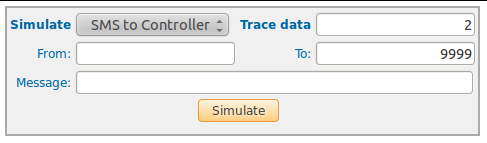
Test sample
Simulate: Rx
From cellular: 59898399813
To cellular: 1234
Message: Py 5678 745812 110
The sample will simulate areceived message (by driver) which would make a payment: from memeber with cellular 59898399813, to member with login name 745812, an by 110 unit in the default currency (1234 is the short number for Cyclos, and 5678 is the payer PIN).