Contents
- 1 Cyclos SMS banking module
- 2 Quick installation guide
- 3 Security setup
- 4 Information flows & AIO
- 5 Driver setup
- 6 Controller setup
- 7 Cyclos SMS configuration
- 8 Logging with Log 4J
- 9 Working with MODEMS
- 10 Connectivity to gateway and Telco's
Cyclos SMS banking module
The SMS module consists of the Controller and Driver see architecture. In the release the Driver and Controller are part of the same 'All In One (AIO)' package. In future releases it will be possible to host the Drive and Controller as separate services. This will only be useful for very specific cases.
The SMS module is published as a single file with three packages for different purposes:
- Simulator: This package can be used to test the Cyclos and SMS controller configuration without the need of connectivity to a mobile phone operator.
- Gateway: This package is the one that is commonly used for operational systems. It allows connectivity to a mobile phone provider or SMS Gateway provider.
- Modem: In stead of connecting to the services of a phone operator or SMS gateway provider it is also possible to connect directly to a local SMS modem or mobile phone (and use the SMS services of the local phone contract)
Compatibility with Cyclos versions
Make sure that version of the SMS module is compatible with the Cyclos version. Here below a compatibility list:
| Cyclos version | SMS module version | |
| Cyclos-3.6 | ↔ | SMS-1.0_RC1 |
| Cyclos-3.6.1 | ↔ | SMS-1.0 |
| Cyclos-3.7_RC1 | ↔ | SMS-1.1 |
| Cyclos-3.7 | ↔ | SMS-1.2 |
| Cyclos-3.7.1 | ↔ | SMS-1.2.1 |
| Cyclos-3.7.2 | ↔ | SMS-1.2.1 or SMS-1.2.2 |
| Cyclos-3.7.3 | ↔ | SMS-1.2.2 |
Note: With the ‘stand alone’ Cyclos package it is relatively easy to install and run Cyclos. Be aware that the SMS module has many configurations and will take more time. For the setup and configuration of SMS module some experience with server administration and mobile phone protocols are required.
Quick installation guide
This installation consists of 5 steps, we highly recommend for everybody to begin with installing the SMS Simulator first, because this is the easiest way to check if Cyclos is configured correctly. After the SMS simulator is working correctly the SMS Gateway or SMS modem can be configured relatively easy in step 4A and 4B.
Step 1: Install Cyclos
- Download and install Cyclos (see Cyclos standard installation).
- Make sure Cyclos is running correctly (by default on http://localhost:8080/cyclos/). Note: Cyclos has an option to create a default database with preconfigured SMS settings. This can save much configuration time. In order to create the database with pre configured SMS settings make sure to set the parameter `cyclos.embedded.sms.enable` in the cylcos.properties file as `true`. The must be done before initiating Cyclos for the first time.
- When you are only testing to Cyclos on a local computer it might be easier to put your firewall off, otherwise make sure the firewall is configured correctly.
Step 2: Configure Cyclos
Note: This step can be skipped when you used the SMS embedded option for the database creation (see step 1)
- First Cyclos needs to be configured for SMS operations. Please follow the Cyclos SMS configuration.
- Then create two new members in Cyclos (for testing):
- Admin menu > User & Groups > Manage members > Create member: select the group for whom the SMS operations have been enabled in the Cyclos SMS configuration.
- In the field "Mobile phone" input a valid phone number.
- In case a separate PIN is configured for SMS operations: register a PIN for the created members.
- Access the profile of each member and in the action Access > External access set the PIN in external channels.
- It is possible to configure Cyclos to automatically charge members in local units for outgoing SMS (e.g. notifications or payment confirmations). So be aware that members will need have an available balance to be able to pay in local units (for more information see Notification settings).
- Admin menu > User & Groups > Manage members > Create member: select the group for whom the SMS operations have been enabled in the Cyclos SMS configuration.
- Make sure everything works fine, login Cyclos as one of the newly created members and try to transfer money from the one to the other.
Step 3: Install SMS Simulator
This step is not required, but we highly recommend you to first install the SMS simulator, because it is an easy way to test your configuration. When you skip this step you can still use the SMS monitor for testing your configuration.
- Download the distribution SMS package and unzip it. You can download it from sourceforge.
- Copy the directory simulator into the webapps directory (<tomcat_home>/webapps) of the tomcat installation and rename the folder simulator to sms.
- The register command requires a 'Kaptcha' confirmation (to avoid unwanted automated registrations). You can configure the Kaptcha settings in the file simulatorDriverConfig.properties (in the dir: web-inf/classes). It can be configured in the same way as the Kaptcha parameters in Cyclos (cyclos.properties).
- Note: you can rename the directory simulator to any other name, but be aware that the name of the directory determines the path of the url, so when you change it make sure to refer to the right urls in Send SMS web service url and Web service url.
3.1 Mysql configuration
- Create an empty MySQL database named cyclos3_sms_aio. This can be done as follows (in this example the root password is 1234), go to the command line and enter:
mysql -uroot -p1234
Welcome to the MySQL monitor

mysql> create database cyclos3_sms_aio;
Query OK, 1 row affected (0.01 sec)

Ctrl-D (linux) or msyql>exit (windows)
msyql> bye
- Now import the following schemas that can be found in the db folder in the zip file. Go to the command line and go the the directory "db" of the extracted zip file and enter (in this example the root password is 1234):
mysql -uroot -p1234 cyclos3_sms_aio < driver\sms_driver.ddl
mysql -uroot -p1234 cyclos3_sms_aio < controller\sms_controller.ddl
mysql -uroot -p1234 cyclos3_sms_aio < controller\session_keys_en.dml
Note: Make sure you import the schemas in the above listed order.
3.2 Edit baseDriverConfig.properties & config.xml
Note: This step can be ignored when you used the SMS embedded option for the database creation (see step 1)
- Now we can configure the SMS module, the default options should work fine. For more information about this configuration, please check SMS Driver setup and SMS Controller setup. Please edit the following files:
- In the file WEB-INF/classes/baseDriverConfig.properties:
- Make sure the driver can access the database previously created. Modify the properties db.connection according to your installation (e.g. db.connection.url=jdbc:mysql://localhost/cyclos3_sms_aio db.connection.username=root db.connection.password=1234).
- Edit the value of the phone.with.area.code.len property if necessary, this must be the number of digits of the phone number together with the area code (e.g. phone.with.area.code.len=9). This must be the same as set in the member field for the mobile phone number see Input pattern.
- Please leave the phone.area.code.prefix and phone.country.code empty, otherwise the simulator will not work correct.
- In the file WEB-INF/classes/config.xml:
- In the section controller > cyclosInstances > cyclosInstance > connection settings change the value of the attribute rootUrl to point to the installed Cyclos instance http://<TomcatIp>:<TomcatPort>/cyclos (e.g. <connectionSettings rootUrl="http://localhost:8080/cyclos" disableCNCheck="true" connectionTimeout="120000" readTimeout="120000" trustAllCert="true"/>).
- In the section cyclosInstance > memberSettings edit the line <principalSettings regexp="^(\d){<amountOfPhoneNumberDigits>}$"/> putting the max and min for the amount of digits separated by a comma (e.g. <principalSettings regexp="^(\d){7,9}$"/>).
- If the amount of digits of the mobile phone numbers are always the same just put in one number (e.g. <principalSettings regexp="^(\d){9}$"/>).
3.3 Run simulator
- In the file WEB-INF/classes/simulatorDriverConfig.properties:
- Insert the url in cyclos.ws.baseUrl= the url should point to the Cyclos installation http://<TomcatIp>:<TomcatPort>/cyclos (e.g. cyclos.ws.baseUrl=http://localhost:8080/cyclos).
- Define the number of digits for phone numbers in simulator.phoneLength=, by default the configuration is set to 9 digit mobile phone numbers (e.g. simulator.phoneLength=9).
- Make sure that number defined the setting 'tx.sendTo' has a mapping to a valid Cyclos instance. E.g. when the number of tx.sendTo is 9999 then in config.xml this number should point to a valid Cyclos instance e.g. <route fromTargetNumber="9999" toCyclos="cyclos"/>, in this example the number 9999 is mapped to the Cyclos instance name cyclos. The cyclos instance name can be set in Admin menu > Settings > Local Settings > Identification for external channels.
- Congratulations, now you can start tomcat: <tomcat_home>/bin/startup.bat (Windows) or <tomcat_home>/bin/startup.sh (Linux).
- Browse to http://<TomcatIp>:<TomcatPort>/<folder name simulator> (e.g. http://localhost:8080/sms).
- You can now login the simulator by entering the mobile phone number of one of the users created in step 2, type "help" in the input text and press "send" to quickly test if everything is working.
Note: please take some time to test all the functionalities with the SMS simulator. If everything is working, then you have configured the SMS module successfully. Now you are ready to connect Cyclos to a gateway or modem.
Step 4: Setup communication with Telco
Now it is time to make the choice of how to send and receive the SMS messages, this can be done in several ways using: a gateway on mobile phone, an external SMS gateway provider or a local modem. For bigger projects we recommend to use an SMS gateway provider or SMS modem(s). But before starting negotiations with an SMS gateway provider it might be useful to use a mobile phone as an SMS gateway for evaluating the functionality. Once you have Cyclos working with a gateway on a mobile phone changing to an SMS gateway is very easy. For more information please see the Architecture page.
Option 1: Install gateway on a mobile phone
Common gateway steps
- Download the distribution SMS package and unzip it. You can download it from sourceforge.
- If you didn't skip step 3 and you installed the sms simulator, please move the folder <tomcat_home>/webapps/sms to any location (with other words remove it from the webapps directory and make sure you have a backup of it).
- Copy the directory gateway (you just unzipped) into the webapps directory (<tomcat_home>/webapps) of the tomcat installation and rename the folder gateway to sms.
- Note: you can rename the directory gateway to any other name, but be aware that the name of the directory determines the path of the url, so when you change it make sure to refer to the right urls in Send SMS web service url and Web service url.
- If you skipped step 3, please follow step 3.1 and step 3.2.
- If you didn't skip step 3, please follow step 3.2 but now for the gateway again (you can also copy the files from the simulator).
Installing the gateway app
There are various good (and free) gateway apps available for the Android and Iphone platforms. We had good results with SMS gateway for Android. As this gateway works over http(s) the communication setup between the phone and computer is usually easier than a setup where the phone and computer will communicate via a serial port (described in the option 3). This guide will describe the steps to use SMS gateway for Android for sending and receiving SMS messages. Other software packages can be configured more or less in the same way.
- Install the app SMS gateway for Android on your android phone.
- On your mobile phone go to Settings, make sure the following settings are selected "Listen for HTTP send SMS commands", "Forward incoming SMS to HTTP" and "Prevent CPU sleep mode". We also recommend to select Enable logging on SDCARD.
- On your mobile phone go to Settings > HTTP Settings and configure the following:
- Listen for HTTP commands on port: 9090 (you can choice any port you like, we used 9090).
- Required password in URL: here you can specify a password, if you are only testing you can leave it blank.
- Forward incoming SMS to HTTP URL: here you can specify the URL of the Cyclos SMS driver that receives the incomming SMS messages, this ishttp://<TomcatIp>:<TomcatPort>/<folder name gateway>/restricted/http/gateway? e.g. http://192.168.1.103:8080/sms/restricted/http/gateway?
- The help (on the bottom of the page) in the HTTP Settings should now display the following:
- Incoming SMS will be forwarded to http://192.168.1.103:8080/sms/restricted/http/gateway?phone=nnn&smscenter=mmmm&text=ttttt.
- To send sms via HTTP invoke http://192.168.1.106:9090/sendsms?phone=nnn&text=ttt&password=
- You can see that the app uses the request parameters phone for sending/receiving the phone number and text for sending/receiving the messages itself. Also you see the url to invoke to send sms messages.
Configuring the gateway
- In the file WEB-INF/classes/httpDriverConfig.properties make sure to set the following parameters:
- white.list.hosts= here you have to add the ip of the mobile phone, to get access to the http driver. E.g. white.list.hosts=192.168.1.106. It might also be convenient to temporarily add the localhost ip so you can test the gateway with your browser (the ips must be separated by comma and a space). E.g. white.list.hosts=192.168.1.108, 127.0.0.1.
- tx.url= here you have to add the url of the mobile phone gateway used to send sms messages via HTTP. This will be in the format http://<ip address mobile phone>:<port SMS gateway>/sendsms? e.g. tx.url=http://192.168.0.156:9090/sendsms? (watch out, do not forget the ? at the end of the property).
- tx.messageParam=text the app uses the request parameter text for the outgoing SMS messages.
- tx.toParam=phone the app uses the request parameter phone for the destination mobile phone number.
- tx.countryCodeLen=0 make sure it is set to zero.
- tx.areaCodeLen=0 make sure it is set to zero.
- tx.method=GET the app uses the get method.
- rx.messageParam=text the app uses the request parameter text for incomming SMS messages.
- rx.fromParam=phone the app uses the request parameter phone for the source mobile phone number.
- rx.method=GET the app uses the get method.
Run the SMS module
- Now you can start tomcat: <tomcat_home>/bin/startup.bat (Windows) or <tomcat_home>/bin/startup.sh (Linux).
- Browse to http://<TomcatIp>:<TomcatPort>/<folder name gateway> (e.g. http://localhost:8080/sms). This will take you to the SMS monitor, here you have to login with your tomcat credentials, make sure it works! For help see step 5.
- Keep the SMS monitor open and startup SMS gateway for Android and send an SMS message to the phone with the android gateway. This should forward it to the SMS driver.
- In the SMS monitor you should see the incoming SMS, but probably it is ignored, but make sure to write down the complete mobile phone number.
- Now you can stop tomcat: <tomcat_home>/bin/shutdown.bat (Windows) or <tomcat_home>/bin/shutdown.sh (Linux).
- The complete mobile phone number you just wrote down is probably in a different format then the one you want to use in Cyclos. You can use the settings file WEB-INF/classes/baseDriverConfig.properties to reformat the phone number. Use the variables phone.with.area.code.len, phone.country.code and if needed phone.area.code.prefix. For more information please read the Phone number format standardizing properties and Information flows & AIO.
- Now startup tomcat again and send a message from a mobile phone with a number registered to a member inside Cyclos to the gateway phone with the text "help". The system should respond with a list of available commands.
- In case you encounter problems, please check step 5 for help.
Option 2: Connect to an SMS gateway provider
- Please follow Common gateway steps, from option 1.
- Now it is time to find out the following. When the gateway forwards an SMS message it will also send the mobile phone number of the mobile that send the message. This mobile phone number is usually in an international format, but in Cyclos the national format is often used. The phone number therefor needs reformatting, you can use the phone.with.area.code.len, phone.country.code and if needed phone.area.code.prefix for this. Please edit the file WEB-INF/classes/baseDriverConfig.properties for this. For more information please read the Phone number format standardizing properties and Information flows & AIO. If you don't know the format the GSP uses you can also skip this step for now and use the SMS monitor to see in which format the GSP formats the phone number for you.
- In the file WEB-INF/classes/httpDriverConfig.properties make sure to set the following parameters:
- white.list.hosts= here you have to add the ip or domain name of the gateway service provider (GSP), to get access to the http driver. E.g. white.list.hosts=184.172.248.26. It might also be convenient to add the localhost ip so you can test the gateway with your browser and the SMS monitor (the ips must be separated by comma and a space). E.g. white.list.hosts=184.172.248.26, 127.0.0.1.
- tx.url= here you have to add the url of the GSP used to send sms messages via HTTP using the gateway. E.g. https://api.zeepmobile.com/messaging/2008-07-14/send_message</nowiki> for messages using POST, or e.g. http://mygsp.com/send? for messages using GET (watch out, do not forget the ? at the end of the property when using GET).
- tx.messageParam=text find out the request parameter carrying the SMS messages, the GSP uses when sending SMS messages trough it.
- tx.toParam= find out which request parameter, for the destination mobile phone number, the GSP uses when sending SMS messages trough it.
- tx.countryCodeLen=0 make sure it is set to zero.
- tx.areaCodeLen=0 make sure it is set to zero.
- tx.method= find out if the GSP uses POST or GET for sending SMS messages, we recommend to use POST if possible e.g. tx.method=POST.
- rx.messageParam= find out which request parameter, carrying the message text, the GSP uses when forwarding messages to the Cyclos SMS driver.
- rx.fromParam= find out which request parameter, carrying the source mobile phone number, the GSP uses when forwarding messages to the Cyclos SMS driver.
- rx.method= find out if the GSP uses POST or GET for forwarding SMS messages to the Cyclos driver, we recommend to use POST if possible e.g. rx.method=POST.
- It will be necessary to provide the Gateway provider with the URL it will have to deliver the incoming messages to. This must refer to the following URL http://<TomcatIp>:<TomcatPort>/<folder name gateway>/restricted/http/gateway? For example: http://mydomain.com/sms/restricted/http/gateway?
- Now you can start tomcat: <tomcat_home>/bin/startup.bat (Windows) or <tomcat_home>/bin/startup.sh (Linux).
- Browse to http://<TomcatIp>:<TomcatPort>/<folder name gateway> (e.g. http://localhost:8080/sms). This will take you to the SMS monitor, here you have to login with your tomcat credentials. For help see step 5.
- To test send a message from a mobile phone with a number registered to a member inside Cyclos to the gateway phone with the text "help". The system should respond with a list of available commands.
- In case you encounter problems, please check step 5 for help.
Option 3: Install SMS modem
The modem package allows connecting the SMS module working via mobile phone or modem. Usually (3G) modems that are used to connect devices (such as notebooks) to the Internet work fine. The modem needs to be configured to communicate with the SMS controller. Modems brands and types have their own configurations and it can be somewhat difficult to get it working. Connecting via a modem has the same advantages as using a mobile phone as gateway, described above in "Option 1: Install gateway on a mobile phone".
All modems which are full AT standard command compliant should work. The example below is based based on the Huawei E176. Currently the modem package has been tested with operating system Ubuntu 10.04, 32 bits and the modems:
- Huawei E176
- Huawei E226
- Motorola Phone G24
- Motorola V3I
- This guide assumes that the modem is installed and active at a serial port. Many modems have drivers for the Windows what makes the install in Windows somewhat easier. In Linux the most straightforward way is to to install a USB modem via a serial port. See Working with MODEMS.
- Download the distribution SMS package and unzip it. You can download it from sourceforge.
- If you didn't skip step 3 and you installed the sms simulator, please move the folder <tomcat_home>/webapps/sms to any location (with other words remove it from the webapps directory and make sure you have a backup of it).
- Copy the directory modem (you just unzipped) into the webapps directory (<tomcat_home>/webapps) of the tomcat installation and rename the folder modem to sms.
- Note: you can rename the directory modem to any other name, but be aware that the name of the directory determines the path of the url, so when you change it make sure to refer to the right urls in Send SMS web service url and Web service url.
- If you skipped step 3, please follow step 3.1 and step 3.2.
- If you didn't skip step 3, please follow step 3.2 but now for the modem again (you can also copy the files from the simulator).
- Configure the SMS Modem module (for more information about this configuration, please check Driver setup and Controller setup)
- Configure the serial port that is used to connect the modem. In the file: modemDriverconfig.properties modify the parameter smsDriver.gateway.port (this parameter usually has value like /dev/gsmmodem or COM4).
- Configure the modem properties in the file: modemDriverconfig.properties. Modify the properties: (example used with the modem Huawei E176)
- smsDriver.gateway.ModemManufacturer=Huawei
- smsDriver.gateway.ModemModel=E176
- smsDriver.PIN=1234
- Now startup tomcat again and send a message from a mobile phone with a number registered to a member inside Cyclos to the modem phone number with the text "help". The system should respond with a list of available commands.
- In case you encounter problems, please check step 5 for help.
Step 5: Problem solving & SMS monitor
Because the Cyclos SMS module can be used in a lot of different ways, it has to be very flexible. But because of this flexibility a lot of things need to be configured and set. This makes it easy to make a little mistake somewhere causing the SMS module not to work. Therefor in this paragraph will help you find the problem. It will also describe the SMS monitor, which is a very handy tool for detecting problems and checking the functionality.
Common mistakes
From our experience we know that a lot of times the following configuration mistakes are made, please check your configuration quickly if you made one of the following mistakes.
Regular expressions:
- Take care of spaces at the begining and the end of the expression.
- Check you accept decimal values with the right separators.
Language setup:
- Check you defined all needed keys in the properties file.
- Check Cyclos and Controller language are the same.
Controller setup:
- Check driver names you link to different URLs.
- Check Cyclos names you link to different URLs.
- Check session timeout and session digits values.
Log files
Often problems can be easily detected by looking at the log files. The controller as well as the driver generate their own log files. The default configuration of the log4j.xml file generates two distinct files for each application, the first is a simple log file (e.g. SmsController.log), the second shows more details about all operations (e.g. SmsControllerDetails.log). The log files are per default generated in CATALINA_BASE/log and have the following names:
- SmsController.log
- SmsControllerDetails.log
- SmsDriver.log
- SmsDriverDetails.log
When operating with "All In One package (AIO)", the following files are generated:
- SmsControllerDriver.log
- SmsControllerDriverDetails.log
For security reasons the default configuration does not write the message text to log files. But in some cases when detecting problems or configuring the SMS module it is necessary to have a detailed log and to trace the complete route of execution and processing of a message. Please read the Security setup how change these settings.
Quick basic testing
In general we would recommend to use the SMS monitor, but in some cases it might be useful to do some easy manual tests.
When Cyclos seems not to be receiving any messages (this only works when the messages are send using GET):
- On the server the tomcat that runs the Cyclos SMS gateway module enter in a browser the following url: http://127.0.0.1:8080/<name folder gateway>/restricted/http/gateway?&<phone number request parameter>=<valid Cyclos phone number>&<message request parameter>=help (e.g. http://127.0.0.1:8080/sms/restricted/http/gateway?&phone=12345678&text=help). Make sure 127.0.0.1 is on the whitelist so it won't be blocked.
- Check the log at "<tomcat home>\logs\SmsControllerDriverDetails.log".
- If it says for example "Ignoring the message to controller because has an invalid from number", then often there is a problem with the phone number, please check Phone number format standardizing properties.
- If it says for example "Request parameter not found:", then you know you have configured the request parameters wrong, check out the rx parameter such as rx.messageParam=text and rx.fromParam=phone.
- If it says for example "Valid command received from a not registered member", then you know that probably everything is configured correctly, but that there doesn't exist a user in Cyclos with that phone number.
- If nothing at all happens check if tomcat is running, if tomcat is running check the log why the Cyclos SMS gateway module didn't startup.
When Cyclos seems not to be sending any messages (this only works when the messages are send using GET):
- Check if you can send sms messages trough your gateway, e.g when you are using your android mobile phone as gateway ''http://192.168.0.108:9090/sendsms?&phone=05181125000&text=testtest''.
- If this doesn't work you are using the wrong url or request parameters for your gateway or the gateway isn't working. If this does work, but the Cyclos SMS module still seems not to be sending any sms, check your tx request parameters (such as tx.messageParam= and tx.toParam=) and tx.url or try to send an SMS trough the monitor.
SMS monitor
The monitor is a page (servlet) that allows to simulate the incoming messages from a provider and outgoing message to the provider. This can be a good help to quickly test some functions, or detect some problems. Message that are simulated to come from the provider will flow from the driver to the controller and from the controller to Cyclos, often this will generate an SMS send by Cyclos to the controller, to the driver and to the gateway/modem, so make sure that the phone number you use can receive an sms in case of live systems.
If you use the (default) AIO installation you can access the monitor by the URL: http://<TomcatIp>:<TomcatPort>/<folder name gateway,modem> (e.g. http://localhost:8080/sms). Make sure the ip of the computer you want to enter the monitor with is on the whitelist of the driver. The parameter white.list.hosts can be found in WEB-INF/classes/httpDriverConfig.properties (e.g. white.list.hosts=192.168.1.108, 127.0.0.1).
You can login the monitor with a tomcat username and password. Make sure this tomcat user has the role "admin". This can be set in the file \<tomcat home>\conf\tomcat-users.xml e.g. in this case you can login with the username cyclos and the password 1234:
<tomcat-users>
  <role rolename="ADMIN"/>
  <user username="cyclos" password="1234" roles="ADMIN"/>
</tomcat-users>
Note: The monitor is available in the modem and gateway package, NOT in the simulator package.
Description of fields in monitor
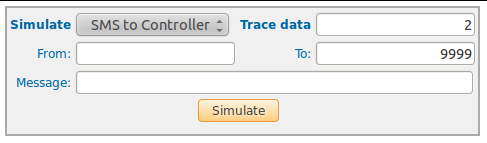
The following fields can be set in the SMS monitor, please see also the picture on the right:
- Simulate: allow to select a simulation action:
- Sms to Controller: Simulate a received message from a cellular phone (the message will be send to controller).
- Sms to TELCO: Simulate a received message from controller (the message will be send to cellular phone).
- To: In case of 'SMS to Controller' corresponds to the short number, in case of 'SMS to TELCO' it's the target cellular phone.
- From: In case of 'SMS to Controller' corresponds to the origin cellular phone (also see example), in case of 'SMS to TELCO' it's the short number.
- Message: Message text to send or to receive (depending of Simulate value).
Example
Simulate: Sms to controller
from: 094590041
to: 9999
Message: pay 7410 094590042 3 units
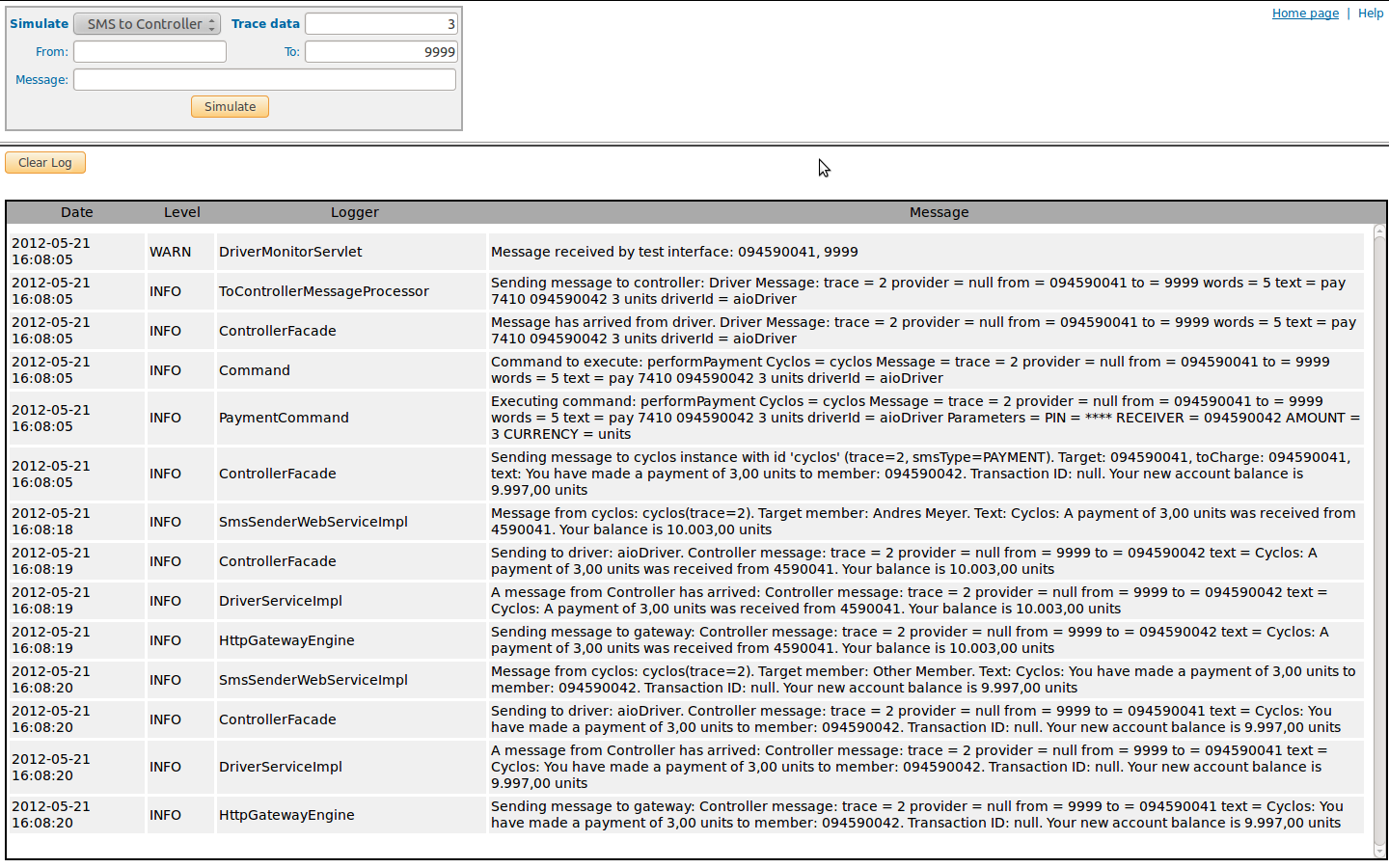
The sample will simulate a received message (by driver) which would make a payment: from member with cellular 094590041, with the pin number 7410, to another member with the cellphone number 094590042 and it will transfer 3 units. The message is send to 9999, which is the short number for Cyclos. In from you can insert the complete international phone number, then the number will be reformatted using the settings in the configuration files, but it is also possible to insert the number that is used in Cyclos.
On the screen of the monitor a table will be shown showing all which is going to be written to the log. For our example, the screen would show:
Security setup
It is per default not possible in an installation to see the messages entering the system. In the log files, the text of the messages is represented with *, while in the database of the system these texts are encoded with symmetric encryption. The cryptography configuration of the database can be found in the WEB-INF\classes\security.properties file. It is recommended to avoid access to curious eyes to this file, as in this file you will find the decryption key for the texts stored in the database. To avoid message encryption (for example for trouble shouting), and to show the texts in the log files, add the system variable -Dlog.details.on.messages="true" to your tomcat (JAVA-OPTS). This configuration will allow to show the complete non-encrypted texts of incoming messages in your log files and the database.
WARNING: Enable full non-encrypted text view of messages for resolving error situations only. A complete message entry will expose confidential information about transactions and members interacting over SMS to any operator with access to log files and database.
Configure file: security.properties
This file resides in the WEB-INF/classes folder of each of the applications (Driver, controller or AllInOne package). The configurable properties are as follows:
- message.encrypt.algoritm - Specifies the message encryption algorithm, currently set to "AES"
- message.encrypt.charset - Character encoding format (7 bits) applied before encrypting a message.
- message.encrypt.password - Encryption password for the texts in the table driver_message_log
Sample file: security.properties
message.encrypt.algoritm=AES
message.encrypt.charset=UTF-8
message.encrypt.password=CHANGEME
Information flows & AIO
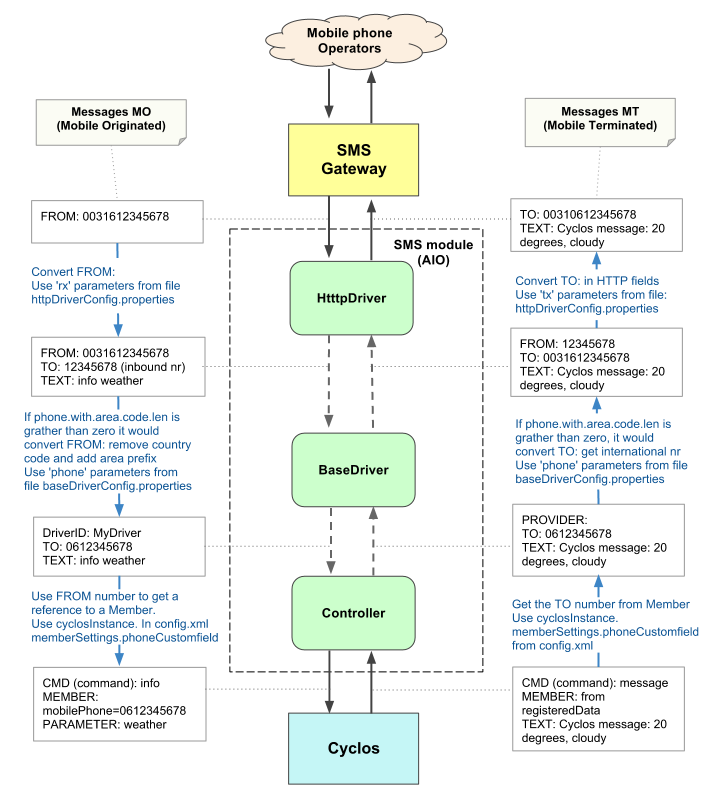
When connecting to an SMS gateway the information will flow from the mobile phone ↔ gateway ↔ http driver ↔ base driver ↔ controller ↔ Cyclos and vice versa. When connecting to an SMS modem the information will flow from the mobile phone ↔ SMS modem ↔ modem driver ↔ base driver ↔ controller ↔ Cyclos and vice versa. The picture on the right show this for connecting to an SMS gateway. It also show which variables and which configuration files are used at what moment. For more information about this please read the Architecture and the the Driver setup and the Controller setup.
The driver and the controller are published on sourceforge as a single installation, the so called 'All In One (AIO)' package. The advantage of the AIO package is that controller and driver can communicate directly, without slow data exchange. Consequently, the webservice connection configurations do not apply. Only in specific cases it is interesting of separating the driver and controller e.g. in case of having physical modems (connected to local Drivers) on different locations. Below you can find more information about the AIO setup:
Configuration files
The AIO package has the configuration files config.xml, for the controller, baseDriverConfig.property for the driver, and the specific configuration httpDriverConfig.properties for the HTTP driver or modemDriverConfig.properties when the driver connects to a modem. All configuration files can be found in the folder /WEB-INF/classes.
rootURL
When using the AIO package the config.xml of the controller (integrated in AIO) must be configured without a URL to connect to the integrated driver, that is, the configuration of the driverInstance element pertaining to the integrated driver will have an element connectionSettings like the following (without rootURL):
<connectionSettings connectionTimeout="120000" readTimeout="120000" disableCNCheck="true" trustAllCert="true"/>
As mentioned before, using an AIO package does not limit the controller to using only one driver (the integrated one). Thus, if operation with an additional external driver is required (NOT the integrated one), a new driverInstance must be created, and its connectionSettings set to something like the following (specifying the rootURL for the web service connection):
<connectionSettings rootUrl="[URL_driver_WS]" connectionTimeout="120000" readTimeout="120000" disableCNCheck="true" trustAllCert="true"/>
Like the controller, the integrated driver of an AIO package does not require a URL to connect to the controller (as the communication with the integrated controller will be done in the same virtual machine). Thus, in the file baseDriverConfig.properties of the AIO we have to put the element "controller.url" to an empty value and will look like:
controller.url=
Database
When using the AIO package, the database configuration used by the SMS module is the one found in baseDriverConfig.properties, ignoring what is contained in config.xml.
Note: Even while the database configuration will be loaded from baseDriverConfig.properties, the configuration in config.xml (which will NOT be considered when operating in AIO mode) MUST be kept present in order to preserve the formats of the files.
Driver setup
The single task of the driver is to handle the communication with a (physically attached) modem or an SMS Gateway provider (GSP). The reason for developing the driver software was to decouple the controller from the complexities of different communication channels. The driver configuration is defined in three files: baseDriverConfig.properties (this configuration file is always used), the file httpDriverConfig.properties is used for connecting via http to an SMS gateway and the file modemDriverConfig.properties is used for connecting to a physical modem.
Base driver configuration
Configure file: baseDriverConfig.properties
The baseDriverConfig.properties file is placed on folder WEB-INF/classes, this allows to configure some characteristic and behaviors.
- engine.id - All driver applications need a label Id. This label Id will be used by controller to identify the driver instances and route the messages between it and Cyclos instances.
- messageInterceptor.class - Optional property. By default the class nl.strohalm.cyclos.driver.message.interceptor.DefaultMessageInterceptorImpl is used. If specific logic is required you can write your own implementation class. For more details please see the Message intercepting section. Note: this property is available from version 1.2.3 and later.
Duplicated message filter:
It is possible to configure the Driver in such a way that duplicated messages will be discarded. Duplicated messages are considered to have the same message text, origin and destination number, and credential (PIN or login password) within a specified time frame. This can be prevent double operations (e.g. payments) when there is a delay with the SMS delivery and the customer sends the same message.
- engine.duplicated.messages.timeWindow - Time window in which messages with the same format will be considered duplicated and will be ignored. (default, 10 minutes)
- engine.messages.digest.cleaner.delay - Time window in which messages after which the CLEANER process will discard the duplicated messages. This property will need to be at least 10 times smaller than the engine.duplicated.messages.timeWindow value. (default, 1 minutes).
Message queue towards the controller:
The message that arrive from the gateway are put in a queue to be dispatched to the controller, before possible errors are generated the driver will retry to send the message within a time window. The properties to control this queue behavior are:
- engine.to.controller.thread.pool.core.size - Available (permanent) for message dispatching. Every message that is pending for dispatching will use these threads
- engine.to.controller.thread.pool.queue.size - Maximum items in dispatching queue. If all threads defined in the engine.to.controller.thread.pool.core.size are busy and a new message arrives, that will be stored in a waiting queue in order to send.
- engine.to.controller.thread.pool.max.size - If the dispatching queue is full engine.to.controller.thread.pool.core.size and a new message arrives, then a new thread will be opened. This process will be repeated until the max size defined in this property is not reached anymore
- engine.retry.failed.messages.delay - This is the time (in seconds) after which the driver will retry to dispatch a message. If there is an error when a message is trying to be dispatched to the controller because the engine.to.controller.thread.pool.max.size has been reached or because of a connectivity (TCP) error. After time defined in the engine.retry.failed.messages.delay has been reached the driver will retry to dispatch the message.
- engine.failed.messages.validity - This is the time (in seconds) after which the driver will stop retrying to retry to dispatch a message. After this time it is considered that it would be not useful anymore to dispatch the message, or dispatching message after the delay could even be a risk.
Controller connection settings properties:
These settings define the connection between the Driver and the Controller.
- controller.url - The base url to contact the web services served by controller (and the server to allow connection from controller).
- controller.disableCNCheck - Allow to connect with Controller WS by SSL, without check the server name. Default value false.
- controller.trustAllCert - Allow to connect with Controller WS by a SSL, without check if the cert is endorsed by a trusted entity.
- controller.connection.timeout - The maximum time to establish a TCP connection with the controller.
- controller.read.timeout - The maximum time the Driver will wait for a response after sending an request to the controller.
Database settings properties:
The Driver uses a database to store the message queues. These properties define the connection to the database. Besides the specific parameters described in this section you can pass any of the parameters accepted by the connection pool of the database (detailed information about these parameters can be found at: DBCP configuration page). To pass a parameter to the connection pool the keys of the "db.connection. *" are used. For example, you want to pass the property testWhileIdle' you should pass the property as follows: db.connection.testWhileIdle = true.
Here below the most common DBCP parameters are listed (and used in the default configuration):
- driverClass - Database driver. For example, for MySql the driver com.mysql.jdbc.Driver would be used
- querydslTemplatesClass - set the class used to drive specified in driverClassName (for MySql use com.mysema.query.sql.MySQLTemplates).
- jdbcProperties - The connection properties that will be sent to the JDBC driver when establishing new connections. The associated value must be of the form [connection_property=value;]*
- url - The URL for the database connection. E.g. jdbc:mysql://localhost/cyclos3_sms_driver
- username - Database user
- password - Database password
- validationQuery - SQL instruction used to validate pool connections.
- testOnBorrow - Indicates that the objects need to be validated before dispatch.
- initialSize - Number of connections created at system initialization.
- maxActive - Maximum number of connections allowed by the pool (-1 is no limitation).
- maxIdle - The maximum number of connections that can remain idle in the pool, without extra ones being released, or negative for no limit.
- maxWait - The maximum number of milliseconds that the pool will wait (when there are no available connections) for a connection to be returned, or -1 to wait indefinitely.
- timeBetweenEvictionRunsMillis - The number of milliseconds to sleep between runs of the idle object evictor thread. When non-positive, no idle object evictor thread will be run.
- minEvictableIdleTimeMillis - The minimum amount of time an object may sit idle in the pool before it is eligible for eviction by the idle object evictor (if any). Default 30 mins.
- connectionInitSqls - SQL statements that will be used to initialize physical connections when they are first created. These statements are executed only once.
Note: In order to define the active time zone the MySql it is necessary to apply db.connection.connectionInitSqls=set time_zone <ACTIVE_ZONE> time_zone = set. Make sure that the active zone set for MySql is the same as the one that used by Tomcat (for more details see: Make sure the Tomcat and MySQL server use the same time zone )
Message filtering process:
A message will arrive at the driver from the controller and the driver will send the message to a modem, gateway or other medium. The message text has to follow some rules and processes:
- (A) All characters specified in the message.characterToReplace property will be replaced by the character in the same list position of message.characterReplacement
- (B) All characters (characters range, or token ranges) specified in the message.characterAllowed property are allowed in a message text (same as for point (A) ).
- (C) If a character is not specified in points (A) or (B) it will be replaced by the character in the property message.characterForbiddenReplacement
- (D) When a property specified a list of characters it should be separated by a comma character (,). I/E: U, u, \u00ED,;
- (E) All characters specified in the properties can be written as Unicode ("$" is the same as "\u0024"). If there are additional characters these need to be written in unicode format UTF-16/UTF-16BE (eg the character deseret capital letter long i must be specified as \ uD801 \ uDC00)
- (F) To specify characters comma and space the tokens 'COMA and 'SPACE' need to be used.
- (G) The message.characterAllowed property is composed of a list of characters, or a range of characters and tokens, separated by commas. A range of characters is defined by START_CHARACTER..END_CHARACTER.
- (H) The tokens of the predefined character range of the property message.characterAllowed property are:
- ALL - allows any character in the message text (this tokens disables the filter message.characterAllowed)
- ALPHANUMERIC - Permits characters and numbers, defined as: A..z, a..z, 0..9 (the allowed characters are: A,B,C,D,E,F,G,H,I,J,K,L,M,N,O,P,Q,R,S,T,U,V,W,X,Y,Z,a,b,c,d,e,f,g,h,i,j,k,l,m,n,o,p,q,r,s,t,u,v,w,x,y,z,0,1,2,3,4,5,6,7,9)
- PUNTUATION - allows the most common punctuation characters defined as: SPACE..-, :..;, =, [ (the allowed characters are: SPACE, (, ), /, COMA, ., *, +, -, :, ;, =, [, ])
Message filtering properties:
The texts in the messages coming from the controller are verified on length and characters before the message is send to the modem, gateway or other medium (see #Message filtering process). To control the texts the following properties are available:
- message.maxLength - Maximum length allowed
- message.characterAllowed List of characters (or characters range) that are allowed.
- message.characterToReplace - List of character which should be replaced
- message.characterReplacement - List of character used for replacement
Phone number format standardizing properties:
All the messages that are received by the BaseDriver can be parsed before being dispatched. The following settings can be defined:
- phone.with.area.code.len - The exact number of digits the phone number has, this should have the same amount of digits as the member field in Cyclos has. When this number is not correct the messages will not be forwarded by the driver. There are two cases in which the phone.with.area.code.len won't have the same length of the phone number field of a Cyclos: a) When the phone.area.code.prefix is not empty, in this case the phone.with.area.code.len should be equal to the length of the phone number in Cyclos minus the amount of digits of the phone.area.code.prefix, b) If phone.with.area.code.len has zero or less as value, the parser and formating will not be applied by driver.
- phone.area.code.prefix - This parameter is only applied when phone.with.area.code.len is one or more. This field can be left blank for most countries, it is only used in some specific countries like the Netherlands or Uruguay. Mobile phone numbers in the Netherlands for example are in the format 0612345678 but from outside the Netherlands they are 0031612345678. The number 0612345678 is used in Cyclos and as user identification, but the number 0031612345678 is used by the gateway. In this case the following settings should be used phone.area.code.prefix=0, phone.with.area.code.len=9 (make sure not to include the prefix in the amount of digits) and phone.country.code=0031. For messages coming from the gateway first the country code is subtracted and subsequently the phone area code prefix is added. For messages from Cyclos first the area code prefix is subtracted and subsequently the country code is added (see example 1 below).
- phone.country.code - This parameter is only applied when phone.with.area.code.len is one or more. If the gateway uses the complete international number for sending and receiving sms messages and you do not want to use these in Cyclos, this parameter can be used. If you enter the country code here only messages coming from the gateway with this country code will be processed. In messages from the gateway the country code will then be subtracted from the number and the number without country code will be used in Cyclos. When Cyclos sends an SMS this country code will be added to the number registered in Cyclos. For strictly regional projects even the country code and regional code can be subtracted, then only messages from a certain region will be processed by the driver (see example 3 below).
The gateway Driver (o Gateway AIO) supports the E.123 format for the FROM of the received MO's. If a message is sent from a phone with number +31612345678 and recieved by the gateway it will be converted to 0031612345678. This measn that the symbol for the international number "+" is replaced by "00". See example 4
Note: Some countries have different phone lengths. This can be solved by disabling the phone length check. The phone.with.area.code.len and phone.country.code and phone.area.code.prefix need to be empty. The number in the user profiles will need to have the complete number (country, area, number). It will only work with the gateway. The simulator does not support different phone lengths.
Below three examples are given how the phone number is processed by the BaseDriver when it flows from the gateway to Cyclos and vise versa.
| Example 1: Dutch mobile phone | ||
| ↓ Gateway ↓ | ||
| 0031612345678 | phone.country.code=0031 | Country code is added/removed, only messages from gateway with 0031 are processed. |
| 612345678 | phone.with.area.code.len=9 | Phone number is counted, only numbers with 9 digits are forwarded. |
| 0612345678 | phone.area.code.prefix=0 | Prefix 0 is added/removed. |
| ↑ Cyclos ↑ | ||
| Example 2: Brazilian mobile phone gateway doesn't use international prefix (0055) | ||
| ↓ Gateway ↓ | ||
| 5112345678 | phone.country.code= | Nothing is removed or added. |
| 5112345678 | phone.with.area.code.len=10 | Phone number is counted, only numbers with 10 digits are forwarded. |
| 5112345678 | phone.area.code.prefix= | No prefix is added or removed. |
| ↑ Cyclos ↑ | ||
| Example 3: United states mobile phone for local project | ||
| ↓ Gateway ↓ | ||
| 00121212345678 | phone.country.code=001212 | Country and regional code is added/removed, only messages from gateway with 001212 are processed (from New York). |
| 12345678 | phone.with.area.code.len=8 | Phone number is counted, only numbers with 8 digits are forwarded. |
| 12345678 | phone.area.code.prefix= | No prefix is added or removed. |
| ↑ Cyclos ↑ | ||
| Example 4: Dutch mobile phone with format E.123 in the Gateway application | ||
| ↓ Gateway ↓ | ||
| +31612345678 | phone.country.code=0031 | The symbol "+" is replace by "00" in the Gateway application. The region and country code is removed (and added 0031 to the message coming from Cyclos). Only messages from the Gateway with "0031" o "+31" are processed |
| 12345678 | phone.with.area.code.len=8 | Phone number is counted, only numbers with 8 digits are forwarded. |
| 12345678 | phone.area.code.prefix= | No prefix is added or removed. |
| ↑ Cyclos ↑ | ||
| Example 5: Conversion y parseo deshabilitado (phone.with.area.code.len=0) | ||
| ↓ Gateway ↓ | ||
| +31612345678 | The symbol "+" is replace by "00" in the Gateway application. All messages from/to the Gateway are processed. No country code is added/removed to message. | |
| 0031612345678 | Phone number is not counted, all numbers, with any digits lenght, are forwarded. | |
| 0031612345678 | No prefix is added or removed. | |
| ↑ Cyclos ↑ | ||
Default TO Phone number property:
In some driver implementations you do not have a TO phone number (when you are receiving a MO message), in this case Driver will use the phone.to.default property.
Sample file: baseDriverConfig.properties
#########################################################################
# Properties file used by the Driver framework							#
# These properties are not specific for any driver implementation		#
#########################################################################

#The driver's id and class used the send messages to controller (both mandatory)
engine.id=aioDriver
engine.class=

# Time window used to check for duplicated MO messages (in seconds)
# 0 means no duplicated check is done
engine.duplicated.messages.timeWindow=1200
# Delay between duplicated messages cleaner executions (in seconds)
engine.messages.digest.cleaner.delay=60

# Thread pool settings used to dispatch the messages to Controller
engine.to.controller.thread.pool.core.size=10
engine.to.controller.thread.pool.max.size=25
engine.to.controller.thread.pool.queue.size=250

# Delay between retries when a message send has failed (in seconds)
engine.retry.failed.messages.delay= 30

# This is the lifetime of the failed messages (in seconds)
engine.failed.messages.validity=600

#Controller connection settings using Web Services
#controller.url=http://localhost:9090/cyclos3_sms_controller
controller.url=
controller.disableCNCheck=true
controller.trustAllCert=true
controller.connection.timeout=120000
controller.read.timeout=120000

#DBCP connection pool settings
#Each property MUST be prefixed with db.connection. to be taken into account for the pool.
#Comments from: http://commons.apache.org/dbcp/configuration.html
db.connection.driverClass=com.mysql.jdbc.Driver
db.connection.querydslTemplatesClass=com.mysema.query.sql.MySQLTemplates
db.connection.url=jdbc:mysql://localhost/cyclos3_sms_aio
db.connection.username=root
db.connection.password=

#The SQL query that will be used to validate connections from this pool before returning to the caller
#It must be a SELECT statement
db.connection.validationQuery=SELECT 1

#If it is true then the connections will be validated before being borrowed from the pool.
db.connection.testOnBorrow=true

#The initial number of connections that are created when the pool is started.
db.connection.initialSize=0

#The maximum number of active connections that can be allocated from this pool at the same time, or negative for no limit.
db.connection.maxActive=35

#The maximum number of connections that can remain idle in the pool, without extra ones being released, or negative for no limit.
db.connection.maxIdle=20

#The maximum number of milliseconds that the pool will wait (when there are no available connections)
#for a connection to be returned, or -1 to wait indefinitely.
db.connection.maxWait=20000

#The number of milliseconds to sleep between runs of the idle object evictor thread.
#When non-positive, no idle object evictor thread will be run.
db.connection.timeBetweenEvictionRunsMillis=60000

#The minimum amount of time an object may sit idle in the pool before it is eligible for eviction
#by the idle object evictor (if any). Default 30 mins.
db.connection.minEvictableIdleTimeMillis=1800000

#SQL statements that will be used to initialize physical
#connections when they are first created. These statements are executed only once.
#IMPORTANT: To make sure Tomcat and MySQL use the same time zone you should set it using this property (see the example below)
#If there are more than one SQL statement each one must be terminated with a double semicolon (;;)
#db.connection.connectionInitSqls=set time_zone='America/Montevideo'

#The connection properties that will be sent to the JDBC driver when establishing new connections.
#The associated value must be of the form [connection_property=value;]*
db.connection.jdbcProperties=useUnicode=true;characterEncoding=utf8;


# message from controller text filter
message.maxLength=160
message.characterAllowed= \u0024, ALPHANUMERIC, PUNCTUATION, <, >
message.characterToReplace=\u00E1,\u00E9,\u00ED,\u00F3,\u00FA,\u00F1,\u00D1
message.characterReplacement=a,e,i,o,u,n,N
message.characterForbidenReplacement=_

# Phone composition
# The driver doesn't accept phone numbers without area code.
phone.with.area.code.len=9
phone.area.code.prefix=
phone.country.code=

# when receive a MO message, this can use a default "to" value (only used if to is null or empty)
phone.to.default=9999
HTTP driver configuration
The HTTP driver allows to receive and send messages through HTTP GET or HTTP POST parameters. Communication with Gateway providers is commonly handled via this Driver. The HTTP driver is configured by the WEB-INF/classes/httpDriverConfig.properties file. The engine of this driver is the class nl.strohalm.cyclos.driver.http.engine.HttpGatewayEngine, therefor the first property of the configuration file is engineClass=nl.strohalm.cyclos.driver.http.engine.HttpGatewayEngine.
The parameters sent or received along with the messages are completely configurable in this property file. A parameter configured empty means it will be ignored when receiving messages or omitted when sending. For example: "tx.passwordParam=" means no password parameter will be sent.
Configure file: httpDriverConfig.properties
- white.list.hosts - The comma-separated list of IP (or domain URL) addresses from which the servlet will accept connections (IP addresses belonging to gateways from which messages will be accepted for processing).
Parameters and values for sending messages:
- tx.httpClient.maxConnection - The maximum count of concurrent connections which will be setup with the remote server (the gateway).
- tx.httpClient.connectionTimeout - Maximum timeout (in milliseconds) awaiting connection with the remote server (the gateway).
- tx.httpClient.readTimeout - Maximum timeout (in milliseconds) awaiting a response from the remote server (the gateway) after a POST or GET request.
- tx.url - URL to which messages for cell phones will be sent (the URL on which the gateway will accept messages we want to send to cell phones).
- tx.method - HTTP method used for sending parameters, possible values are POST or GET.
- tx.charset - Charset used to encoding text message when send a MT message (to gateway). The use UTF-8 by default, but some gateway only recognize ISO-8859-1.
- tx.disableCNCheck - If set to true, the server name is not checked for HTTPS connections when sending messages (MT) with the gateway. The default value is false.
- tx.trustAllCerts - If set to true, the certificate authority of the server certificate in HTTPS connections is not verified when sending messages (MT) with the gateway. The default value is false.
- tx.apiIdParam - Specifies the name of a parameter which will be passed to the gateway (if empty it will be ignored when sending). Usually this parameter identifies the application sending messages (in this case the driver) to the gateway.
- tx.apiId - Specifies the value which will be set to the parameter tx.apiIdParam.
- tx.messageParam - Specifies the name of the parameter which will be filled with the text of the message.
- tx.fromParam - Specifies the name of the parameter which will be filled with the origin number of the message. If empty it will be ignored on sending.
- tx.toParam - Specifies the name of the parameter which will be filled with the basic phone number to which the message will be sent. The value of this number depends on the settings of the parameters tx.countryCodeLen and tx.areaCodeLen.
- tx.countryCodeLen - Specifies the number of digits (counting from the beginning of the receiving phone number) corresponding to the country code. The initial digits of the (complete) phone number sent with the parameter tx.countryCodeParam will be subtracted from the beginning of the complete phone number and will be excluded from the rest of digits sent in the parameter tx.toParam.
- tx.areaCodeLen - Specifies the number of digits corresponding to the area code. The initial digits of the (complete) phone number sent with the parameter tx.areaCodeParam will be subtracted from the beginning of the complete phone number (after having subtracted the number of digits corresponding to the parameter tx.countryCodeLen) and will be excluded from the rest of digits sent in the parameter tx.toParam. This parameter has three value ranges:
- greater than zero - Equivalent to the number of digits identifying the area code
- 0 or less than zero - The parameter tx.areaCodeParam will not be sent.
- tx.countryCodeParam - Specifies the name of the parameter in which the country code digits of the receiving phone number will be sent. The value of this parameter depends of the setting in tx.countryCodeLen.
- tx.areaCodeParam - Specifies the name of the parameter in which the area code of the receiving phone number will be sent. The value of this parameter depends of the setting in tx.areaCodeLen.
- tx.passwordParam - Specifies the name of a parameter in which a password for authentication with the gateway will be sent. If empty the parameter will be omitted when sending.
- tx.password - Value for the parameter tx.passwordParam.
- tx.userParam - Specifies the name of a parameter in which a username for authentication with the gateway will be sent.
- tx.user - Value for the parameter tx.userParam.
- tx.okResponse - Specifies a regular expression to which the text response from the gateway will be matched for the response to be considered valid (when sending a message MT).
- tx.providerParam - Specifies the name of a parameter the value of which will be mapped to a value of a possible custom field (configured in the controller).
- tx.provider.value.DEFAULT - The value which will be used by default (when no mapping can be found for a key tx.provider.value.<value>) for the parameter tx.providerParam
- tx.traceParam - Reference (for trace operation) to input message or transaction.
Parameters and values for receiving messages:
- rx.messageParam=message - Specifies the name of the parameter in which the text of the message will be received.
- rx.toParam - Specifies the name of the parameter containing the phone number to which the message has been sent.
- rx.providerParam - Specifies a label which will be put to all messages received by this driver.
- rx.areaCodeParam - Specifies the parameter containing the area code of the phone number to which the message has been sent.
- rx.countryCodeParam - Specifies the name of the parameter containing the country code of the phone number to which the message has been sent.
- rx.fromParam - Specifies the name of the parameter containing the phone number from which the message has been sent. NOTE: to comply with international phone numbers the driver will concatenate the values of the parameters rx.countryCodeParam, rx.areaCodeParam, and rx.fromParam.
- rx.response - Specifies the response text (when there are no errors) sent to the gateway each time a message from the latter will be received.
- rx.userParam - Specifies the name of the parameter in which a username for gateway authentication can be received. If it is empty (or its value cannot be validated), it will be ignored when receiving messages.
- rx.user - Specifies the value expected in the parameter specified by rx.userParam
- rx.passwordParam - Specifies the name of the parameter in which a password for gateway authentication can be received. If it is empty (or its value cannot be validated), it will be ignored when receiving messages.
- rx.password - Specifies the value expected in the parameter specified by rx.passwordParam
- rx.traceParam - Unique Id for message (it will be included on response messages generated by this)
Sample file: httpDriverConfig.properties
engine.id=aioDriver
engine.class=nl.strohalm.cyclos.driver.http.engine.HttpGatewayEngine

white.list.hosts=127.0.0.1

#****************** Parameters used to SEND a request to the Gateway ******************
tx.url=http://localhost:8888/sms?
tx.disableCNCheck=true
tx.trustAllCerts=true
tx.apiIdParam=
tx.apiId=
tx.messageParam=message
tx.fromParam=
tx.toParam=to
tx.countryCodeLen=0
tx.areaCodeLen=0
tx.countryCodeParam=
tx.areaCodeParam=
tx.passwordParam=
tx.userParam=
tx.password=
tx.user=

# HTTP method to send (POST, GET)
tx.method=GET

# MT message, charset encoding
tx.charset=ISO-8859-1

# Regular expression to identify a successful send command
tx.okResponse=.*

tx.httpClient.maxConnection=3
tx.httpClient.connectionTimeout=120000
tx.httpClient.readTimeout=120000

# Provider Configuration
tx.providerParam=
tx.provider.value.DEFAULT=0

#Define the parameter used to send back the trace data
tx.traceParam=trace

#****************** Parameters used when RECEIVE a request from the Gateway ******************
rx.messageParam=message
rx.toParam=
rx.providerParam=
rx.areaCodeParam=
rx.countryCodeParam=
rx.fromParam=from

# User and Password access
rx.passwordParam=
rx.userParam=
rx.password=
rx.user=

rx.method=POST

#the response to send back to the invoker
rx.response=OK

#Define the parameter used to read trace data set by the GW
rx.traceParam=
Modem driver configuration
The MODEM driver allows sending and receiving messages with a SMS modem. The modem driver is configured by the WEB-INF/classes/modemDriverConfig.properties file. The engine of this driver is the class nl.strohalm.cyclos.driver.modem.engine.ModemDriverEngine, therefor the first property of the configuration file is: engineClass=nl.strohalm.cyclos.driver.modem.engine.ModemDriverEngine.
Configure file: modemDriverConfig.properties
- smsDriver.gateway.port - tty port for serial in linux (usb adapter where the modem is connected), or com port in windows.
- smsDriver.gateway.serialSpeed - serial speed, with modem.
- smsDriver.gateway.serialPolling - serial port will be polled (instead of to wait an event, default value false).
- smsDriver.gateway.ModemManufacturer - self-explanatory, see smsDriver.gateway.ModemModel.
- smsDriver.gateway.ModemModel - self-explanatory, actually we only support Huawei modems, with models E176 y E220 (or full AT standard command compliant).
- smsDriver.gateway.simPhoneNumber - the phone number through which messages will be received (corresponding to the modem's SIM).
- smsDriver.PIN - pin for SIM card.
- driver.modem.adminPhoneNumber - Administrator phone number (e.g.: used to get the sms balance, see driver.modem.adminMessageMark, and driver.modem.telcoPhoneNumber).
- driver.modem.adminMessageMark - If an incoming message starts with this value it indicates a message from the driver.modem.adminPhoneNumber, then the message should be redirected to the TELCO directly.
- driver.modem.telcoPhoneNumber - TELCO support phone number (e.g.: for movistar is 222).
Sample file: modemDriverConfig.properties
engine.id=aioDriver
engine.class=nl.strohalm.cyclos.driver.modem.engine.ModemDriverEngine

smsDriver.gateway.port=/dev/gsmmodem
smsDriver.gateway.serialSpeed=19200
smsDriver.gateway.serialPolling=true
smsDriver.gateway.ModemManufacturer=Huawei
smsDriver.gateway.ModemModel=E176

smsDriver.gateway.simPhoneNumber=9999
smsDriver.PIN=1234
Controller setup
The controller serves as a bridge between Cyclos and the driver software. It handles the processing of messages, it parses messages, identifies the type of the operation (payment, account info etc), manages a session per operation, processes operations and sends return messages (confirmation, error etc). The controller configuration is defined in two files: WEB-INF/classes/config.xml and cyclosInstance.properties. The config.xml file allows to set various rules and behaviors. It also contains the logic for message routing between Cyclos and the Driver.
Configure file: config.xml
The first XMl element level (controller) contain: A controller can handle communication with more than one Drivers and more than one Cyclos instances. This is defined in the following settings.
- cyclosInstances - Here the different Cyclos instances can be configured. All kind of things can be set for example what currency can be used and how this currency can be written in the sms messages. The most important settings are the Cyclos instance name and the rooturl of that Cyclos instance. See Cyclos instances below.
- driverInstances - Since it is possible to work with multiple drivers and multiple Cyclos instances, the driver needs to know SMS comming from which number (fromTargetNumber) need to go to which Cyclos instance (toCyclos). See Driver instances below for more information.
- globalSettingConfig - See Gobal setting config.
- databaseSettings - See Database settings.
- sessionSettings - See Session settings.
Cyclos instances:
The Cyclos instance configuration has information about a specific cyclos instance operating with this controller. It contains a list of cyclosInstance with the following elements:
- name - used to identify a cyclos instance, this item must have the same value as the field Identification for external channels, located at adminMenu->Settings->LocalSettings in Cyclos (see Cyclos setup). It's used just like an ID
- language - Specifies the ISO language code to evaluate the language translation file (see Translation)
- country - Specifies the ISO country code to evaluate the language translation file (see Translation)
- variant - ISO variant suffix to evaluate the language translation file (see Translation)
- instanceSettings - Specifies the parameters used to control the iteration behavior with Cyclos
- whenOffline - Specifies the behavior of teh Controller when Cylos is in the OFFLINE mode. The possible values are RETRY; in which case the message processing is retried (see keys: engine.retry.failed.messages.delay and engine.failed.messages.validity in Message queue towards the controller), NOTIFY; notifies the sender that the system is ofline (the SMS costs will be for the organization), or NONE; The message is simply ignored and will not be processed. The default value is RETRY
- currencies - List the currencies supported by the system. This element is optional. If nothing is specified the default currency is used. (see Account information, Direct Payment, or Payment request) Cyclos will take the first available currency for which the SMS Web Service client has permissions.
- currency - Represents a unit with which operating is supported, the attribute symbol is the symbol identifying this unit inside cyclos
- alias - The attribute name of this element specifies a text with which this unit can be identified inside a me. For example, <alias name="units"> allows that the unit will be identified in a text message as pay PIN RECEIVER AMOUNT units.
- currency - Represents a unit with which operating is supported, the attribute symbol is the symbol identifying this unit inside cyclos
- commands - A command list containing:
- name - Internal identifier of the command, currently valid identifiers are: confirm, requestPayment, accountDetails, performPayment, help, registration, infoText. See Operations
- requestConfirmation - Indicates if the request requires a confirmation before executing the command (see Security confirmation)
- A parameter list which allows to configure the behavior of the operation. Each of the elements contains the following attributes:
- name - The parameter name, which must match the parameter expected for the command being configured (ver Operation settings).
- value - The parameter value.
- driverRouting - A list of route elements which specify:
- fromProvider - A possible value for providerCustomField. All messages for members which contain this value in the providerCustomField field will be routed to 'toDriver and the corresponding usedFromNumber, specified below.
- toDriver - A name value valid for driverInstance for which a configuration exists
- usedFromNumber - Indicates the source number used for sending messages.
- default - Defines that this routing is to be used as default if no specific route could be found for a providerCustomField value. Only one route where the attribute default is set to true can exist for each cyclosInstance, the default value is false.
- connectionSettings - Defines the properties of communication with the Cyclos web services for this cyclosInstance with the following attributes:
- rootUrl - This attribute contains the cyclos web services path (and the server to allow connection from Cyclos)
- user - same value configure in cyclos web service client Http username
- password - same value configure in cyclos web service client Http password
- disableCNCheck - Allow to connect with Cyclos web service with SSL, without checking the server name. Default value is false
- trustAllCert - Allow to connect with Cyclos web service with SSL, without checking if the certificate is endorsed by a trusted entity (root authority). Default value is false
- connectionTimeout - Timeout waiting for establishing a TCP connection.
- readTimeout - Timeout waiting for a response after having sent data.
- memberSettings - Settings for member and message management in this cyclosInstance:
- phoneCustomField - The cyclos custom field containing the member's phone number. The member's phone number must be stored without international code prefix inside cyclos (as a cyclosInstance can only operate for a single country)
- msgParamPrincipalType - How to identify a member when referenced inside a message. The value USER implies that the member will be referenced by login name. This value can also be a member custom field defined as unique in Cyclos (including the same phoneCustomField value to use the user's phone number as identification)
- providerCustomField - The member custom field in Cylos which contains the provider of SMS dispatching. When using a single provider, like a gateway, this attribute can be omitted. The value contained in the member custom field is used to determine the driverRouting at the moment of message sending to a user. The value contained in the member custom field is also transmitted to the Driver (where it could be used for properties mapping, see Http driver configuration ).
- notifyNotRegisteredUser - If set to true, the system will respond with an internationalized message with key command.memberNotRegistered to messages coming from not registered members (except for member registration messages if enabled, in which case the response will be the result of the member registration)
- principalSettings:
- regexp - Any reference to a member contained in the text of a message must first of all match this regular expression to be considered valid (this improves security). If you use msgParamPrincipalType="USER" then The regular expersion specified here should match with all username (specified in Cyclos).
- phoneNumberConvert - Si es true, el controllador intentara transformar las referencias a un mimebro contenidas en el texto de unmensaje tomando comparandolo con la cantidad de digitos del numero de procedencia del mismo. Este parametro debe tener valor false si msgParamPrincipalType tiene valor USER y los nombres de usuario son distintos a los números telefónicos en Cyclos. Por ejemplo si phoneNumberConvert="true" al recibir el mensaje "py 1234 123456 1" desde el número telefónico 09654321, el controlador interpretara el destinatario del pago como msgParamPrincipalType=09123456 (agrega los digitos de la izquierda, 09, faltantes en comparación con el teléfono de origen del mensaje).
Operation settings:
Some of the commands allow parameters to be passed which affect their behavior. Following is a list of commands which accept parameters and how these affect the command's behavior.
- Account information - See command Account information operation
- nameLen - Allows to define if to show or not the name (and how much of it) of members associated to the transactions. A value greater than zero implies that for each transaction shown in the response message the first characters (as many as specified in this parameter) of the counterparty member name (the receiver if it relates to a payment, or the payer if relates to a receiving payment). Per default this parameter is 0 (zero, thus no member name characters of the participating members in the transaction). A very large value can result in the surpassing of the maximum message length as defined by the intermediary providers (the gateway or the phone operators), in which case the text may be truncated at message reception or split into more than one message (with all the costs generated). As an example, if this parameter has a value of 10, then the resulting response message would look like the following: Available balance U$S 785,50. Movs: 17/05 Daniel Mol. 25,00. 20/05 Jane Carso. -50,00. 25/05 Andriu Car. 100,00.
- pageSize - Allows to define the amount of transactions included in the response of an account details command. Per default the value of this parameter is 3.
- usePin - If this value is false, no PIN is required in the command and no PIN will be required for Security confirmation of the operation (if confirmation is enabled).
- Direct payment - See command Direct payment
- usePin - If this value is false, no PIN is required in the command and no PIN will be required for Security confirmation of the operation (if confirmation is enabled).
- Payment request - See command Payment request
- usePinInConfirm - If this value is false, no PIN is required for the payment confirmation, and neither for the (optional) Security confirmation is it is confirgured for this operation.
- Register new user - See command Register new user operation
- useLoginName - Determines if a login name needs to be specified as a first mandatory parameter of a registration message. If this option is enabled, the the user name registration message parameter turns optional (if not receiving a user name, the same value or login name is used). Default is true.
- defaultInitialGroup - Allows to define the alias name of the default group for which members will be registered. If not defined, it is mandatory to set the parameter aliasGroup. If a defaultInitialGroup has been defined the first parameter of the registration message will be considered a group if (and only if) it is preceded by the character(s) defined in groupPrefixChar.
- groupPrefix - Specifies a character or prefix which identifies a group the first parameter of a registration message. This parameter only applies if a defaultInitialGroup has been defined..
- groupAliases - A parameter group (name, value) allowing to define aliases for the distinct group IDs for which member registrations are allowed.
- notifyErrorByDriver - Determines that all error responses in the execution of this command will be sent directly by the driver (this means that Cyclos will not be able neither to apply nor register any fee of any type for this kind of messages sent). The default value is true.
Driver instances:
Consists of a list of driverInstance, each representing a driver from which messages will be received and through which messages can be sent to members (see element cyclosInstance.DriverRouting). The element driverInstance has an attribute:
- name - the name is used as an identifier of the driverInstance (see tag cyclosInstance.driverRouting.toDriver)
Every element of driverInstance, also contains the following entries:
- cyclosRouting - determines the possible routes to cyclos instances for message processing. Consists of a list of route elements with the following attributes:
- fromTargetNumber - The recipient phone number for messages coming from this driverInstance
- toCyclos - A name of a defined cyclosInstance . This will be the cyclos with which messages sent to fromTargetNumber and received from this driverInstance will be processed
- usingPrefix - Allows to define that messages received by a single driver and short number can be routed to different cyclosInstances by reference of the beginning of the text received. This attribute is optional, if present determines that all messages beginning with the specified text will be processed using this route (and its toCyclos specified).
- connectionSettings - Specifies required values for connections with the driverInstance (used at the moment of sending messages to a member). Consists of the following attributes:
- rootUrl - URL for the driverInstance webservices.
- connectionTimeout - Maximum timeout awaited to establish a TCP connection to rootUrl.
- readTimeout - Maximum timeout awaited to receive a response after having sent a request to driverInstance.
- disableCNCheck - Allows to connect with driverInstance webservice by SSL, without checking the server name.
- trustAllCert - Allows to connect with driverInstance webservice by a SSL, without checking if the certificate is endorsed by a trusted entity.
- messageSettings - This (optional) setting allows to change some characteristics of sent and recieved messages of the corresponding Driver. It can have the following attributes:
- defaultTrace - This parameter (by default null) indicates the value of the traceID that the message coming from Cyclos will get when their TraceID is null.
Gobal setting config:
Here we define settings affecting the general function of the controller (specifically related to the routing between cyclos instances and driver instances).
- responseInvalidMessages - determines that the controller sends a response to received messages that cannot be processed by any of the configured cyclos instances (and thus it can not be defined in which of those the sending member resides; this only applies when the driver instance receiving the message contains routing to more than one cyclos instance with Global command mode). The response message will be sent directly through the driver (and thus at the exclusive expense of the organization). This attribute is optional, and its value per default is FALSE.
Database settings:
This setting contains required data to connect to the database in which records about confirmation sessions, commands and executions as well as message data will be stored. It contains attributes username and password which represent values used for the connection. It also contains the following elements:
- url - The connection URL to the database
- driverClassName - The name of the class handling the database connection (for mysql use com.mysql.jdbc.Driver)
- querydslTemplatesClassName - The name of the class managing the query language for the database used in driverClassName (for mysql use com.mysema.query.sql.MySQLTemplates).
- connectionProperty - List of parameters passed to the database connection pool (for more information of the database connection pool please see: Database settings properties)
Session settings:
Set here data required for the function of session control for payment confirmations and commands, as well as access blocking due to incorrect access. This element contains the attribute removeExpiredDelayInSeconds specifying the time (in seconds) a session will be tracked (thus the time a session can determine an action). Has the following elements:
- control - Specifies parameters for the management of control sessions. For every message the system is processing a control session is defined (except the message being a confirmation for a previous session). Contains the following attributes:
- timeoutInSeconds - The timeout in seconds
- maxWrongTries - Defines the maximum amount of consecutive invalid (or failed) commands (from the same mobile device) which will be processed in the timeout specified by timeoutInSeconds. If maxWrongTries in timeoutInSeconds have been surpassed from the same origin phone number, the message received (regardless if, from the same origin number, it is incoming correctly or incorrectly) will be ignored and discarded, until the timeout has been reached.
- confirmation - Specifies parameters for the management of command or payment confirmations. Contains the following attributes:
- timeoutInSeconds - Timeout in seconds
- maxWrongTries - Defines the maximum amount of confirmation attempts for an invalid session key from the same phone number, until the timeout defined. If maxWrongTries in timeoutInSeconds have been surpassed, the incoming message (regardless if, from the same origin number, it is incoming correctly or incorrectly) will be ignored and discarded, until the timeout defined.
- maxWrongPinTries - Defines the maximum amount of confirmation attempts for a valid session with an invalid credential (PIN). If maxWrongPinTries in timeoutInSeconds have been surpassed, the incoming message (regardless if, from the same origin number, it is incoming correctly or incorrectly) will be ignored and discarded, until the timeout defined. This blocking is independent of the one cyclos can generate from the concepts of invalid PIN or password.
- keyLength - The length of the unique session password (One Time Password). Each confirmation session is identified by a randomly generated unique password of keyLength characters.
- pendigsByCommand - Defines the maximum amount of commands that can be awaiting confirmation at the same time. If pendigsByCommand has been reached for the same origin number and a new incoming message is received (again from the same origin number), this new message (regardless if incoming correctly or incorrectly) will be ignored and discarded (except the message being a confirmation attempt).
- useKeyFromDictionaryFirst - boolean. Determines that the unique session passwords (OTP) will be extracted from a dictionary of words in the database (instead of randomly generated). Take note that the system will use a keyword from the dictionary for the time specified in controller->sessionSettings->removeExpiredDelayInSeconds for every action it manages. If all the passwords in the dictionary table would be used up in the time span specified, the system will automatically switch to random password generation again (until passwords in use by other sessions are freed again).
Sample file: config.xml
<?xml version="1.0" encoding="UTF-8"?>
<controller language="es" xmlns:xsi="http://www.w3.org/2001/XMLSchema-instance" xsi:noNamespaceSchemaLocation="config.xsd">
  <cyclosInstances>
    <cyclosInstance name="cyclos" language="en" country="US">
       <instanceSettings whenOffline="RETRY"/>
       <currencies>
         <currency symbol="units" default="true">
           <alias name="U"/>
           <alias name="Un"/>
           <alias name="Unit"/>
           <alias name="Units"/>
         </currency>
       </currencies>
       <commands>
	  <command name="confirm" requestConfirmation="false"/>
	  <command name="requestPayment" requestConfirmation="false"/>
	  <command name="accountDetails" requestConfirmation="false">
	    <parameter name="nameLen" value="0"/>
	    <parameter name="pageSize" value="3"/>
	  </command>
	  <command name="performPayment" requestConfirmation="false"/>
	  <command name="help" requestConfirmation="false"/>
	  <command name="registration" requestConfirmation="false">
           <parameter name="notifyErrorByDriver" value="false"/>
	    <parameter name="useLoginName" value="true"/>
           <parameter name="defaultInitialGroup" value="6"/>
           <parameter name="groupPrefix" value="."/>
           <paramGroup name="groupAliases">
             <parameter name="full" value="5"/>
             <parameter name="new" value="6"/>
           </paramGroup>
	  </command>
	  <command name="infoText" requestConfirmation="false"/>
       </commands>
       <driverRouting>
         <route fromProvider="*" toDriver="aioDriver" usedFromNumber="9999" default="true"/>
         </driverRouting>
       <connectionSettings rootUrl="http://localhost:8080/cyclos" disableCNCheck="true" connectionTimeout="120000" readTimeout="120000" trustAllCert="true"/>
       <memberSettings phoneCustomField="mobilePhone" msgParamPrincipalType="mobilePhone" providerCustomField="provider" notifyNotRegisteredUser="false">
     	  <principalSettings regexp="^(\d){7,9}$"/>
       </memberSettings>
    </cyclosInstance>
  </cyclosInstances>
  <driverInstances>
    <driverInstance name="aioDriver">
      <cyclosRouting>
        <route fromTargetNumber="9999" toCyclos="cyclos"/>
      </cyclosRouting>
      <connectionSettings connectionTimeout="120000" readTimeout="120000" disableCNCheck="true" trustAllCert="true"/>
    </driverInstance>
  </driverInstances>
  <globalSettings responseInvalidMessages="false"/>
  <databaseSettings username="root" password="">
    <url>jdbc:mysql://localhost/cyclos3_sms_aio</url>
    <driverClassName>com.mysql.jdbc.Driver</driverClassName>
    <querydslTemplatesClassName>com.mysema.query.sql.MySQLTemplates</querydslTemplatesClassName>
  </databaseSettings>
  <sessionSettings removeExpiredDelayInSeconds="120">
    <control timeoutInSeconds="300" maxWrongTries="10"/>
    <confirmation timeoutInSeconds="300" maxWrongTries="3" maxWrongPinTries="4" useKeyFromDictionaryFirst="true" keyLength="4" pendingsByCommand="3"/>
  </sessionSettings>
</controller>
Cyclos SMS configuration
- Startup tomcat and login to Cyclos (see Step 6: Startup Cyclos).
- In Admin Menu > Custom fields > Member fields create the following member field (or if it already exists make sure it is configured correctly):
- Mobile phone - use the following settings:
- Internal name: mobilePhone
- Data type: String
- Input pattern: With the input pattern it is possible to enforce a format. For example to make sure that the phone numbers have a prefix like an area code. For example, the input pattern "#########" forces the phone number to have 9 digits, for more information click here. We advice to use the mobile phone number as it is commonly used in the country and not to include the country code. If mobile phones have area codes in the country of the project, we advice to include them so that every phone number is really unique (in most cases the phone.with.area.code.len should be equal to the length of phone number defined here, more information on the phone number format can be found at the page phone.with.area.code.len).
- Unique: Yes
- Enable field for groups: Make sure the field is enabled for the groups that need to use SMS banking (e.g.: Full members).
- Provider (optional) - this field is only needed if you want to redirect messages to specific providers via different drivers. Most commonly you would send all outgoing messages via one Driver to a single SMS gateway, in which case the provider field is not necessary. This field will have a list of possible providers, make sure the providers are also configured correctly in the property fromProvider of the controller (view driverRouting settings in Cyclos instances).
- Internal name: provider
- Enable field for groups: Make sure the field is enabled for the groups that need to use SMS banking (e.g.: Full members).
- Mobile phone - use the following settings:
- In Admin menu > Settings > Channels create the following channel (or if it already exists make sure it is configured correctly):
- SMS - use the following settings:
- Internal name: sms
- User identification: Login name and Mobile phone
- Default user identification: Mobile Phone or login name
- Credentials: Usage of PIN is recommended. If you want SMS user to login to the Cyclos web access channel with the same (SMS) password you can select 'login password'.
- Supports payment request: Yes
- Web service url: Write here the url of the payment request web service of the controller. This must be composed as follows: 'http://<ServerNameController>:<PortController>/<folder name simulator,gateway,modem>/services/paymentRequest' for example: 'http://localhost:8080/sms/services/paymentRequest' if you test the sms module locally, or 'http://yourdomain.com/sms/services/paymentRequest' for a live installation. The path 'services/paymentRequest' is generated by the SMS controller.
- SMS - use the following settings:
- In Admin menu > Settings > Local settings change the settings so that Cyclos can send SMS notifications:
- Section Cyclos instance identification:
- Identification for external channels - Use the value cyclos this will be fine for most configurations. This variable should be the same in the file config.xml <cyclosInstance name="cyclos" language="en" country="US"> and <route fromTargetNumber="9999" toCyclos="cyclos"/>. More advanced configurations are possible for example to use more Cyclos instances or more drivers. For more information (see Cyclos instances).
- Section SMS:
- Enabled: Yes
- Operations channel: SMS
- Send SMS web service url: Write here the url of the smsSender request web service of the controller. This must be composed as follows: 'http://<ServerNameController>:<PortController>/<folder name simulator, gateway, modem>/services/smsSender' for example: 'http://localhost:8080/sms/services/smsSender' if you test the sms module locally, or 'http://yourdomain.com/sms/services/smsSender' for a live installation. The path 'services/smsSender' is generated by the SMS controller.
- Custom field representing the mobile phone: Mobile phone
- Section Cyclos instance identification:
- In Admin menu > Accounts > Manage Accounts > 'Member account'
- Create or modify a specific transaction type that will be used for SMS payments with the following settings:
- Enabled: Yes
- Channels: SMS
- Allow SMS Notification: Yes
- Optional: you might also want to create a specific payment filter for SMS payments so that members can filter on SMS payments in the account history page.
- Optional: you can create a Transaction type from the member account to the account that will receive the costs for SMS sending (outbound messages). This is only needed if you want to charge the SMS costs to users in Cyclos units. For more information see Notification settings. Usually this transfer type will have as destination a system (organization) account. In the transaction type make sure to configure the following settings:
- Name: SMS charge
- Channels: SMS
- Create or modify a specific transaction type that will be used for SMS payments with the following settings:
- In Admin menu > Settings > Web service clients we have to allow the controller to communicate with Cyclos:
- Name: SMS Controller
- Internet address: Set here the IP address from which Cyclos will be accessed (the IP address or DNS name of the server running the controller). If you install the SMS controller on the same tomcat server as Cyclos you can use 127.0.0.1 (this ip is always referring to the local host) or the local ip address of your computer. Make sure your firewall is configured correctly.
- Channel: SMS
- Credentials required: Yes
- Permissions:
- Search members: if you use the Simulator you will need the setting search member true
- Perform payments: Select here the Transfer Type created for usage of SMS payments (see Enable SMS by groups)
- Manage members: Select here all the groups for which you will enable new member registrations (see Operation settings->Register new user->Default initial group and Cyclos instances-> Register new user > alias groups)
- Ignore e-mail and custom field validations: Yes
- Access account details: Yes
- Access informations: Yes
- Send SMS messages: Yes
- Get info texts: Yes
- In Admin menu > Users & Groups > Permission Groups configure the following settings for each group using SMS payments:
- Group settings:
- In section Access settings:
- Accessible channels: Check channel SMS
- Default channels: If you wish SMS operations to be enabled per default for the members of this group check the SMS channel
- In the Notification settings section, load the following characteristics:
- SMS allowed messages: Mark here all notification types available by SMS for group members.
- Default messages sent by SMS: Enable here all notifications you wish to be default for members (see Configuring member preferences).
- Allow charging for SMS by default: Mark checked if you would like new members to be charged per default when a SMS with fee is sent to them (see Configuring member preferences).
- Accept free mailings by default: Mark checked if you wish new members to accept per default SMS mailings free of charge (see Configuring member preferences).
- Accept paid mailings by default: Mark checked if you wish new members to accept charged SMS mailings (see Configuring member preferences).
- SMS charge transfer type: Select the transaction type created for charging SMS outbound messages to members.
- Free SMS: Type the amount of monthly free messages for each member. Tip: for testing it is easiest to just enter a big amount like 100000.
- Additional charged SMS package: Type the amount of messages sold to members in each package. A package is automatically sold to a member if Free SMS ran out for the current month and there are no messages left from packages acquired before (without expiry, see Additional SMS package expires after) at the moment a notification message is sent (the member needs to authorize these sales selecting the corresponding option in Member Menu > Preferences > Notifications)
- Additional SMS amount: Add here the amount debited to the member every time she will acquire a message package.
- Additional SMS package expires after: Messages sold in packages have an expiry date, configure here the expiration time span. For example, if a member bought (automatically, trying to send an SMS and having left no Free SMS for the current month) a package of 10 messages, and on the following month she still has 3 messages left from the acquired package, these messages will start to be used (as long as they do not expire) after the Free SMS (for the new beginning month) ran out.
- It is recommended to verify the values in the properties Max PIN wrong tries and PIN block time after max tries as these can affect the behavior of the system if PIN has been chosen as credential for the SMS channel. Probably these fields are not shown until the group configuration is saved and edited again.
- In section Access settings:
- Group permissions:
- In the setting Payments - Member payments select the Transaction type(s) created for the group enabled to perform payments
- In case this group can issue payment requests, in the setting Payments - Request payments from other channels check the SMS channel.
- If you wish members to see the log of sent SMS, mark the option SMS logs.view
- Group settings:
Note: after a member is created, the default settings for the sms operations/notifications/mailings are used. It is possible for individual members to specify its personal preferences.
- In Member menu > Preferences > Notifications a member can change the values for the following elements:
- SMS operations: The basic operations (payments, invoices, account details) can be performed by SMS. To enable cyclos to allow processing operations via SMS set the option Enable SMS operations. If this option is not set the system will not process operation requests by SMS for the member.
- Cyclos notifications - Cyclos generates notification messages, and notifications can or not be sent by SMS. To configure that an event triggers an SMS message, check the box for the SMS column in the row corresponding to the event for which messages should be received. It is recommended to enable the Payment events notifications, while it is not recommended to enable Payments made via external channels notification events.
- SMS Mailing - The administrator can send a message via SMS to a member or group.
- Accept free SMS mailings - A member checking this option will accept messages from the administrator sent free of charge. If not checked and the administrator sends free of charge messages to members, the message will be discarded (unless it is a personal message).
- Accept paid SMS mailings - A member checking this option will accept messages from the administrator sent with a fee. If not checked and the administrator sends a message with a fee to the member, the message will be discarded.
Logging with Log 4J
The SMS module uses Log4J for logging. If you prefer to change the log4j characteristics you would need to change the log4j.xml or log4j.properties files (they are placed in the root directory of sources for both applications, driver and controller). To know how to configure log4j with an XML file please refer to log4j web site.
Working with MODEMS
Most project will have the driver connected to a gateway provider. In some case it can be preferable to connect to a physical modem (e.g. for cheaper local rates, or no good gateway service provider in the region). This documentation explains how to do this.
Java communication implementation
- In order for the Driver of the modem to be able to connect to the hardware you need to install an implementation of the Java communication API. We suggest to use RXTX.
- Download the RXTX binaries rxtx-2.2pre2. For our tests we used versions with Windows XP 32 and Ubuntu 10.10 32/64 with good results. NOTE: This version shows a version warning in the log but this can be ignored.
- Go to the root of the ZIP file and copy the file RXTXcomm.jar to JAVA_HOME/jre/lib/ext
- In the zip file select the directory depending on your platform.
- i686 linux-gnu
- win 32
- X86_64 linux-gnu
- In the platform directory, copy the file rxtxSerial.dll (or librxtxSerial.so for linux) to $JAVA_HOME/jre/bin ($JAVA_HOME/jre/lib/i386 or $JAVA_HOME/jre/lib/amd64 for Linux)
Serial ports on Linux (udev command)
- Some problems could arise if you are using a GSM modem (USB device) under linux. The main problem may be that the current user does not have permissions to access the device file.
Another problem is that the device could appear connected as a different file under the /dev folder every time you plug the device. udev can help solve this by mapping the device to a unique file.
- (A) type man udev to get help about the udev command
- (B) Connect the device to the computer
- (C) Execute dmesg command to know in what /dev the file got mounted
$ dmesg
........
[88208.964028] usb 1-4: new high speed USB device using ehci_hcd and address 14
[88209.102329] usb 1-4: configuration #1 chosen from 1 choice
[88209.108233] option 1-4:1.0: GSM modem (1-port) converter detected
[88209.108385] usb 1-4: GSM modem (1-port) converter now attached to ttyUSB0
[88209.118211] option 1-4:1.1: GSM modem (1-port) converter detected
[88209.118348] usb 1-4: GSM modem (1-port) converter now attached to ttyUSB1
......
$
- (D) execute udevadm info -q all -n {path to the device mounting point} (or udevadm info -q all -n {path to the device mounting point} -a for details) to get more info about the device connected
$ udevadm info -q all -n /dev/ttyUSB1
P: /devices/pci0000:00/0000:00:1d.7/usb1/1-4/1-4:1.1/ttyUSB1/tty/ttyUSB1
N: ttyUSB1
S: char/188:1
S: serial/by-path/pci-0000:00:1d.7-usb-0:4:1.1-port0
S: serial/by-id/usb-HUAWEI_Technology_HUAWEI_Mobile-if01-port0
S: gsmmodem
E: UDEV_LOG=3
E: DEVPATH=/devices/pci0000:00/0000:00:1d.7/usb1/1-4/1-4:1.1/ttyUSB1/tty/ttyUSB1
E: MAJOR=188
E: MINOR=1
E: DEVNAME=/dev/ttyUSB1
E: SUBSYSTEM=tty
E: ID_PORT=0
E: ID_PATH=pci-0000:00:1d.7-usb-0:4:1.1
E: ID_VENDOR=HUAWEI_Technology
E: ID_VENDOR_ENC=HUAWEI\x20Technology
E: ID_VENDOR_ID=12d1
E: ID_MODEL=HUAWEI_Mobile
E: ID_MODEL_ENC=HUAWEI\x20Mobile
E: ID_MODEL_ID=141e
E: ID_REVISION=0000
E: ID_SERIAL=HUAWEI_Technology_HUAWEI_Mobile
E: ID_TYPE=generic
E: ID_BUS=usb
E: ID_USB_INTERFACES=:ffffff:080650:
E: ID_USB_INTERFACE_NUM=01
E: ID_USB_DRIVER=option
E: ID_IFACE=01
E: ID_VENDOR_FROM_DATABASE=Huawei Technologies Co., Ltd.
E: DEVLINKS=/dev/char/188:1 /dev/serial/by-path/pci-0000:00:1d.7-usb-0:4:1.1-port0 /dev/serial/by-id/usb-HUAWEI_Technology_HUAWEI_Mobile-if01-port0 /dev/gsmmodem
$
- (E) create a file name for the udev rules in /etc/udev/rules.d/ name it wathever you want ending with .rules
- (F) write down in a single line comma separated, ENV{Id param you see in step D}=value or ATTRS ({the subsystem you see in step C and D}=value), with values that identify the device you want.
- (G) add SYMLINK+="newdevicename" were newdevicename is the name of the file you want the device to be plugged-in, MODE="0777" so you give permissions to everybody or whatever permission is right for your installation (the running user should have read and write permissions over the file)
$ cat /etc/udev/rules.d/gsmmodem.rules
# UDEV sample for two modems:
#     interface 1, modem Huawei (vendorId=12d1)
#     modem motorola G24 (vendorId=22b8)
SUBSYSTEM=="tty", ENV{ID_VENDOR_ID}=="12d1", ATTRS{bInterfaceNumber}=="01",SYMLINK+="gsmmodem",MODE="0777"
SUBSYSTEM=="tty", ENV{ID_MODEL}=="Motorola_Phone__G24_", ENV{ID_VENDOR_ID}=="22b8",SYMLINK+="gsmmodem",MODE="0777"
$
- (J) unplug the device
- (K) sudo restart udev and wait a few seconds after it finishes
- (L) plug-in the device and wait a few seconds
- (M) udevadm info -q all -n /dev/{symlink name you added} (this should show you the device information)
$ udevadm info -q all -n /dev/gsmmodem
P: /devices/pci0000:00/0000:00:1d.7/usb1/1-4/1-4:1.1/ttyUSB1/tty/ttyUSB1
N: ttyUSB1
S: char/188:1
S: serial/by-path/pci-0000:00:1d.7-usb-0:4:1.1-port0
S: serial/by-id/usb-HUAWEI_Technology_HUAWEI_Mobile-if01-port0
S: gsmmodem
E: UDEV_LOG=3
E: DEVPATH=/devices/pci0000:00/0000:00:1d.7/usb1/1-4/1-4:1.1/ttyUSB1/tty/ttyUSB1
E: MAJOR=188
E: MINOR=1
E: DEVNAME=/dev/ttyUSB1
E: SUBSYSTEM=tty
E: ID_PORT=0
E: ID_PATH=pci-0000:00:1d.7-usb-0:4:1.1
E: ID_VENDOR=HUAWEI_Technology
E: ID_VENDOR_ENC=HUAWEI\x20Technology
E: ID_VENDOR_ID=12d1
E: ID_MODEL=HUAWEI_Mobile
E: ID_MODEL_ENC=HUAWEI\x20Mobile
E: ID_MODEL_ID=141e
E: ID_REVISION=0000
E: ID_SERIAL=HUAWEI_Technology_HUAWEI_Mobile
E: ID_TYPE=generic
E: ID_BUS=usb
E: ID_USB_INTERFACES=:ffffff:080650:
E: ID_USB_INTERFACE_NUM=01
E: ID_USB_DRIVER=option
E: ID_IFACE=01
E: ID_VENDOR_FROM_DATABASE=Huawei Technologies Co., Ltd.
E: DEVLINKS=/dev/char/188:1 /dev/serial/by-path/pci-0000:00:1d.7-usb-0:4:1.1-port0 /dev/serial/by-id/usb-HUAWEI_Technology_HUAWEI_Mobile-if01-port0 /dev/gsmmodem
$
- (N) setup your application configuration files to point to the symbolic link instead of the real device
Connectivity to gateway and Telco's
In most cases it is best to use a gateway service provider (GSP) for sending and receiving SMS messages. In this way it is not necessary to have negotiations with all the telco's. This chapter lists some considerations when using a GSP.
Abbreviations and Concepts
| TELCO | Company cellphone and SMS service. |
| MO | Mobile Originated: a message sent by a mobile phone. The message can be sent to a phone or to a software application. |
| MT | Message Terminated: a message to a mobile phone. The message can be sent by phone or by a software application. |
| GSM MODEM | An electronic device that allows the sending and receiving messages (and / or data) in a cellular network. In current cellular networks, this device requires an ID chip, known as SIMM to operate. |
| SMS GATEWAY | A provider which allow to send messages to TELCOS hidding the complexities of the TELCOS interfaces. |
Connection for sending and receiving SMSs
The Driver is the module that is connected to the Gateway to allow sending and receiving messages. Another option is connect the Driver to a GSM Modem, however working with a Gateway is probably the best option.
Network Protocols
The supported connection between the Driver and the service provider is HTTP or HTTPS. You can also negotiate a VPN. However connecting through a VPN or not, we always recommend to use the HTTPS connection to improve security.
Communication protocol
It is the way the Gateway and the Driver module will interact. It is accustom to use REST as communication technologies, although we are not limited to those technologies. An agreement should be made between the Gateway and Driver technical staff about the communication protocol so one or both of them could start developing and testing the integration.
TELCO works with
It is important that the chosen provider operates with all the TELCOS you want integrate with. This is important for two reasons:
- The cost of messages between two TELCOS is usually more expensive than one message within the same TELCO
- We require a short number to be unique among all TELCOS to ensure that all cellphones (regardless of the TELCO to which they belong) send messages to the same number.
Short Number
There is typically only one short number to receive SMS messages. This short number must be requested in each TELCO you want to operate. It is usually easier for Gateways to negotiate short numbers among different TELCOS, in that case the only thing you need to do is give all information the Gateway ask for.
Cost of service
In general there are two types of contracts
- You pay a fixed monthly amount to the Gateway. In some cases this include a maximum number of SMS.
- You pay for SMS traffic.
Message Costs
Except the case of MT recovery message (see MT message recovery), all other messages sent by Cyclos would generate a cost to the organization that operates it. That cost is fixed by the TELCO through which the message is sent.
Telcos generally tend to work by selling packets of messages, which are valid at the time (similar to a prepaid card for sending SMS messages). For this reason, the cost of sending an SMS message can depend on TELCO whereby the trafficked.
In some cases gateway providers charge the organization with a cost per message traffic (received as sent, in whatever form). This cost is added to the monthly fixed cost for the service and will depend on the volume of message sent and / or received from each of the TELCO with which they work.
NOTE: when the personal interview with a Gateway provider, check what are the fixed costs for the service and whether there are variable costs depending on the traffic of messages (or otherwise).
MT message recovery
Often organizations want to avoid variable costs. For these cases you can use the MT message. This type of message is charged to the recipient thereof. Depending on the laws of each region (country), may require additional clauses in contracts with users who access this service or a kind of instantaneous activation and deactivation of the same (eg via SMS).
In general the cost charged for the message to the recipient exceeds the cost of a normal SMS and must be specified and informed service user. The price for the message must be negotiated with the TELCO when requesting the services of short number (for details, see the section on short number). In some cases the Gateway operator can add a fee to his favor at the cost of MT (payable by the recipient of the message).
NOTE: At the time of the interview with the gateway is important to record the plans that they suggest (and whether they can work on your order against the TELCO) service for the show, and make an outline of costs for each message.
Transfer service ID (Caller ID)
Every SMS you receive comes with the service ID of the sender (The caller ID is the cellphone number). This information is essential to identify what member sent the message and that way validate the transactions.
NOTE: Sometimes (especially when the message is transferred from a TELCO to another, or when the message travels across international borders), that information may not get properly. At the time of the interview with the Gateway's staff is important to note that ID is required for us to work properly.
Safety Requirements
As Cyclos operates on economic transactions special attention must be paid to data security. SMS messages should include personal data as transaction PIN, username, etc.
In many countries, personal data are regulated by law. You must take into account the legislation of the region to assess the requirements of confidentiality of the information contained in the messages.
For this reason the data and the means of transfer must be consistent in its protection. See also the connection point for sending and receiving data
TELCO connectivity
Gateway operator must connect each of the TELCO in which it does (to send and receive messages).
Special attention should be paid to the security of data transfer.
NOTE: at the time of the interview with the operator of Gateway is important to emphasize this fact and point out that security in data transfer becomes a key point. Try to get as much information as possible about the background of the Gateway operator in terms of security in their methods of operation.
Logs, and confidentiality clauses
It is important to include confidentiality clauses regarding the data that is included in messages that are trafficked, and the logs that are kept from them.
NOTE: To avoid surprises, at the time of the interview with the staff of Gateway providers do note that the request will include confidentiality clauses referring to the data traffic in the messages.